還原映像程序完成後,會顯示非標準 Ubuntu 登入畫面
Summary: 當使用者在執行 Ubuntu 20.04 的電腦上,搭配 Dell Client Agent - Enabler (DCA) 按一下還原 Dell Hybrid Client 時,裝置會製作映像,並傳回一個 Bremen 登入畫面,而非標準的 Ubuntu 登入畫面。
This article applies to
This article does not apply to
This article is not tied to any specific product.
Not all product versions are identified in this article.
Symptoms
受影響的產品:
- 所有出貨時搭載 Ubuntu 20.04 與 DCA Enabler 組態的產品
使用者按一下還原 Dell Hybrid Client 按鈕,在建立映像後,會看到使用者登入 bremen。
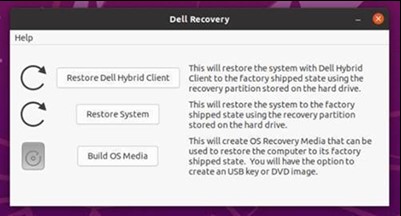
圖 1:(僅英文)Dell 復原畫面

圖 2:(僅英文)使用者登入 bremen
注意:這不是原廠出貨狀態,正確的行為是讓使用者看到標準 Ubuntu 登入畫面。
Cause
發生這種情況是因為假設 DCA Enabler 裝置上存在 Dell Hybrid Client 二進位檔案,Dell 復原工具會遵循工作流程。同樣的工作流程問題會導致顯示 「還原 Dell Hybrid Client 」按鈕,這是不正確的。
Resolution
若要解決此問題,可使用下列兩個選項。
選項 1
- 在使用者的登入畫面上
bremen,使用密碼登入bremen - 前往 Dell Recovery 選項。

圖 3:(僅英文)Dell 復原畫面
- 按一下 還原系統 按鈕。這會將作業系統還原至出廠狀態。
選項 2
- 重新啟動裝置,在電腦開機時按下 ESC 鍵,這會開啟 GRUB 畫面。
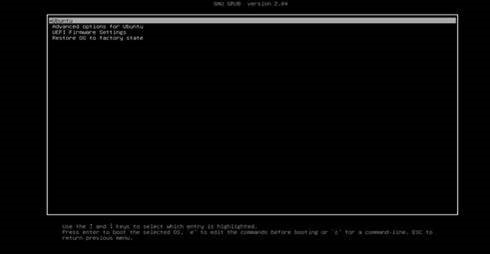
圖 4 (僅限英文版) GRUB 畫面
- 使用方向鍵前往最後一個選項,將作業系統還原至出廠狀態, 然後按下 Enter 鍵。
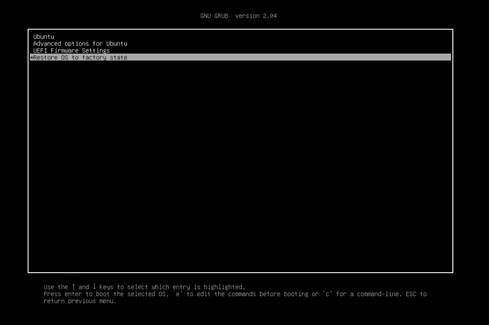
圖 5:(僅英文)將作業系統還原至出廠狀態
- 電腦會啟動將 Ubuntu 還原至出廠狀態的程序。
Affected Products
Dell Hybrid ClientArticle Properties
Article Number: 000195375
Article Type: Solution
Last Modified: 30 Sept 2024
Version: 6
Find answers to your questions from other Dell users
Support Services
Check if your device is covered by Support Services.