NetWorker Web Interface failed to fetch the latest counts for Dashboard monitoring
Summary: The NetWorker Web User Interface (NWUI) is used to manage the NetWorker Datazone. The NWUI Dashboard tab shows error "Failed to fetch latest counts for Dashboard" and does not display the details of the Policies, Workflows, and Actions. ...
Symptoms
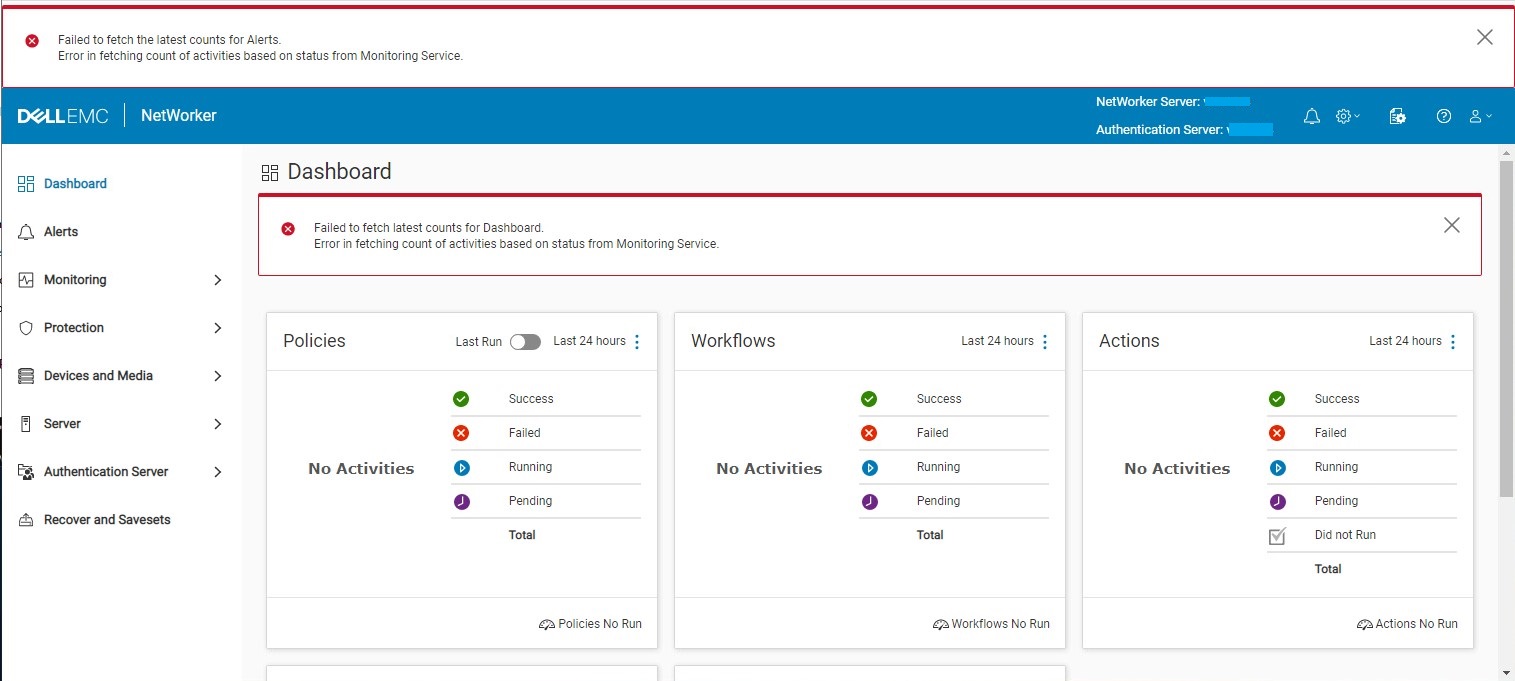
The NWUI console shows:
Failed to fetch latest counts for Dashboard
Error is fetching count of activities based on status from Monitoring Service
The C:\Program Files\EMC NetWorker\nsr\authc-server\tomcat\logs\nwui.log shows:
...
HH:MM:SS [https-jsse-nio-9090-exec-6] INFO  c.e.n.c.n.impl.GlobalApi - Authenticating user Administrator on authentication server Emcbkp01p.berlitz.com.co.
HH:MM:SS [https-jsse-nio-9090-exec-6] INFO  c.e.n.c.n.impl.GlobalApi - Testing server details for nw calls.
HH:MM:SS [https-jsse-nio-9090-exec-8] ERROR c.e.n.c.n.i.MonitoringApi - Error in fetching count of activities based on status from Monitoring Service. java.net.ConnectException: Connection refused: connect
...
The C:\Program Files\EMC NetWorker\nwui\monitoring\app\logs\monitoring-app.log shows:
...
YYYY-MM-DD HH:MM:SS [TomcatWebServer] [main] INFO  org.springframework.boot.web.embedded.tomcat.TomcatWebServer - Tomcat initialized with port(s): 9095 (https)
YYYY-MM-DD HH:MM:SS [DirectJDKLog] [main] INFO  org.apache.coyote.http11.Http11NioProtocol - Initializing ProtocolHandler ["https-jsse-nio-9095"]
YYYY-MM-DD HH:MM:SS [DirectJDKLog] [main] INFO  org.apache.catalina.core.StandardService - Starting service [Tomcat]
YYYY-MM-DD HH:MM:SS [DirectJDKLog] [main] INFO  org.apache.catalina.core.StandardEngine - Starting Servlet engine: [Apache Tomcat/9.0.48]
YYYY-MM-DD HH:MM:SS [DirectJDKLog] [main] INFO  org.apache.catalina.core.ContainerBase.[Tomcat].[localhost].[/monitoring] - Initializing Spring embedded WebApplicationContext
YYYY-MM-DD HH:MM:SS [ServletWebServerApplicationContext] [main] INFO  org.springframework.boot.web.servlet.context.ServletWebServerApplicationContext - Root WebApplicationContext: initialization completed in 3092 ms
YYYY-MM-DD HH:MM:SS [DataSourceConfig] [main] INFO  monitoring - DB password file not present.
YYYY-MM-DD HH:MM:SS [DataSourceConfig] [main] ERROR monitoring - Unable to retrieve the database password from Keystore
java.lang.NullPointerException: null
	at com.dell.emc.nw.monitoring.utils.DataSourceConfig.getDBPasswordFromKeystore(DataSourceConfig.java:75) ~[classes!/:?]
	at com.dell.emc.nw.monitoring.utils.DataSourceConfig.getDataSource(DataSourceConfig.java:64) ~[classes!/:?]
	at com.dell.emc.nw.monitoring.utils.DataSourceConfig$$EnhancerBySpringCGLIB$$c434748a.CGLIB$getDataSource$0(<generated>) ~[classes!/:?]
...
Cause
The monitoring process needs permissions to the NWUI keystore to populate the Dashboard information. The "monitoringdbpasswordalias" alias has been removed from the NWUI keystore (nwui.keystore) file and the monitoring process is not able to authenticate. The cause of the missing "monitoringdbpasswordalias" alias is not known.
The NWUI keystore should show the "monitoringdbpasswordalias" alias:
C:\>"C:\Program Files\NRE\java\jre1.8.0_321\bin\keytool.exe" -list -keystore  "C:\Program Files\EMC NetWorker\nwui\monitoring\app\conf\nwui.keystore"
Enter keystore password:
Keystore type: PKCS12
Keystore provider: SunJSSE

Your keystore contains 3 entries

emcauthctomcat, MONTH DD, YYYY, PrivateKeyEntry,
Certificate fingerprint (SHA-256): B2:D3:E1:8D:65:12:8D:51:3F:EA:CA:41:9C:A9:93:C2:21:8D:A7:A7:25:F8:CE:69:F9:21:90:55:37:43:6E:4E
emcauthcsaml, MONTH DD, YYYY, PrivateKeyEntry,
Certificate fingerprint (SHA-256): 5B:9D:23:57:5F:A7:A0:0F:83:D5:AE:61:C2:06:AF:60:0C:60:19:F8:7B:4F:6E:D2:BC:18:DD:96:6E:A1:A5:FB
monitoringdbpasswordalias, MONTH DD, YYYY SecretKeyEntry,
The affected environment is missing the "monitoringdbpasswordalias" alias:
C:\>"C:\Program Files\NRE\java\jre1.8.0_321\bin\keytool.exe" -list -keystore  "C:\Program Files\EMC NetWorker\nwui\monitoring\app\conf\nwui.keystore"
Enter keystore password:
Keystore type: PKCS12
Keystore provider: SunJSSE

Your keystore contains 2 entries

emcauthctomcat, MONTH DD, YYYY, PrivateKeyEntry,
Certificate fingerprint (SHA-256): B2:D3:E1:8D:65:12:8D:51:3F:EA:CA:41:9C:A9:93:C2:21:8D:A7:A7:25:F8:CE:69:F9:21:90:55:37:43:6E:4E
emcauthcsaml, MONTH DD, YYYY, PrivateKeyEntry,
Certificate fingerprint (SHA-256): 5B:9D:23:57:5F:A7:A0:0F:83:D5:AE:61:C2:06:AF:60:0C:60:19:F8:7B:4F:6E:D2:BC:18:DD:96:6E:A1:A5:FB
Resolution
The "monitoringdbpasswordalias" alias must be re-created in the NWUI keystore. The NWUI keystore password is required to authenticate into the NWUI keystore file. In the procedure, the NWUI keystore password should be used in place of <password>.
- Open a command prompt window with the "Run as administrator" option.
- Create a copy of the pg_hba.conf:
copy "C:\Program Files\EMC NetWorker\nwui\monitoring\nwuidb\pgdata\pg_hba.conf" "C:\Program Files\EMC NetWorker\nwui\monitoring\nwuidb\pgdata\pg_hba.conf_original"
- Open the pg_hba.conf file with a text editor:
notepad "C:\Program Files\EMC NetWorker\nwui\monitoring\nwuidb\pgdata\pg_hba.conf"
- Change the METHOD from "md5" to "trust" for all the uncommented users at the bottom of the file
- Save the changes to pg_hba.conf
- Stop the "NetWorker WebUI Database" and "NetWorker Web Management UI Server"
services: net stop nwui - Start the "NetWorker WebUI Database" and "NetWorker Web Management UI Server" services:
net start nwui - Connect to the NWUI Database with
psql:
"C:\Program Files\EMC NetWorker\nwui\monitoring\postgres\12\bin\psql" -U nwuiuser -d nwui -p 5435
- Change the "nwuiruser" password to NWUI keystore password:
ALTER USER nwuiuser WITH PASSWORD 'password'; - Exit the psql connection:
quit - Stop the "NetWorker WebUI Database" and "NetWorker Web Management UI Server" services:
net stop nwui - Create a new file nwuidb.conf:
notepad "C:\Program Files\EMC NetWorker\nwui\monitoring\nwuidb\pgdata\nwuidb.conf"
- Enter the Base64 encode of NWUI keystore password <password> into the new nwuidb.conf file: https://www.base64encode.org/
- Save the change to the new nwuidb.conf file.
- Revert the pg_hba.conf:
copy "C:\Program Files\EMC NetWorker\nwui\monitoring\nwuidb\pgdata\pg_hba.conf_original" "C:\Program Files\EMC NetWorker\nwui\monitoring\nwuidb\pgdata\pg_hba.conf"
- Start the "NetWorker WebUI Database" and "NetWorker Web Management UI Server" services:
net start nwui - Confirm the
monitoringdbpasswordaliaswas created in the NWUI keystore:
"C:\Program Files\NRE\java\jre1.8.0_321\bin\keytool.exe" -list -keystore "C:\Program Files\EMC NetWorker\nwui\monitoring\app\conf\nwui.keystore"
- Validate the symptom is no longer encountered in the NWUI.