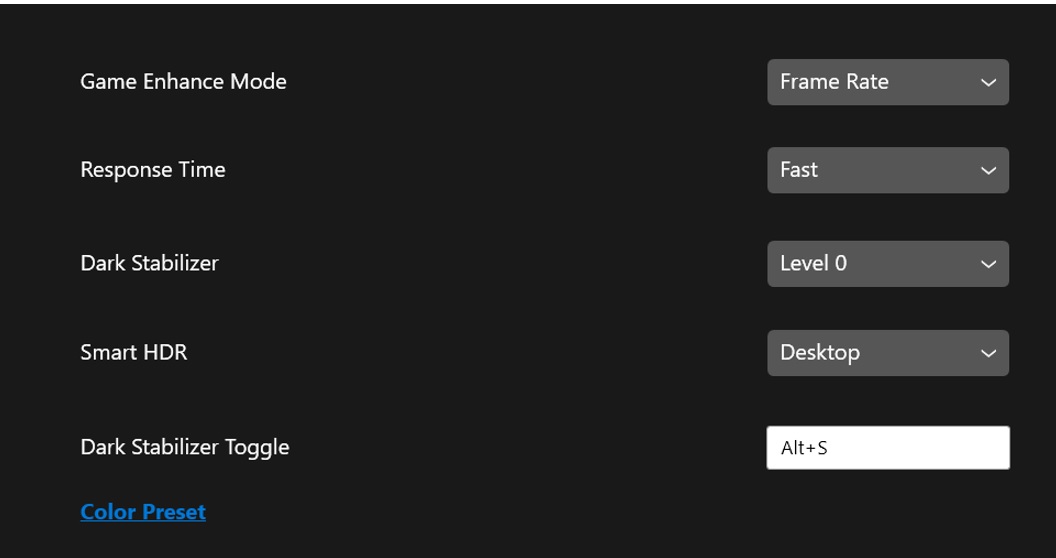
스마트 HDR 모드 전환 후 게임 설정이 나타납니다.
Summary: DDM(Dell Display Manager) 2.0 게임 UI(User Interface) 지연은 스마트 HDR 모드 간 전환 후 게임 설정을 업데이트합니다.
This article applies to
This article does not apply to
This article is not tied to any specific product.
Not all product versions are identified in this article.
Symptoms
게임 탭에서 스마트 HDR 게임 옵션을 변경할 때 스마트 HDR 모드 간 전환 후 모니터에 일시적으로 검은색 화면이 표시됩니다.
해당되는 플랫폼:
- Dell 32 4K UHD 게이밍 모니터 G3223Q
- Dell 32 게이밍 모니터 G3223D
- AW3423DWF
Cause
모드 사이를 전환하는 동안 모니터를 새로 고치는 데 시간이 걸립니다. 모니터는 블랭크 옵션과 너무 별도로 스위치 후 먼저 검은색 화면을 표시합니다.
Resolution
모니터가 변경을 완료하면 UI가 새로 고쳐집니다.
- 설정이 적용된 후에는 추가 조치가 필요 없이 설정이 반영됩니다.
- UI가 최신 정보로 업데이트된 후에만 설정을 추가로 변경할 수 있습니다.
Affected Products
Alienware 34 Curved QD OLED Gaming Monitor AW3423DWF, Dell Display Manager 2.x, Dell 32 Gaming Monitor G3223D, Dell 32 4K UHD Gaming Monitor G3223QArticle Properties
Article Number: 000203889
Article Type: Solution
Last Modified: 04 Sept 2025
Version: 5
Find answers to your questions from other Dell users
Support Services
Check if your device is covered by Support Services.