Dell Unity : Les transferts de réplication cessent de fonctionner (corrigible par l’utilisateur)
Summary: Comment gérer un événement dans lequel les transferts de réplication ont été arrêtés.
This article applies to
This article does not apply to
This article is not tied to any specific product.
Not all product versions are identified in this article.
Symptoms
Même si la synchronisation automatique par RPO est définie dans la réplication, aucun transfert n’est effectué et l’heure de dernière synchronisation est toujours obsolète.
Bien que le transfert ne soit pas en cours, l’état de synchronisation est inactif et l’état de santé est OK.
Bien que le transfert ne soit pas en cours, l’état de synchronisation est inactif et l’état de santé est OK.
Cause
Les causes possibles sont les suivantes:
(1) Il y a un problème avec le snapshot à transférer.
(2) Lors de l’effacement de la tâche d’une tâche dans la synchronisation manuelle, est effectué.
(1) Il y a un problème avec le snapshot à transférer.
(2) Lors de l’effacement de la tâche d’une tâche dans la synchronisation manuelle, est effectué.
Resolution
(1) Procédez comme suit pour supprimer le snapshot problématique à partir de l’interface utilisateur Unisphere.
Suspendre la réplication > Supprimer un snapshot > Reprendre la réplication
(2) Suspendre et reprendre la réplication.
Suspendre la réplication > Supprimer un snapshot > Reprendre la réplication
Remarque : Contactez le support technique Dell si une erreur se produit au cours de l’une des étapes.
(2) Suspendre et reprendre la réplication.
Additional Information
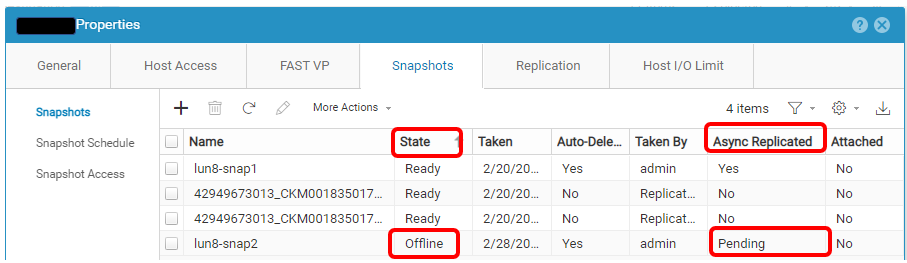
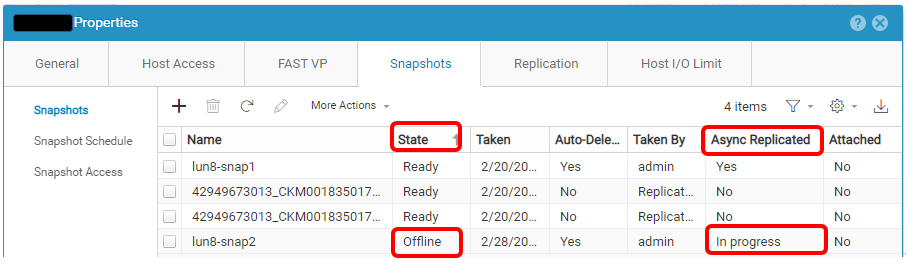
Voici un exemple d’instantané problématique.
Affected Products
Dell EMC Unity, Dell Unity 300, Dell EMC Unity 300F, Dell EMC Unity 350F, Dell EMC Unity XT 380, Dell EMC Unity XT 380F, Dell EMC Unity 400, Dell EMC Unity 400F, Dell EMC Unity 450F, Dell EMC Unity XT 480, Dell EMC Unity XT 480F, Dell EMC Unity 500
, Dell EMC Unity 500F, Dell EMC Unity 550F, Dell EMC Unity 600, Dell EMC Unity 600F, Dell EMC Unity 650F, Dell EMC Unity XT 680, Dell EMC Unity XT 680F, Dell EMC Unity XT 880, Dell EMC Unity XT 880F, Dell EMC Unity Family |Dell EMC Unity All Flash, Dell EMC Unity Family, Dell EMC Unity Hybrid, Dell EMC UnityVSA Professional Edition/Unity Cloud Edition
...
Article Properties
Article Number: 000210066
Article Type: Solution
Last Modified: 31 Dec 2025
Version: 2
Find answers to your questions from other Dell users
Support Services
Check if your device is covered by Support Services.