Dell Networking OS10 BGP Passive Peering
Summary: This article explains how to configure a DELL OS10 switch as a Passive Border Gateway Protocol (BGP) Peer. This feature is required when the peer has Port 179 Blocked or can only be the Active BGP Peer. ...
Instructions
Index
- What is Active and Passive BGP peer
- Behavior of OS10
- Configuring Dell OS10 as Passive Peer
- Sample configuration
What is Active and Passive BGP peer
Initially BGP Peer-1 is in an Idle state. It sends a TCP SYN to configured Peer-1 with the source port as a random port and the destination is port 179. Peer-2 responds to peer with a TCP SYN, ACK with source port as 179 and Destination port is the random port used by Peer-1. Peer-1 responds with a TCP SYN ACK.
After TCP session is formed, BGP moves to the OPENSENT state.
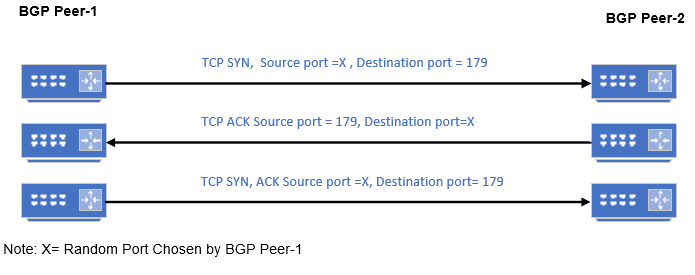
In the above scenario:
- Peer-1 is the Active or connecting side as it is sending the TCP SYN.
- Peer-2 is the Passive or listening side as it is listening to TCP Port 179 and responds with an ACK.
When a BGP speaker is configured as active, it may end up on either the active or passive side of the connection that eventually gets established. Once the TCP connection is completed, it does not matter which end is active or passive. The only difference is in which side of the TCP connection has port number 179.
Behavior of OS10
- Initially If OS10 receives a TCP SYN packet with a destination port 179 from a neighbor to form BGP Neighborship, it responds with a TCP ACK
- If it does not receive any TCP SYN, OS10, it tries to form BGP Neighborship by sending a TCP SYN with destination port 179
- If the peer cannot accept TCP packet with destination Port 179, that is, can only act as Active or connecting side, then passive peering in OS10 must be enabled.
- If passive peering is enabled for the peer template, the system does not send an OPEN message but responds to an OPEN message.
- BGP Passive Peering (IPv4/IPv6) does not support password until 10.5.4.4. Check the release notes/User guide of newer firmware to check if support has been added later.
- You can restrict the number of passive sessions the neighbor accepts using the limit command.
Configuring Dell OS10 as Passive Peer
When passive peering is enabled switch does not initiates TCP connection, but it listens on TCP connection Port 179.
Configuration Syntax
| Configuration | Explanation |
|---|---|
OS10# configure |
Configure |
OS10(config)# router bgp <AS Number> |
Configure BGP. |
OS10(conf-router-bgp-AS)# template <template-name> |
Configure the Peer template to apply passive peering. |
OS10(conf-router-template)# listen <IP address/subnet> |
Enable peer listening and IP address or subnet (Dynamic Peers*) |
OS10(conf-router-template)# listen <IP address/subnet> limit <limit > |
Optional: Enter maximum passive peer (Dynamic Peer*) count, which peer listening can dynamically learn. After the specified limit is reached, the next neighbor in the subnet is treated as normal BGP peer. |
OS10(conf-router-template)#exit |
Exit out of the template. |
*Dynamic Peers = Group of BGP neighbors that a range of IP addresses define. Here the range of IP address is defined by IP or subnet mask.
Sample configuration
Consider that the Dell OS10 switch is connected forming a BGP peering to Router and Server. Router has no restriction. The Server has an incoming Firewall rule to block TCP destination port 179.
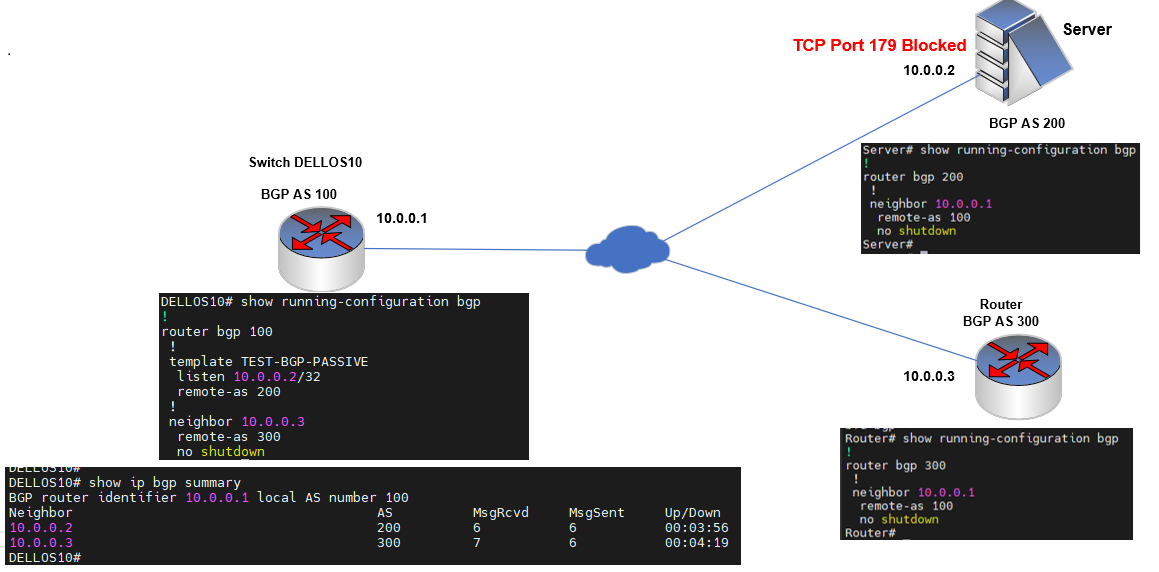
DELLOS10#
DELLOS10# configure terminal
DELLOS10(config)# router bgp 100
DELLOS10(config-router-bgp-100)# template TEST-BGP-PASSIVE
DELLOS10(config-router-template)# listen 10.0.0.2/32
DELLOS10(config-router-template)# remote-as 200
DELLOS10(config-router-template)# exit
Or:
An IP range can be specified to listen rather than a specific host and limit the number of connections. In the below sample configuration, the 10.0.0.0/24 subnet is configured to listen to five Neighbors. After this limit is reached, the next neighbor in the subnet is treated as normal BGP peer.
DELLOS10#
DELLOS10# configure terminal
DELLOS10(config)# router bgp 100
DELLOS10(config-router-bgp-100)# template TEST-BGP-PASSIVE
DELLOS10(config-router-template)# listen 10.0.0.0/24 limit 5
DELLOS10(config-router-template)# remote-as 200
DELLOS10(config-router-template)# exit
Sample Configuration
DELLOS10#
DELLOS10# configure terminal
DELLOS10(config)# router bgp 100
DELLOS10(config-router-bgp-100)# template TEST-BGP-PASSIVE
DELLOS10(config-router-template)# listen 10.0.0.2/32
DELLOS10(config-router-template)# remote-as 200
DELLOS10(config-router-template)# send-community extended
DELLOS10(config-router-template)# send-community standard
DELLOS10(config-router-template)# !
DELLOS10(config-router-template)# address-family ipv4 unicast
DELLOS10(config-router-bgp-template-af)# route-map From-Server in
DELLOS10(config-router-bgp-template-af)# route-map To-Server out