NetWorker Management Web UI:如何安装
Summary: 如何安装 NetWorker Management Web UI (NWUI) 软件。
This article applies to
This article does not apply to
This article is not tied to any specific product.
Not all product versions are identified in this article.
Instructions
NetWorker Web 用户界面 (NWUI) 是基于 Web 的管理界面,用于配置、作和监视 NetWorker 服务器。NWUI 使用 HTML5、Apache Tomcat 和 Spring Framework,通过直观的工作流和增强的响应能力提供卓越的用户体验。在 Linux 或 Windows 上安装 NetWorker Web 用户界面。您可以在 NetWorker 服务器或单独的主机上安装它。
NWUI 服务器必须已安装 Java。建议使用 NetWorker Runtime Environment (NRE)。如果主机也是 NetWorker 服务器,则 NetWorker 服务器的本地身份验证服务也要求使用 Java。如果主机是现有 NetWorker 服务器,则 NetWorker 服务器服务需要 Java 并且 Java 已经安装。如果要在不是 NetWorker 服务器的主机上安装 NWUI,则必须先安装 Java (NRE),然后才能完成 NWUI 安装。NetWorker:NRE:NetWorker Runtime Environment - 简介和安装
NWUI 服务器必须已安装 Java。建议使用 NetWorker Runtime Environment (NRE)。如果主机也是 NetWorker 服务器,则 NetWorker 服务器的本地身份验证服务也要求使用 Java。如果主机是现有 NetWorker 服务器,则 NetWorker 服务器服务需要 Java 并且 Java 已经安装。如果要在不是 NetWorker 服务器的主机上安装 NWUI,则必须先安装 Java (NRE),然后才能完成 NWUI 安装。NetWorker:NRE:NetWorker Runtime Environment - 简介和安装
在 Linux 上安装 NWUI
观看 YouTube 视频

- 使用 root 帐户连接到主机。
- 从 戴尔在线支持 网站下载 NetWorker Management Web UI 软件包。
提醒:没有“NWUI 软件包”。下载 NetWorker 版本软件包。压缩下载内容包含 NWUI 安装文件。
- 键入 tar命令以解压文件。例如:
tar -xvf file_name.tar.gz
[root@lnx-nwserv]:~# tar xf nw1910_linux_x86_64.tar.gz ; cd linux_x86_64 ; ls -l | grep nwui
-rw-r--r--. 1 root games 191592892 Jan  9 12:40 lgtonwui-19.10.0.1-1.x86_64.rpm
-rw-r--r--. 1 root games 177367524 Jan  9 12:40 lgtonwuiserv-19.10.0.1-1.x86_64.rpm
[root@lnx-nwserv]:~/linux_x86_64#
NWUI 有两个 RPM 文件:
lgtonwui:用于在非 NetWorker 服务器的主机上安装。这会在主机上安装新的 Apache Tomcat 实例,以供 NWUI 使用。lgtonwuiserv:用于在 NetWorker 服务器上安装
- 从包含解压的 NetWorker 软件包的目录中,使用
rpm命令安装所需的 NetWorker Management Web UI 软件包。
NetWorker 服务器:
cd linux_x86_64 ; rpm -ivh lgtonwuiserv-*.rpm
独立 Linux 系统:
cd linux_x86_64 ; rpm -ivh lgtonwui-*.rpm
- 出现提示时,启动 NWUI 配置脚本:
/opt/nwui/scripts/mcui_configure.sh
[root@lnx-nwserv]:~/linux_x86_64# /opt/nwui/scripts/nwui_configure.sh
提醒:提示会因安装是本地安装还是从 NetWorker 服务器远程安装而异。
- 当地:提供 NetWorker 身份认证服务主机名。身份验证主机是 NetWorker 服务器,除非此数据区中使用了单独的主机进行身份验证。
- 远程:使用 java 安装。指定密钥库密码。提供 NetWorker Authentication Service 主机(通常是 NetWorker 服务器)的主机名及其端口。
Specify the directory where the Java Standard Edition Runtime Environment (JRE) software is installed [/opt/nre/java/latest]:

Specify the host name of the NetWorker Authentication Service host [lnx-nwserv]:

Specify the host name of the NetWorker Server to be Managed by NWUI [lnx-nwserv]:

Specify the AUTHC port for Networker Server which is managed by NWUI [9090]:

The NetWorker Web UI Server requires a keystore file to configure encryption and to provide SSL support.
EMC recommends that you specify a password that has a minimum of nine characters,
with at least one upper case letter, one lower case letter, one number and one special character.

The installation process will create a new keystore file.

Specify the keystore password:
Confirm the password:

The installation completed successfully.
- 启动 NWUI 服务。
启动的进程称为:
Linux
Linux
nwuictld
Linux
sysvinit: service nwui start/stop/status
Linux
systemd: systemctl start/stop/status nwui
[root@lnx-nwserv]:~# systemctl status nwui
● nwui.service - NetWorker Management Web UI Server
   Loaded: loaded (/opt/nwui/scripts/nwui.service; enabled; vendor preset: disabled)
   Active: active (running) since Thu 2024-01-25 16:55:06 EST; 5min ago
...
...
- 使用以下链接访问 NetWorker Management Web UI:
https://<NWUI_hostname>:9090/nwui

日志:NetWorker Management Web UI (NWUI):分流和故障处理指南
在 Windows 上安装 NWUI
观看 YouTube 视频
1.以具有管理员权限的用户身份登录目标主机。
2.从 戴尔在线支持 网站下载 NetWorker Management Web UI 软件包。
提醒:没有“NWUI 软件包”。下载 NetWorker 版本软件包。压缩下载内容包含 NWUI 安装文件。
3.解压软件包并找到相应的安装程序包。
具体取决于主机是 NetWorker 服务器还是独立主机。安装可能有所不同。


4. 查看并同意许可条款。
5.默认安装文件夹为 C:\Program Files\EMC NetWorker\nwui。建议将此软件保留为默认设置,或者与其他 NetWorker 软件(如果已安装)安装在同一位置。
6.指定 NetWorker 身份认证主机的完全限定域名 (FQDN)。这通常是 NetWorker 服务器;但是,在具有多个 NetWorker 服务器的环境中,可以使用单个主身份验证主机。默认端口为 9090。
7.指定 NetWorker 服务器 主机的 FQDN。这是由此 NWUI 服务器管理的 NetWorker 服务器。每个 NWUI 服务器只能管理一个 NetWorker 服务器。默认端口为 9090。

8.如果出现安全警报提示,您必须
-“查看证书”
-“安装证书”-“下一步”
-“将所有证书放入以下存储区”-“浏览”
-“选择证书存储区”。
- “受信任的根证书颁发机构”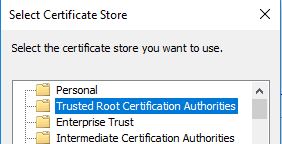
OK,接下来
9. 创建 NWUI 密钥库密码。单击“下一步”。
10.安装完成后,从浏览器访问 NetWorker Management Web UI,并使用标准 NetWorker 身份验证凭据登录。
https://<NWUI_hostname>:9090/nwui

Additional Information
NetWorker Management Web UI (NWUI):如何使用
NetWorker:如何在独立 Linux作系统
上安装 NetWorkerNetWorker NWUI:如何从 NetWorker Web 用户界面
配置 AD/LDAPNetWorker:如何从 NetWorker Web 用户界面 (NWUI) 配置“基于 SSL 的 AD”(LDAPS)
NetWorker 管理 Web UI (NWUI):分流和故障处理指南
Affected Products
NetWorkerProducts
NetWorker, NetWorker SeriesArticle Properties
Article Number: 000008992
Article Type: How To
Last Modified: 11 Sept 2025
Version: 10
Find answers to your questions from other Dell users
Support Services
Check if your device is covered by Support Services.