PowerFlex 2.6: Die Konvertierung des SVM-Betriebssystems schlägt fehl: "UNEXPECTED Error java.lang.NullPointerException Befehl wird ausgeführt. CustomizeSvmCommand"
Summary: Das Konvertieren des PowerFlex-SVM-Betriebssystems schlägt mit dem Befehl "UNEXPECTED Error java.lang.NullPointerException executing command" fehl. CustomizeSvmCommand"
This article applies to
This article does not apply to
This article is not tied to any specific product.
Not all product versions are identified in this article.
Symptoms
Konvertieren des SVM-Betriebssystems von SLES 11.3 auf SLES 12.2 mit GW
Problem
Die Aufgabe im GW-Vorgang schlägt mit einem unerwarteten Fehler fehl.
scaleio-trace.log enthält Folgendes:
2018-08-28 13:39:40,241 [executor-27] ERROR c.e.s.s.d.i.c.CustomizeSvmCommand - UNEXPECTED Error java.lang.NullPointerException executing command .CustomizeSvmCommand (abort) : com.emc.scaleio.serverCommons.vmwareObj.VmWareSpecGenerator.getCustomizationSpec(VmWareSpecGenerator.java:88)
com.emc.scaleio.serverCommons.vmwareObj.vCenterClient.copyCustomization(vCenterClient.java:1863)
com.emc.scaleio.serverCommons.vmwareConnectors.VCenterConnectorImpl.copyVmCustomization(VCenterConnectorImpl.java:416)
com.emc.s3g.scaleio.domain.installation.VCenterConnectionImpl.copyVmCustomization(VCenterConnectionImpl.java:238)
com.emc.s3g.scaleio.domain.installation.commands.CustomizeSvmCommand.executeVCenterCommand(CustomizeSvmCommand.java:59)
com.emc.s3g.scaleio.domain.installation.commands.CustomizeSvmCommand.executeVCenterCommand(CustomizeSvmCommand.java:29)
com.emc.s3g.scaleio.domain.installation.commands.VCenterCommand.executeCommand(VCenterCommand.java:48)
com.emc.s3g.scaleio.domain.installation.commands.BaseCommand.call(BaseCommand.java:515)
java.util.concurrent.FutureTask.run(FutureTask.java:266)
java.util.concurrent.ThreadPoolExecutor.runWorker(ThreadPoolExecutor.java:1149)
java.util.concurrent.ThreadPoolExecutor$Worker.run(ThreadPoolExecutor.java:624)
java.lang.Thread.run(Thread.java:748)
Auswirkungen
Die Konvertierung kann nicht fortgesetzt werden.
Cause
Beim vmware-tools-Prozess in der ursprünglichen SVM ist ein Problem aufgetreten. VCenter kann die IP-Adressen nicht abrufen und kann daher die neuen SVMs nicht entsprechend konfigurieren.
Auf der Registerkarte "VM Summary" des vCenter ist die Liste "IP Addresses" leer, wie im folgenden Screenshot gezeigt. Der Status von "VMware Tools" kann jedoch weiterhin "Wird ausgeführt" sein.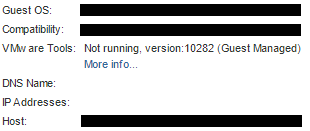
Resolution
Identifizieren Sie alle (ursprünglichen) SVMs, die keine IP-Adressen in vCenter anzeigen, melden Sie sich bei ihnen an und starten Sie den vmware-tools-Prozess neu, z. B.:
systemctl restart vmtoolsd
Additional Information
Betroffene Versionen
Dies ist kein Problem von ScaleIO/VxFlex OS.
Affected Products
PowerFlex SoftwareProducts
PowerFlex SoftwareArticle Properties
Article Number: 000031281
Article Type: Solution
Last Modified: 22 Sept 2025
Version: 4
Find answers to your questions from other Dell users
Support Services
Check if your device is covered by Support Services.