PowerFlex 2.6: Konverter SVM OS mislykkes "UVENTET feil java.lang.NullPointerException utfører kommando . CustomizeSvmCommand"
Summary: PowerFlex Convert SVM OS mislykkes med "UNEXPECTED Error java.lang.NullPointerException executing command. CustomizeSvmCommand"
This article applies to
This article does not apply to
This article is not tied to any specific product.
Not all product versions are identified in this article.
Symptoms
Konvertere SVM OS fra SLES 11.3 til SLES 12.2 med GW
Symptomer
Oppgaven i GW-operasjonen mislykkes med en uventet feil.
scaleio-trace.log inneholder følgende:
2018-08-28 13:39:40,241 [executor-27] ERROR c.e.s.s.d.i.c.CustomizeSvmCommand - UNEXPECTED Error java.lang.NullPointerException executing command .CustomizeSvmCommand (abort) : com.emc.scaleio.serverCommons.vmwareObj.VmWareSpecGenerator.getCustomizationSpec(VmWareSpecGenerator.java:88)
com.emc.scaleio.serverCommons.vmwareObj.vCenterClient.copyCustomization(vCenterClient.java:1863)
com.emc.scaleio.serverCommons.vmwareConnectors.VCenterConnectorImpl.copyVmCustomization(VCenterConnectorImpl.java:416)
com.emc.s3g.scaleio.domain.installation.VCenterConnectionImpl.copyVmCustomization(VCenterConnectionImpl.java:238)
com.emc.s3g.scaleio.domain.installation.commands.CustomizeSvmCommand.executeVCenterCommand(CustomizeSvmCommand.java:59)
com.emc.s3g.scaleio.domain.installation.commands.CustomizeSvmCommand.executeVCenterCommand(CustomizeSvmCommand.java:29)
com.emc.s3g.scaleio.domain.installation.commands.VCenterCommand.executeCommand(VCenterCommand.java:48)
com.emc.s3g.scaleio.domain.installation.commands.BaseCommand.call(BaseCommand.java:515)
java.util.concurrent.FutureTask.run(FutureTask.java:266)
java.util.concurrent.ThreadPoolExecutor.runWorker(ThreadPoolExecutor.java:1149)
java.util.concurrent.ThreadPoolExecutor$Worker.run(ThreadPoolExecutor.java:624)
java.lang.Thread.run(Thread.java:748)
Innvirkning
Kunne ikke fortsette med konverteringen.
Cause
VMware-verktøyprosessen i den opprinnelige SVM-en har et problem, og VCenter er ikke i stand til å hente IP-adressene fra den, og kan derfor ikke konfigurere de nye SVM-ene tilsvarende.
Ser inn i VCenter's VM sammendragsfanen, "IP-adresser" listen er tom, som vist i skjermbildet nedenfor. Statusen "VMware Tools" kan imidlertid fortsatt være "Running."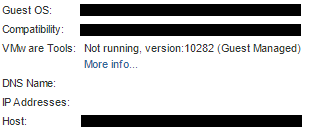
Resolution
Identifiser alle (opprinnelige) SVM-er som ikke viser IP-adresser i vCenter, logg på dem, og start VMware-verktøyprosessen på nytt, for eksempel:
systemctl restart vmtoolsd
Additional Information
Berørte versjoner
Dette er ikke et problem med ScaleIO/VxFlex OS.
Affected Products
PowerFlex SoftwareProducts
PowerFlex SoftwareArticle Properties
Article Number: 000031281
Article Type: Solution
Last Modified: 22 Sept 2025
Version: 4
Find answers to your questions from other Dell users
Support Services
Check if your device is covered by Support Services.