由于代理无法在 DNS 中解析,Avamar 虚拟机映像备份失败并显示“无代理”错误
Summary: 由于代理未在 DNS 中解析,Avamar 虚拟机映像备份失败,并显示“无代理”错误。
This article applies to
This article does not apply to
This article is not tied to any specific product.
Not all product versions are identified in this article.
Symptoms
Avamar UI 中的活动监视器显示“无代理”
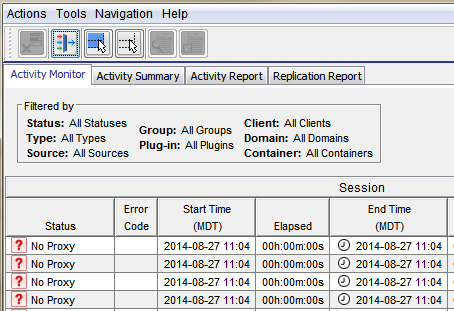
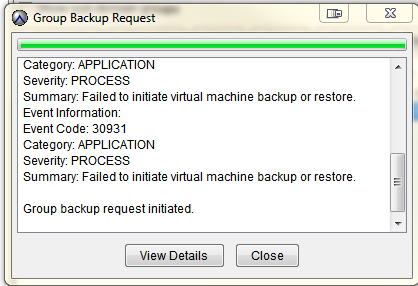
按需 VMware 映像备份失败,并显示:
类别:应用程序
严重性:流程
摘要:无法启动虚拟机备份或恢复。
事件信息:
事件代码:30931
类别:应用程序
严重性:流程
摘要:无法启动虚拟机备份或恢复。
如果启动组备份请求。
Cause
代理未解析为 DNS。
打开代理的 putty 会话将显示主机名: localhost
打开代理的 putty 会话将显示主机名: localhost
Resolution
- 打开代理的 putty — 注意主机名是否显示“localhost”
- 通过运行以下命令,验证代理是否可以解析 DNS 服务器的 FQDN、短名称和反向 IP 查找:
- nslookup proxydnhostname .domain.com
- nslookup ###.###.##### 。###
- *还验证 Avamar 应用工具节点是否可以解析代理 FQDN、短名称和反向 IP 查找
- 如果代理无法将其主机名解析为 DNS,请验证 IP 或网关没有 DNS 问题或网络相关问题。
- DNS 问题解决后,尝试重新注册代理。请参阅《Avamar VMware 用户指南》。
Additional Information
以下文章讨论具有相同通用“无代理”错误的问题。
Affected Products
AvamarProducts
AvamarArticle Properties
Article Number: 000033551
Article Type: Solution
Last Modified: 05 Feb 2025
Version: 4
Find answers to your questions from other Dell users
Support Services
Check if your device is covered by Support Services.