VM 備份失敗,並顯示「Unable to delete pre-existing snapshots: Another task is already in progress.」
Summary: VM 備份失敗,並出現以下錯誤: 2021-04-14T17:46:35Z ERROR: [@(#) 組建號碼: 51] Failed to complete removal of snapshot "snapshot-347817": Another task is already in progress.2021-04-14T17:46:35Z ERROR: [@(#) 組建號碼: 51] Unable to delete pre-existing snapshots: Another task is already in progress. ...
This article applies to
This article does not apply to
This article is not tied to any specific product.
Not all product versions are identified in this article.
Symptoms
單一 VM 的 VM 備份失敗。
為 VM 建立手動快照也失敗,並出現以下錯誤: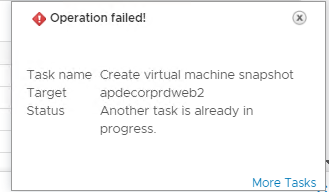
為 VM 建立手動快照也失敗,並出現以下錯誤:
Cause
在 ESXi 主機上為該特定 VM 顯示過時的工作。
Resolution
1) 登入 vcenter,並檢查 VM 是否有附加任何舊快照 (如果有的話- 刪除/整合這些快照)。
2) 檢查 vproxy 上是否有任何快照 (如果有的話- 刪除/整合這些快照)。
如果在 VM 或 vproxy 上未看到舊版快照,請執行下列步驟,檢查 ESXI 主機上 VM 的使用中工作:
1) 在主控台登入 ESX 主機或透過 SSH
2) 若要產生與特定虛擬機器相關聯的工作清單,您必須先取得虛擬機器的 Vmid。執行命令:
vim-cmd vmsvc/getallvms
輸出類似於:
Vmid Name File Guest OS Version Annotation
112 VM-1 [Datastore] VM-3/VM-3.vmx winLonghornGuest vmx-04
128 VM-2 [Datastore] VM-3/VM-3.vmx winXPProGuest vmx-04
144 VM-3 [Datastore] VM-3/VM-3.vmx winNetStandardGuest vmx-04
3) 記下 Vmid 欄下的值,因為這些值會在後續步驟中加以參考。
4) 當您擁有 Vmid 時,您可以取得與特定虛擬機器相關聯的工作清單。執行命令:
vim-cmd vmsvc/get.tasklist VMID
其中 VMID 是在步驟 3 中識別的數字。
輸出類似於:
(ManagedObjectReference) [
'vim.Task:haTask-112-vim.VirtualMachine.createSnapshot-3887'
]
5) 記下工作識別符。在上面的範例中,工作識別符是:
haTask-112-vim.VirtualMachine.createSnapshot-3887
6) 若要取得特定工作狀態的相關資訊,請執行命令:
vim-cmd vimsvc/task_info task_identifier
其中 task_identifier 是步驟 5 中記錄的字串。
輸出類似於:
(vim.TaskInfo) {
dynamicType = ,
key = "haTask-112-vim.VirtualMachine.createSnapshot-3887",
task = 'vim.Task:haTask-112-vim.VirtualMachine.createSnapshot-3887',
description = (vmodl.LocalizableMessage) null,
name = "vim.VirtualMachine.createSnapshot",
descriptionId = "VirtualMachine.createSnapshot",
entity = 'vim.VirtualMachine:112',
entityName = "deploy-test",
state = "running",
cancelled = false,
cancelable = false,
error = (vmodl.MethodFault) null,
result = ,
progress = 15,
reason = (vim.TaskReasonUser) {
dynamicType = ,
userName = "root",
},
queueTime = "2012-11-28T01:29:35.233835Z",
startTime = "2012-11-28T01:29:35.234891Z",
completeTime = ,
eventChainId = 2936866,
changeTag = ,
parentTaskKey = ,
rootTaskKey = ,
如果有任何作用中的工作存在,這需要由 VMware 團隊再次確認,並由 VMware 支援據此採取後續行動。
2) 檢查 vproxy 上是否有任何快照 (如果有的話- 刪除/整合這些快照)。
如果在 VM 或 vproxy 上未看到舊版快照,請執行下列步驟,檢查 ESXI 主機上 VM 的使用中工作:
1) 在主控台登入 ESX 主機或透過 SSH
2) 若要產生與特定虛擬機器相關聯的工作清單,您必須先取得虛擬機器的 Vmid。執行命令:
vim-cmd vmsvc/getallvms
輸出類似於:
Vmid Name File Guest OS Version Annotation
112 VM-1 [Datastore] VM-3/VM-3.vmx winLonghornGuest vmx-04
128 VM-2 [Datastore] VM-3/VM-3.vmx winXPProGuest vmx-04
144 VM-3 [Datastore] VM-3/VM-3.vmx winNetStandardGuest vmx-04
3) 記下 Vmid 欄下的值,因為這些值會在後續步驟中加以參考。
4) 當您擁有 Vmid 時,您可以取得與特定虛擬機器相關聯的工作清單。執行命令:
vim-cmd vmsvc/get.tasklist VMID
其中 VMID 是在步驟 3 中識別的數字。
輸出類似於:
(ManagedObjectReference) [
'vim.Task:haTask-112-vim.VirtualMachine.createSnapshot-3887'
]
5) 記下工作識別符。在上面的範例中,工作識別符是:
haTask-112-vim.VirtualMachine.createSnapshot-3887
6) 若要取得特定工作狀態的相關資訊,請執行命令:
vim-cmd vimsvc/task_info task_identifier
其中 task_identifier 是步驟 5 中記錄的字串。
輸出類似於:
(vim.TaskInfo) {
dynamicType = ,
key = "haTask-112-vim.VirtualMachine.createSnapshot-3887",
task = 'vim.Task:haTask-112-vim.VirtualMachine.createSnapshot-3887',
description = (vmodl.LocalizableMessage) null,
name = "vim.VirtualMachine.createSnapshot",
descriptionId = "VirtualMachine.createSnapshot",
entity = 'vim.VirtualMachine:112',
entityName = "deploy-test",
state = "running",
cancelled = false,
cancelable = false,
error = (vmodl.MethodFault) null,
result = ,
progress = 15,
reason = (vim.TaskReasonUser) {
dynamicType = ,
userName = "root",
},
queueTime = "2012-11-28T01:29:35.233835Z",
startTime = "2012-11-28T01:29:35.234891Z",
completeTime = ,
eventChainId = 2936866,
changeTag = ,
parentTaskKey = ,
rootTaskKey = ,
如果有任何作用中的工作存在,這需要由 VMware 團隊再次確認,並由 VMware 支援據此採取後續行動。
Article Properties
Article Number: 000185657
Article Type: Solution
Last Modified: 23 Aug 2022
Version: 5
Find answers to your questions from other Dell users
Support Services
Check if your device is covered by Support Services.