Isilon: Unable to create Hadoop encryption zone with RangerKMS and Active Directory Kerberos
Summary: When attempting to create a Hadoop encryption zone, the creation is failing and the username is going as cluster name instead of HDFS user.
This article applies to
This article does not apply to
This article is not tied to any specific product.
Not all product versions are identified in this article.
Symptoms
When attempting to create a Hadoop encryption zone with OneFS 8.2, Ambari 2.7.3 and HDP 3.1.4.0-315 zone creation fails as we are unable to obtain the key.
HDP cluster installed and Kerberized with Active Directory, Ranger deployed with Ranger KMS. Keys are created in KMS
[hdpuser1@centos-05 ~]$ hadoop key list -provider kms://http@centos-05.foo.com:9292/kms
Listing keys for KeyProvider: org.apache.hadoop.crypto.key.kms.LoadBalancingKMSClientProvider@1750fbeb
keya
keyb
On creating the encryption zone, we see the following error:
# isi hdfs crypto encryption-zones create --path=/ifs/zone3/hdp/hadoop-root/keya --key-name=keya --zone=zone3 -v
Create Encryption Zone call failed: GetKeyMetaData: KMS return HTTP status: 403; Remote exception message: User:ISILONS-2G88EXB$ not allowed to do 'GET_METADATA' on 'keya'; Request: http://centos-05.foo.com:9292/kms/v1/key/keya/_metadata?user.name=hdfs
The referenced user account with no access to GET_METADATA is the AD machine object account: ISILONS-2G88EXB$ , not the hdfs service account unable to add this AD object into Ranger KMS as a user account privilege, the $ prevents addition.
hdfs account is added in KMS with required Get_Metadata privilege, (see screenshot)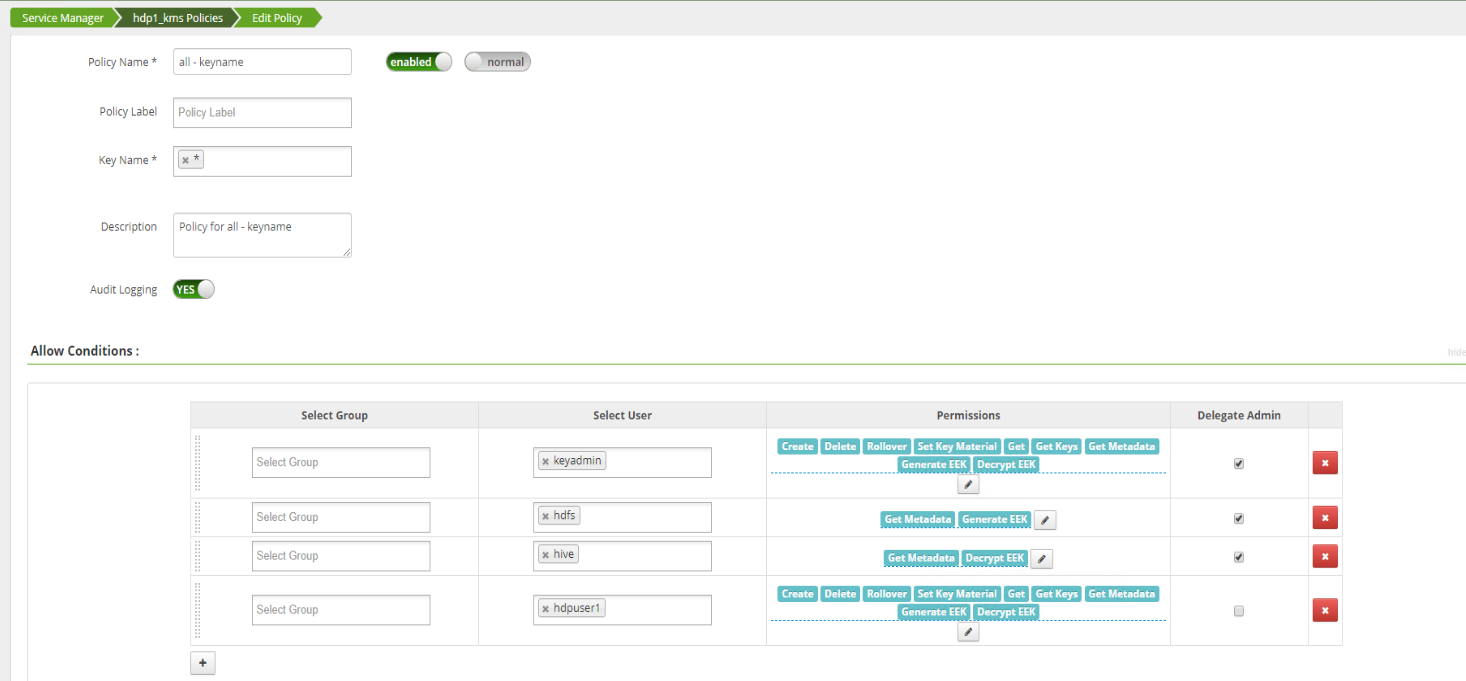
pipe1-1# isi auth mapping token --zone=zone3 --user=foo\ISILONS-2G88EXB$
User
Name: FOOisilons-2g88exb$
UID: 1000008
SID: S-1-5-21-856609431-2249676204-1531082451-1738
On Disk: S-1-5-21-856609431-2249676204-1531082451-1738
ZID: 5
Zone: zone3
Privileges: -
Primary Group
Name: FOOdomain computers < -- computer object
GID: 1000003
SID: S-1-5-21-856609431-2249676204-1531082451-515
On Disk: S-1-5-21-856609431-2249676204-1531082451-515
Supplemental Identities
Name: Authenticated Users
SID: S-1-5-11
Based on the above behavior TDE with Ranger KMS and AD is not supported at this time.
Cause
As per engineering, AD kerberos + RangerKMS scenario is not supported officially at this time, and the current white paper would not be changed.
Resolution
RFE (Request for Enhancement) is the option at this moment.
Because it will be considered as a feature, PdM is required to intervene to set the Schedule, it is recommended that the Account Team contact the Product Team for further plan.
Because it will be considered as a feature, PdM is required to intervene to set the Schedule, it is recommended that the Account Team contact the Product Team for further plan.
Additional Information
HDFS reference and TDE white paper guides:
https://www.delltechnologies.com/resources/en-us/asset/white-papers/products/storage/h18083-wp-using-tde-with-isilon-hdfs.pdf
PowerScale OneFS HDFS Reference Guide
Affected Products
PowerScale OneFSArticle Properties
Article Number: 000188253
Article Type: Solution
Last Modified: 15 Sept 2025
Version: 3
Find answers to your questions from other Dell users
Support Services
Check if your device is covered by Support Services.