How to log in to IDPA systems using either UI or CLI
Summary: This article discusses how to log in to the different IDPA systems using either user interface (UI) or command-line interface CLI).
This article applies to
This article does not apply to
This article is not tied to any specific product.
Not all product versions are identified in this article.
Instructions
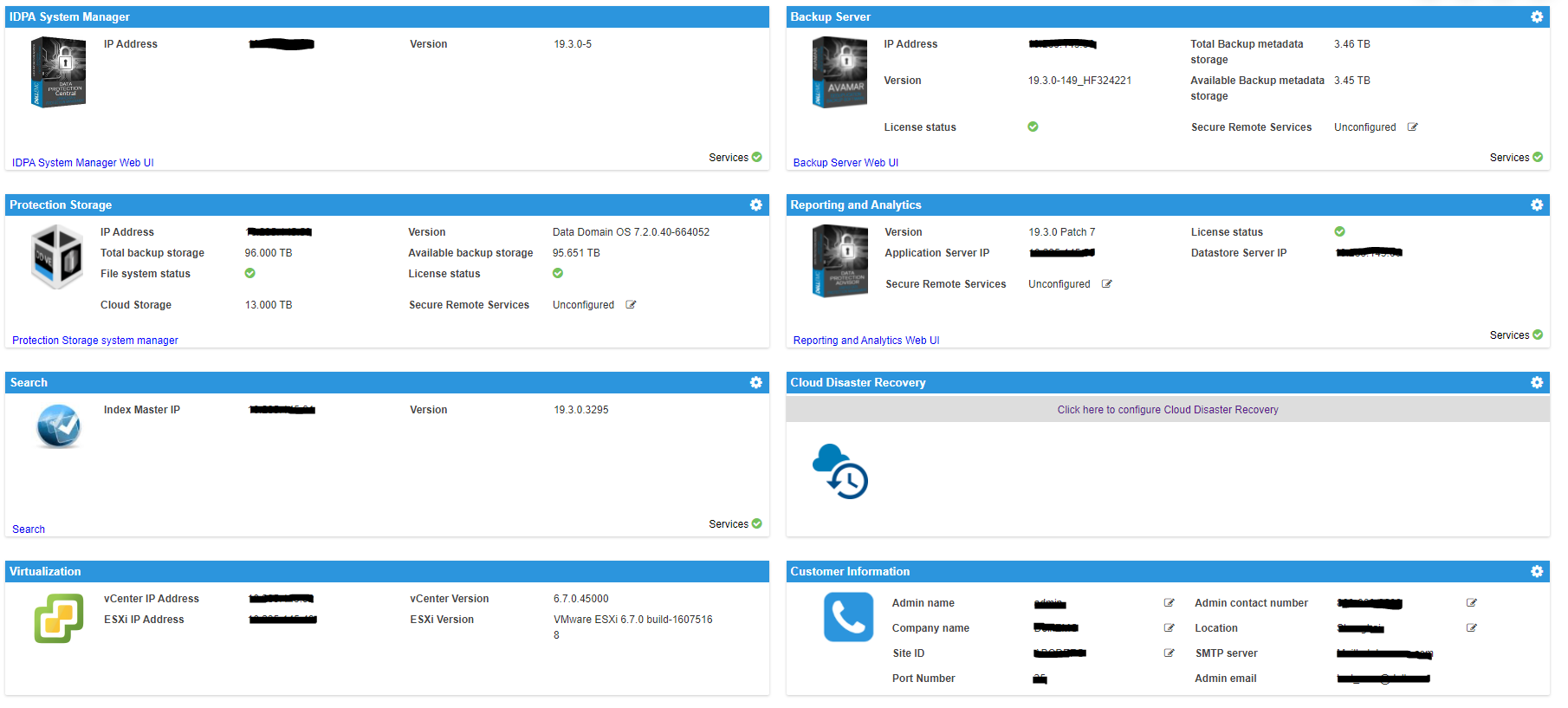
Integrated Data Protection Appliance (IDPA) has several systems that you must log in to, and there are several different users depending on the system.
There are:
- IDPA System Manager (DPC)
- Backup Server (Avamar)
- Protection Storage (Data Domain)
- Reporting and Analytics (DPA)
- Search, Hypervisor Manager (vCenter)
- One or more Hypervisor (ESXi) servers
- There may also be Cloud Disaster Recovery Add-on (CDRA) installed
There is also the ACM server as seen in this UI screenshot:
Here are the users for each system:
ACM:
UI: root
CLI: root
IDPA System Manager (DPC):
UI: administrator@dpc.local: idpauser or AD login if configured
CLI: admin
Protection Software (Avamar):
UI: MCUser
CLI: admin
Protection Storage (Data Domain):
UI: sysadmin
CLI: sysadmin
Reporting and Analytics (DPA):
UI: administrator
CLI: root
Search:
UI: admin: idpauser or AD login if configured
CLI: root
Hypervisor Manager (VCSA):
UI: administrator@vsphere.local: root
CLI: root
Hypervisor (ESXi):
UI: root
CLI: root
If you are on IDPA 2.7.1 and earlier versions:
IDPA System Manager and Search are configured with Lightweight Directory Access Protocol (LDAP) from the ACM server by default. If you have not set up Active Directory (AD) or external LDAP from the ACM, then the user
You can also manually set up AD or LDAP for Backup Server, Protection Storage, and Reporting and Analytics to use AD or LDAP login for them.
IDPA System Manager and Search are configured with Lightweight Directory Access Protocol (LDAP) from the ACM server by default. If you have not set up Active Directory (AD) or external LDAP from the ACM, then the user
idpauser works to log in to these two system UI.
You can also manually set up AD or LDAP for Backup Server, Protection Storage, and Reporting and Analytics to use AD or LDAP login for them.
If you are on IDPA 2.7.2 or later versions, LDAP is configured on all products, and idpauser user works for all systems, including the ACM.
If you set up your AD/LDAP server in the ACM, it will be configured on all systems in IDPA as well.
Affected Products
Integrated Data Protection Appliance FamilyArticle Properties
Article Number: 000188344
Article Type: How To
Last Modified: 10 May 2026
Version: 8
Find answers to your questions from other Dell users
Support Services
Check if your device is covered by Support Services.