Dell Unity: Data Collection Error Code:0x6400ba2 (Dell Correctable)
Summary: Data Collection errors out with "The service task cannot be performed because a service task of the same type is in progress. Please retry later. (Error Code:0x6400ba2)" Unity Data Collection does not complete. (Dell Correctable) ...
This article applies to
This article does not apply to
This article is not tied to any specific product.
Not all product versions are identified in this article.
Symptoms
No daily collects are generated after the upgrade.
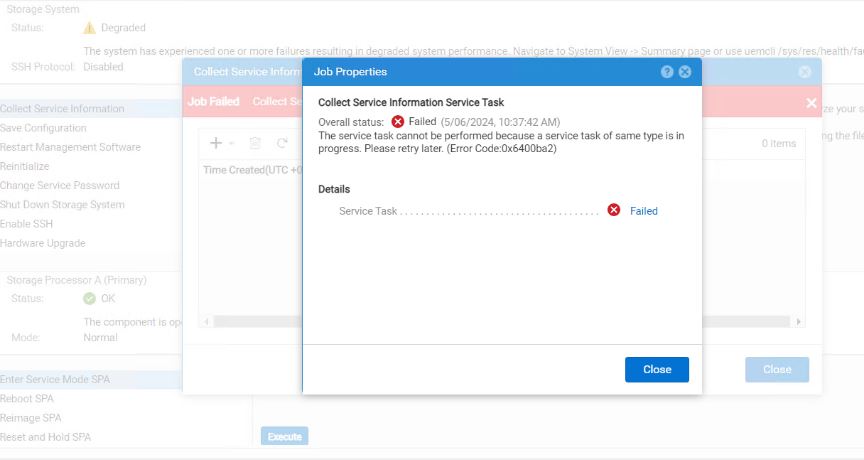
The user gets the following error when initiating a new Data Collection from the UI:
The service task cannot be performed because a service task of same type is in progress. Please retry later. (Error Code:0x6400ba2)
Cause
Looking at previous cases, if the user believes that it is taking longer to complete the Data Collection, then the user may exit out of the Data Collection by pressing ctrl+c which may lead to lock file creation and leaving it in a stale state on the system.
The existence of /tmp/dc_service.lock in /tmp file was preventing Data Collection from running.
Resolution
Troubleshooting steps taken to confirm the issue:
Data Collection started running, but eventually the job failed with the below error from the UI:
The service action has timeout. (Error Code:0x6400c05)
-
Provide output of the below command from both SPs.
ps -ef | grep svc_dc
Example of output:
16:44:29 root@APMXXXXXXXXXXX spa:~# ps -ef |grep svc_dc
root 2898 1 0 Feb14 ? 00:00:00 /bin/sh /EMC/Platform/bin/svc_dc -n upgrade_ 5 --skipUpgradeCheck
root 3558 2898 0 Feb14 ? 00:00:00 flock --timeout=0 /tmp/dc_service.lock /EMC/Platform/bin/dc_scripts/svc_dc_agent.sh -n upgrade_ 5
root 3562 3558 0 Feb14 ? 00:00:00 /bin/sh /EMC/Platform/bin/dc_scripts/svc_dc_agent.sh -n upgrade_ 5
root 4809 4800 0 Feb14 ? 00:00:00 /bin/sh /EMC/Platform/bin/dc_scripts/svc_dc_core_dump_sweeper.sh
root 4830 4809 0 Feb14 ? 00:00:00 /EMC/Platform/bin/dc_grp [DC sweeper group]: /EMC/Platform/bin/dc_scripts/svc_dc_core_dump_sweep_helper.sh 2>&1 | /EMC/Platform/bin/dc_scripts/write_file.sh /EMC/Platform/tmp/dc_dump_sweeper_log.txt
root 4833 4830 0 Feb14 ? 00:00:00 sh -c /EMC/Platform/bin/dc_scripts/svc_dc_core_dump_sweep_helper.sh 2>&1 | /EMC/Platform/bin/dc_scripts/write_file.sh /EMC/Platform/tmp/dc_dump_sweeper_log.txt
root 4837 4833 0 Feb14 ? 00:55:00 /bin/sh /EMC/Platform/bin/dc_scripts/svc_dc_core_dump_sweep_helper.sh
root 5528 4837 0 Feb14 ? 00:20:04 /bin/sh /EMC/Platform/bin/dc_scripts/svc_dc_core_dump_sweep_helper.sh
root 6122 6115 0 Feb14 ? 00:57:30 /bin/bash /EMC/Platform/bin/dc_scripts/svc_dc_listener.sh
root 12090 11892 0 16:44 pts/0 00:00:00 grep --color=auto svc_dc
root 12486 12484 0 15:57 ? 00:00:03 /bin/sh /EMC/Platform/bin/svc_dc --remote-tmp-dir /EMC/Platform/tmp/dcsparse/mnt --remote --no-audit
-
Check for the existence of
/tmp/dc_service.lockon both SPs and provide a list of the contents in the /tmp folder to Dell Support.list the files and check for dc_service.lock on both the sp's 10:16:07 root@CKM0019XXXXXXX spb:~# ls -latr /tmp drwxrwxrwt 2 root root 1024 Apr 26 21:02 .ICE-unix drwxrwxrwt 2 root root 1024 Apr 26 21:02 .Test-unix drwxrwxrwt 2 root root 1024 Apr 26 21:02 .X11-unix drwxrwxrwt 2 root root 1024 Apr 26 21:02 .XIM-unix -rw------- 1 root root 5 Apr 26 21:03 csxid48zogC -rw------- 1 root root 6 Apr 26 21:03 csxidAQ6zuW -rw------- 1 root root 6 Apr 26 21:03 csxidQVAbuk -rw------- 1 root root 6 Apr 26 21:03 csxpidB0riMr -rw------- 1 root root 6 Apr 26 21:03 csxpidPTTm_T -rw------- 1 root root 6 Apr 26 21:03 csxpidTCULQM -rw------- 1 root root 6 Apr 26 21:03 csxpidhXbyNB -rwx------ 1 root root 1288656 May 6 10:15 dc_service.lock <---Need to check with an L2 and remove the file -rw-r--r-- 1 root root 57 Apr 26 21:05 ipv4_conf -rw-r--r-- 1 root root 17 Apr 26 21:05 ipv6_conf -rw-r--r-- 1 root root 0 Apr 26 21:05 vvnx-disc-local-lock.SyncClusterLock -rw-r--r-- 1 root root 0 Apr 26 21:05 vvnx-disc-lock.SyncClusterLock
-
Request Dell Support to check Data Collection status and try to terminate the current Data Collection session if any are running.
# svc_dc --status
-
Check the root partition on both the SPs:
df -kh 10:16:16 root@CKM0019XXXXXXX spb:/tmp# df -kh Filesystem Size Used Avail Use% Mounted on udev 1.3G 8.0K 1.3G 1% /dev /dev/mapper/alteroot 13G 6.4G 5.8G 53% / tmpfs 4.3G 82M 4.2G 2% /dev/shm tmpfs 4.3G 475M 3.8G 11% /run tmpfs 4.3G 0 4.3G 0% /sys/fs/cgroup /dev/ram0 59M 2.7M 56M 5% /tmp /dev/sda7 128G 1.3G 121G 2% /cores /dev/sda1 113M 1.9M 105M 2% /mnt/c4lx-cfg_msata /pramfs 122M 36M 87M 30% /pramfs /dev/mirrora5 57G 1.3G 53G 3% /EMC/backend/service -
After obtaining all the above outputs, contact Dell Technical Support or your Authorized Service Provider to kill the process and remove the service lock file.
Affected Products
Dell EMC UnityArticle Properties
Article Number: 000201006
Article Type: Solution
Last Modified: 11 Jun 2025
Version: 6
Find answers to your questions from other Dell users
Support Services
Check if your device is covered by Support Services.