Data Domain: Reboot loop at "NVRAM driver load and initialization"
Summary: PowerProtect Data Domain systems have reported being stuck in a reboot loop. The NVRAM driver fails to load or initialize successfully resulting in a system reboot.
This article applies to
This article does not apply to
This article is not tied to any specific product.
Not all product versions are identified in this article.
Instructions
Affected Systems:
- PowerProtect DD6400 | DD6900 | DD9400 | DD9900
- All DDOS versions
Symptoms:
- Unable to boot into DDOS
- Serial output (Virtual Console - iDRAC) shows Boot process restarts after "NVRAM driver load and initialization"
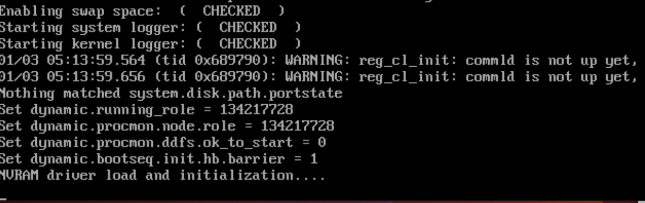
Cause:
- The DIMM located on the NVRAM card is not seated or installed correctly.
- OR
- The NVRAM card is not installed correctly or is faulty.
Required Action:
With the system powered off:
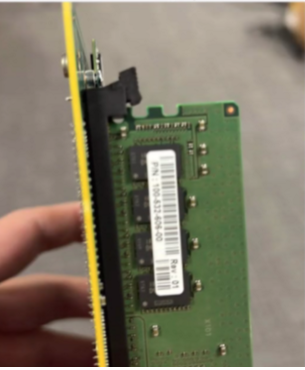
- Check and reseat the DIMM on the NVRAM card.
- Here is a image showing the NVRAM DIMM not clipped in correctly
- Ensure the NVRAM card or PCI riser are seated securely.
- Power up and retry booting the system.
- If symptoms persist, replace the NVRAM (Part Number: DGK85).
Affected Products
Data Domain, DD6400 ApplianceProducts
Data Domain, Data Domain Deduplication Storage Systems, DD6900 Appliance, DD9400 Appliance, DD9900 ApplianceArticle Properties
Article Number: 000208323
Article Type: How To
Last Modified: 16 May 2026
Version: 6
Find answers to your questions from other Dell users
Support Services
Check if your device is covered by Support Services.