PowerStore:PowerStoreOS 3.6のNVMe拡張エンクロージャ(Indus)表示LEDステータス
Summary: PowerStoreOS 3.6にアップデートした後、NVMe拡張エンクロージャ(Indus)インジケーションLEDのステータスがオフの状態に変わります。
This article applies to
This article does not apply to
This article is not tied to any specific product.
Not all product versions are identified in this article.
Symptoms
PowerStoreOS 3.6にアップデートした後、NVMe拡張エンクロージャ(Indus)インジケーションLEDのステータスが青色からオフの状態に変わります。
NVMe拡張エンクロージャのステータスLED
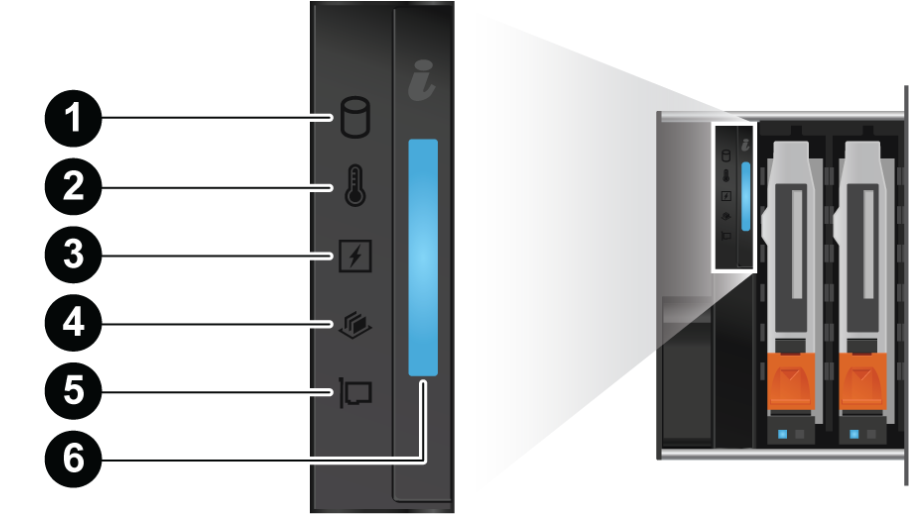
PowerStoreOS 3.6へのアップグレード後のLEDステータスの表示
PowerStoreOS 3.6より前の表示LEDステータス
NVMe拡張エンクロージャのステータスLED
PowerStoreOS 3.6へのアップグレード後のLEDステータスの表示
| LED | 場所 | 色 | 状態 | 説明 |
|---|---|---|---|---|
| インジケーションLED | 6 | 消灯 | 電源が入っており、正常 | |
| ブルー | 点灯 | システムIDモードが有効 | ||
| オレンジ色 | 点滅 | ハードウェア障害 |
PowerStoreOS 3.6より前の表示LEDステータス
| LED | 場所 | 色 | 状態 | 説明 |
|---|---|---|---|---|
| インジケーションLED | 6 | ブルー | 点灯 | 電源が入っており、正常 |
| ブルー | 点滅 | システムIDモードが有効 | ||
| オレンジ色 | 点滅 | ハードウェア障害 |
Cause
PowerStoreOS 3.6でアップデートされたNVMe拡張エンクロージャファームウェアは、インジケーションLEDのステータスを変更します。
Resolution
PowerStoreハードウェア情報ガイドは、PowerStoreOS 3.6の表示LEDステータスの変更に伴って更新されます。
Affected Products
PowerStore 1000T, PowerStore 1200T, PowerStore 3000T, PowerStore 3200T, PowerStore 5000T, PowerStore 500T, PowerStore 5200T, PowerStore 7000T, PowerStore 9000T, PowerStore 9200TArticle Properties
Article Number: 000220328
Article Type: Solution
Last Modified: 11 Dec 2023
Version: 1
Find answers to your questions from other Dell users
Support Services
Check if your device is covered by Support Services.