PowerProtect:使用不同界面备份 OpenShift K8s
Summary: 无法备份 PersistentVolumeClaims (PVC),备份返回但出现错误
This article applies to
This article does not apply to
This article is not tied to any specific product.
Not all product versions are identified in this article.
Instructions
环境:PowerProtect Data Manager 19.16
OpenShift 群集: 4.14
OADP 版本:1.27
备份失败,并显示不同的代码 (
其中一个与 Data Domain 和 PowerProtect Data Manager 位于同一网络中。
第二个接口在无法访问 PowerProtect Data Manager-DataDomain 的网络中运行。
在 OpenShift K8s 中,您必须使用与 Data Domain 和 PowerProtect Data Manager 位于同一网络中的接口创建网络连接定义 (NAD)。在此示例中,使用
修改 PowerProtect 和 Velero 部署,添加网络定义 注释:
在 PowerProtect Data Manager K8s 群集(编辑>高级选项)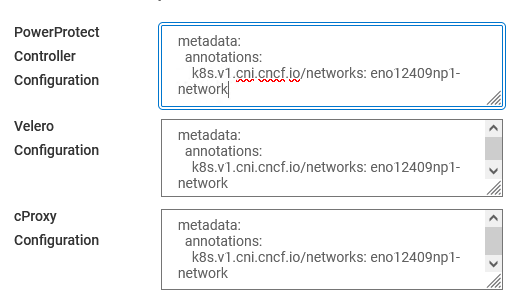
中添加相同的信息
进行所有更改后,运行
OpenShift 群集: 4.14
OADP 版本:1.27
备份失败,并显示不同的代码 (
ABK0018 和 ABK0002) 配置新的 OpenShift K8s 群集后。
"PVC backup returned with an error Unable to backup PVC 'pvc-mysql-0' BackupPvSessions completed with errors: Unable to open DD Boost connection to PowerProtect DD System host "DD_IP": [5203] The call timed out"OpenShift 使用不同的接口和 IP 网络运行。
其中一个与 Data Domain 和 PowerProtect Data Manager 位于同一网络中。
第二个接口在无法访问 PowerProtect Data Manager-DataDomain 的网络中运行。
在 OpenShift K8s 中,您必须使用与 Data Domain 和 PowerProtect Data Manager 位于同一网络中的接口创建网络连接定义 (NAD)。在此示例中,使用
eno12409np1 作为接口
apiVersion: k8s.cnicncf.io/v1 [k8s.cni.cncf.io]
kind: NetworkAttachmentDefinition
Metadata:
  Name: eno12409np1-network
Spec:
  Config: '{
    "cniVersion": "0.3.1",
    "type": "macvlan",
    "Active": "eno12409np1",
    "mode": "bridge",
    "ipam": {
      "type": "host-local",
      "subnet": network_subnet_dd_ppdm/mask [network_subnet_dd_ppdm]",
      "rangeStart": "192.168.10.10",
      "rangeEnd": "192.168.10.50",
      "routes": [{"dst": "0.0.0.0/0 [0.0.0.0]"}],
      "gateway": "192.168.10.1"
    }
  }'
修改 PowerProtect 和 Velero 部署,添加网络定义 注释:
k8s.v1.cni.cncf.io/networks [k8s.v1.cni.cncf.io]: eno12409np1-network
在 PowerProtect Data Manager K8s 群集(编辑>高级选项)
中添加相同的信息
Verify 和 保存。
进行所有更改后,运行
Discovery 并执行新备份。Article Properties
Article Number: 000225761
Article Type: How To
Last Modified: 31 Jul 2024
Version: 2
Find answers to your questions from other Dell users
Support Services
Check if your device is covered by Support Services.