Avamar: Understanding the Differences Between EmailHome and DialHome Features
Summary: This article discusses the differences between Avamar's EmailHome (also known as Avalanche) and DialHome (also known as ConnectEMC) features.
This article applies to
This article does not apply to
This article is not tied to any specific product.
Not all product versions are identified in this article.
Symptoms
This article helps the reader understand the differences between the two methods which Avamar uses to communicate system health and status information to Dell.
Avamar has two distinct and separate features which allow it to communicate information to Dell in order to facilitate effective support for the product.
The features are configured and enabled independently. Either (or neither) may be active on a system.
Avamar has two distinct and separate features which allow it to communicate information to Dell in order to facilitate effective support for the product.
- EmailHome
- DialHome
The features are configured and enabled independently. Either (or neither) may be active on a system.
Cause
Not applicable
Resolution
EmailHome:
Function: This is the traditional 'call home' feature used by Avamar and provides support with useful information to help troubleshoot problems with a system.
Configured and managed with: Avamar Administrator user interface -> Manage Profiles -> High Priority Events.
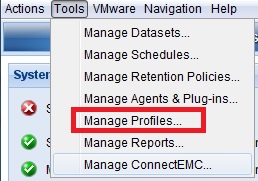
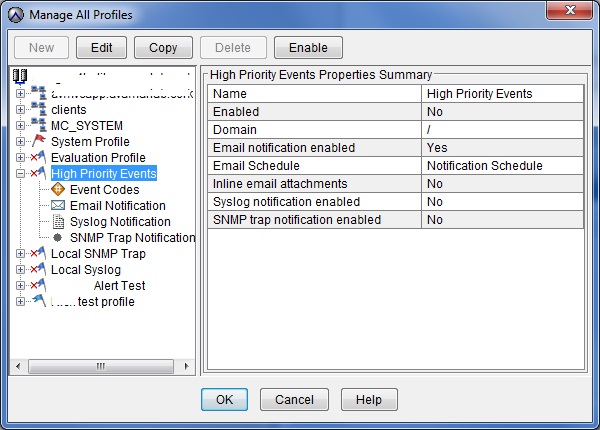
EmailHome can be configured using various parameters in the Avamar Management Console Service (MCS) configuration file.
/usr/local/avamar/var/mc/server_data/prefs/mcserver.xml file
For example:
"admin_mail_sender_address" value="administrator@company.com"
"smtpHost" value="192.x.x.12"
"email_home_subject_template" value="Avamar HFSADDR VERSION - High Priority Events"
How to trigger a test email: Avamar Administrator user interface > Edit Profile > Email Notification > Send Email.
What does Dell need in order to confirm that email are being received?
The Avamar system ID (obtain with avmaint nodelist | grep systemid | uniq).
Notifications get sent to:
Dell's EmailHome system (also known as Avalanche)
Dell's EmailHome system (also known as Avalanche)
Notification schedule: Email is sent twice daily according to a schedule defined for the high priority events.
Relies on:
The Avamar MCS and the High Priority Events profile must be enabled on the Avamar Utility Node. The Avamar system must be able to connect to and be allowed to send email using the customer's Simple Mail Transfer Protocol (SMTP) server.
The Avamar MCS and the High Priority Events profile must be enabled on the Avamar Utility Node. The Avamar system must be able to connect to and be allowed to send email using the customer's Simple Mail Transfer Protocol (SMTP) server.
Email is sent to:
emailhome@avamar.com
DialHome (ConnectEMC):
Function:
Enables automatic creation of Support SRs when Avamar hardware or critical Avamar services experience issues.
Enables automatic creation of Support SRs when Avamar hardware or critical Avamar services experience issues.
Configured and managed with:
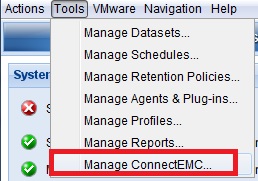
Avamar Administrator user interface -> Tools -> Manage ConnectEMC.
Avamar Administrator user interface -> Tools -> Manage ConnectEMC.
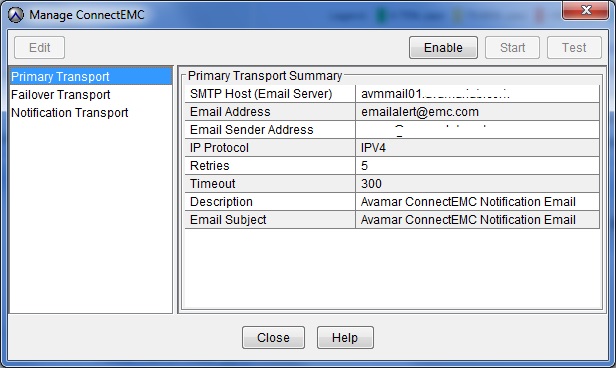
How to trigger a test email:
Once configured, either;
a) Use the test button in the configuration user interface.
b) Run the following command from the utility node to push a test-only connectEMC email from the Avamar server:
admin@util:~/>: mccli event publish --code=22915
0,23000,CLI command completed successfully.
What does Dell require in order to confirm if an email is being received?
The Avamar system ID (obtain with avmaint nodelist | grep systemid | uniq ).
How to troubleshoot:
Logs are available on the Avamar Utility Node in /opt/connectemc.
Logs are available on the Avamar Utility Node in /opt/connectemc.
Notifications get sent to:
The Dell Technologies SYR DialHome system
The Dell Technologies SYR DialHome system
Notification schedule:
Email is sent when important events occur. Also, a status email is sent once every 24 hours. The exact time the daily email sent is related to the most recent start time of the Avamar MCS service.
Relies on:
The Linux service connectemc and the ability to connect to and send email using the customer's SMTP server.
The Linux service connectemc and the ability to connect to and send email using the customer's SMTP server.
Email is sent to:
emailalert@emc.com
REFERENCE ARTICLES:
emailalert@emc.com
REFERENCE ARTICLES:
Affected Products
Avamar, Avamar ServerArticle Properties
Article Number: 000038389
Article Type: Solution
Last Modified: 16 Dec 2025
Version: 8
Find answers to your questions from other Dell users
Support Services
Check if your device is covered by Support Services.