NetWorker: Debug information levels
Summary: This article provides information about NetWorker debug levels, and how to enable debugging.
Instructions
Premise:
User Message: Message that can be seen by the user in normal (localized) operation. It includes viewing of a log file, and output triggered by setting the (-v) verbosity command-line flag. User messages include generic logging, such as INFO, WARNING, ERROR, and so forth.
Debug Message: Message that is intended for in-depth analysis. Debugging is triggered by the (-D) command-line flag or the dbgcommand. Debug messages are not localized.
Messages flow in NetWorker:
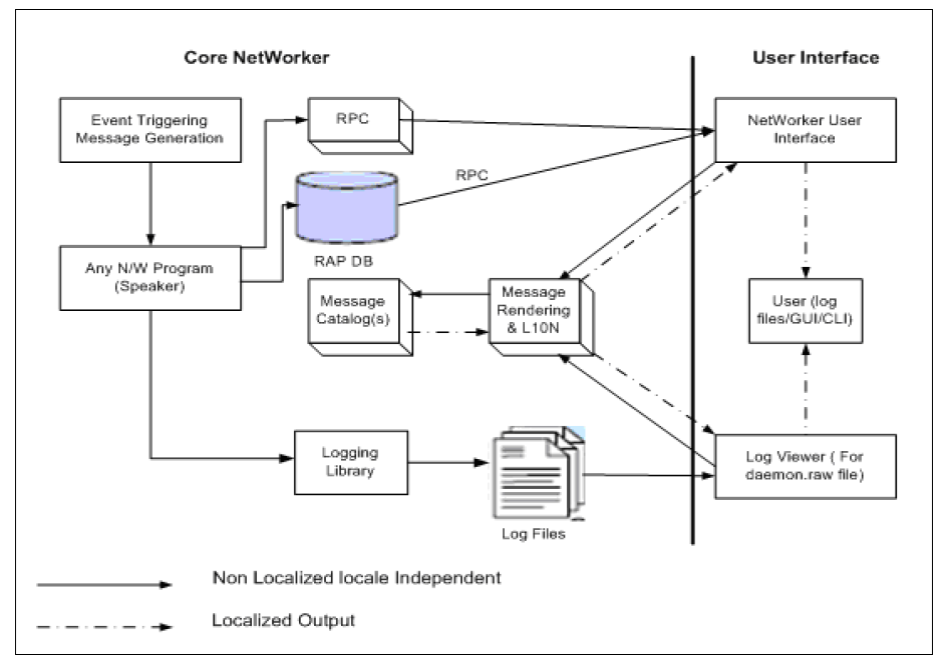
A program that produces a message is called a speaker. Each speaker sends a message either to the UI, log file or to another program. NetWorker RAP resource `NSR Log` is created to manage each log file. A message can be sent to the UI directly using Remote Procedure Call (RPC). A log viewer (Viewer) reads UI intended or log messages and makes them visible to a user. Speakers log messages in a locale-independent format that viewers can translate later by the help of the Message catalog. The advantage is that users can view the UI simultaneously in different languages, and the same log file in various languages.
Logging:
General NetWorker service logging is written to the NetWorker daemon.raw:
- Linux:
/nsr/logs/daemon.raw - Windows (Default):
C:\Program Files\EMC NetWorker\nsr\logs\daemon.raw
.raw files. While some messages can be determined in a .raw file, many are unstructured data which is not human-readable (or difficult to translate). NetWorker provides the nsr_render_log utility to render .raw log files into human-readable output. See: NetWorker: How to use nsr_render_log to render .raw log files
Additional NetWorker logs are detailed in: NetWorker: Log Files and Locations
NetWorker Debug Levels:
The following table describes what information is available in the daemon.raw (or NetWorker logs) at the different debug levels when debugging NetWorker processes (daemons) or NetWorker command including Databases modules.
|
Debug Level
|
Debug information
|
Usage
|
|
0
|
No debugging (Disabled)
|
Default logging.
|
|
1
|
|
Occasional
|
|
2
|
|
Occasional
|
|
3
|
|
Frequent
|
|
4
|
|
Occasional
|
|
5
|
|
Frequent
|
|
6
|
|
Occasional
|
|
7
|
|
Frequent
|
|
8
|
|
Occasional
|
|
9
|
|
Frequent
|
|
10-99
|
|
Rare
|
Debug levels are compounded, meaning that each debug level includes all levels prior to it. For example, when setting debug level 9, levels 1 through 9 are logged.
Enabling Debug:
Process-Specific debugging:
To enable NetWorker process-specific debugging, the dbgcommand is used to set a Debug level. The NetWorker dbgcommand allows greater debugging of specific NetWorker processes, without enabling global debug across all NetWorker processes. dbgcommand can be set on a PROCESS_NAME or PROCESS_ID (PID). Debugging set by dbgcommand is sent to the NetWorker daemon.raw log.
NetWorker host-specific processes: NetWorker Processes and Ports
From an elevated prompt on the NetWorker host, run:
dbgcommand -n PROCESS_NAME Debug=DEBUG_LEVEL

    dbgcommand -p PROCESS_ID Debug=DEBUG_LEVEL
Overview of dbgcommand functions:
| Option | Value | Usage |
Debug=<value> |
>= 0 (See NetWorker Debug Levels) | Enabling process debug. |
Vflag=<value> |
>= 0 | Setting verbosity level. |
MsgID=<value> |
value = bool 0 or 1 | Change the message ID printing of a running process. |
PrintDevInfo |
N/A |
|
FlushDnsCache |
N/A | Flush the process's DNS cache. |
Example:
[root@nsr ~]# dbgcommand -n nsrd Debug=9
Process ID List : 869448
Processing PID:869448
Debug messaging is found in the daemon.raw:
0 01/30/2026 12:39:33 PM  nsrd NSR notice 01/30/26 12:39:33.163590 nsrd-D3 is_storage_node_active, hostname: nsr.amer.lan.
0 01/30/2026 12:39:33 PM  nsrd NSR notice 01/30/26 12:39:33.163697 nsrd-D5 lg_getnameinfo(): Entry in getnameinfo_cache  not found...
0 01/30/2026 12:39:33 PM  nsrd NSR notice 01/30/26 12:39:33.163722 nsrd-D7 lg_inet_getnameinfo(): ENTER input sa=192.168.9.152  input host buff=0x5604d67a8090 hostlen=1025     input service buff=(nil) servicelen=0    input flags=0x0008 NI_NAMEREQD=1 NI_NUMERICHOST=0 NI_NUMERICSERV=0 NI_NOFQDN=0
0 01/30/2026 12:39:33 PM  nsrd NSR notice 01/30/26 12:39:33.164319 nsrd-D7 lg_inet_getnameinfo(): EXIT rc=0      host str=nsr-sn.amer.lan       service str=null
0 01/30/2026 12:39:33 PM  nsrd NSR notice 01/30/26 12:39:33.164378 nsrd-D3 is_storage_node_active, hostname: nsr.amer.lan.
0 01/30/2026 12:39:33 PM  nsrd NSR notice 01/30/26 12:39:33.164405 nsrd-D5 lg_getnameinfo(): Entry in getnameinfo_cache  not found...
0 01/30/2026 12:39:33 PM  nsrd NSR notice 01/30/26 12:39:33.164424 nsrd-D7 lg_inet_getnameinfo(): ENTER input sa=192.168.9.152  input host buff=0x5604d67a8090 hostlen=1025     input service buff=(nil) servicelen=0    input flags=0x0008 NI_NAMEREQD=1 NI_NUMERICHOST=0 NI_NUMERICSERV=0 NI_NOFQDN=0
0 01/30/2026 12:39:33 PM  nsrd NSR notice 01/30/26 12:39:33.164867 nsrd-D7 lg_inet_getnameinfo(): EXIT rc=0      host str=nsr-sn.amer.lan       service str=null
Disabling debug:
[root@nsr ~]# dbgcommand -n nsrd Debug=0
Process ID List : 869448
Processing PID:869448
Using -D <Level>:
NetWorker commands can also be run with debug enabled. This is done by appending -D<DEBUG_LEVEL> to the command. For example, to set Debug level 9 on the save process run on a NetWorker client, update the client's backup command to save -D9.
For more information, see:
- NetWorker: How to Debug Backup Operations
- NetWorker: How to Debug Recover Job Failures from NMC
- NetWorker: How to troubleshoot Scheduled Cloning Issues
- NetWorker VMware Protection-vProxy: How to Enable Debug Logging
- Data Domain: Enabling DD Boost API Logging | Precert Logs
- See the NetWorker Command Reference Guide, available through: Support for NetWorker | Manuals & Documents (Requires Dell support account sign in).
Additional Information
- NRE 8.x: How to clear Java Cache, enable Java Console and Debugging.
- NRE 17.x: How to Clear Java Cache, Enable Java Console, and Debugging
- NetWorker Management Web UI (NWUI): Triage and Troubleshooting Guide
- NetWorker: How To Enable AUTHC DEBUG for Troubleshooting Purposes
- NetWorker: How to enable RabbitMQ Debugging
- NetWorker: How to Enable REST API Debugging
- NetWorker Troubleshooting Guide: Process Crashes and Core Dumps
- NetWorker: How to Use the NSRGet NetWorker Data Collection Tool