Dell Networking OS9 Sådan konfigureres en manuel DHCP-binding eller statisk DHCP-binding
Summary: Denne artikel beskriver, hvordan du konfigurerer en manuel DHCP-binding (Dynamic Host Control Protocol) eller statisk DHCP-binding i Dell Networking OS9.
Instructions
Indeks
Hvad er manuel DHCP-binding
Konfiguration
Kontrolere
Point at huske
Hvad er manuel DHCP-binding eller statisk DHCP-binding?
DHCP-serveren tildeler automatisk klienten en tilgængelig IP-adresse og opretter derefter en post i bindingstabellen. Administratoren kan dog manuelt oprette en post for en klient. Manuelle bindinger er nyttige, når du vil garantere, at en netværksenhed modtager en bestemt IP-adresse.
Konfiguration
Dynamisk puljekonfiguration
|
Kommando |
Forklaring |
|---|---|
DELL# configure |
Gå til konfigurationstilstand |
DELL(conf)# ip dhcp server |
Aktivér DHCP-tilstand |
DELL(config-dhcp)# pool <POOL NAME> |
Opret DHCP-puljen |
DELL(config-dhcp-D-POOL)# network <Network/subnet mask> |
Angiv IP-adressen |
DELL(config-dhcp-D-POOL)# default-router <Default Router IP> |
Angiv standardrouter |
DELL(config-dhcp-D-POOL)# dns-server <DNS server IP> |
Angiv DNS-Server |
Konfiguration af statisk pulje
|
Kommando |
Forklaring |
|---|---|
DELL# configure |
Gå til konfigurationstilstand |
DELL(conf)# ip dhcp server |
Aktivér DHCP-tilstand |
DELL(config-dhcp)# pool <POOL NAME> |
Opret DHCP-pulje |
DELL(config-dhcp-S-POOL)# host-address <IP address> |
Angiv IP-adresse |
DELL(config-dhcp-S-POOL)# hardware-address <Mac address> |
Angiv klienthardwareadressen |
DELLconfig-dhcp-S-POOL)# default-router <Default Router IP> |
Angiv standardrouter (valgfrit) |
DELL(config-dhcp-S-POOL)# dns-server <DNS server IP> |
Angiv DNS-server (valgfrit) |
Aktiver DHCP-SERVER
|
Kommando |
Forklaring |
|---|---|
DELL# configure |
Gå til konfigurationstilstand |
DELL(conf)# ip dhcp server |
Aktivér DHCP-tilstand |
DELL(config-dhcp)# no disable |
Aktivér DHCP-server |
Eksempelkonfiguration
Overvej nedenstående eksempel, hvor en klient med mac-adresse 11:22:33:44:55:66 skal modtage IP-adresse 10.0.0.100 fra DHCP-serveren.

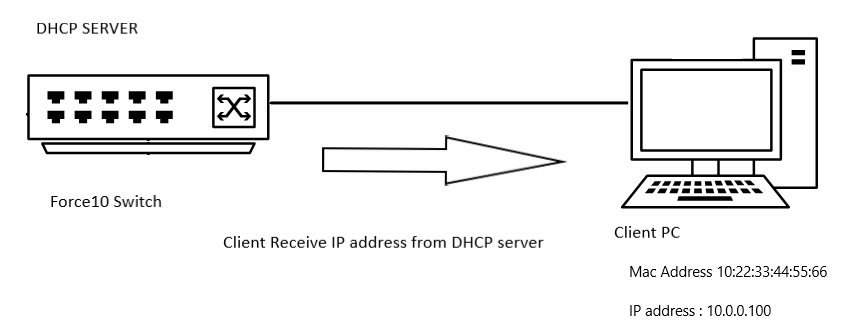
Eksempelkonfiguration
DELL# configure
DELL(conf)# ip dhcp server
DELL(config-dhcp)# pool DYNAMICPOOL
DELL(config-dhcp-DYNAMICPOOL)# network 10.0.0.0/24
DELL(config-dhcp-DYNAMICPOOL)# default-router 10.0.0.1
DELL(config-dhcp-DYNAMICPOOL)# dns-server 8.8.8.8
DELL(config-dhcp-DYNAMICPOOL)# exit
DELL(config-dhcp)#

DELL(config-dhcp)# pool STATICPOOL
DELL(config-dhcp-STATICPOOL)# host-address 10.0.0.100
DELL(config-dhcp-STATICPOOL)# hardware-address 10:22:33:44:55:66
DELL(config-dhcp-DYNAMICPOOL)# exit
DELL(config-dhcp)#

DELL(config-dhcp)# no disable
Bekræft
DHCP-KONFIGURATION
For at kontrollere DHCP-serverkonfigurationen og gruppeoplysningerne skal du bruge nedenstående kommando:
DELL# show ip dhcp configuration pool
Eksempel på output
DELL# show ip dhcp configuration  pool

Pool Name            : DYNAMICPOOL
Pool Type            : Dynamic
Domain Name          :
Lease Time           : 1Day 0Hrs 0Mins
DNS Servers          : 8.8.8.8
Default Routers      : 10.0.0.1
Network              : 10.0.0.0 255.255.255.0

Pool Name            : STATICPOOL
Pool Type            : Manual
Domain Name          :
Lease Time           : 1Day 0Hrs 0Mins
DNS Servers          :
Default Routers      :
Hardware Address     : 10:22:33:44:55:66
Hardware Address Type: Ethernet
Host                 : 10.0.0.100 0.0.0.0
Bindende
For at bekræfte IP-adressen leveret af DHCP-serveren skal du bruge nedenstående kommando:
DELL# show ip dhcp binding

Sample output
DELLEMC#show ip dhcp binding
 IP address      Hardware address   Lease expiration     Type
10.0.0.100      10:22:33:44:55:66    infinite             Manual
Total number of entries in the table: 1
Husk følgende
- Du skal have et dynamisk puljeområde i netværket, for at den statiske gruppe kan fungere
- Manuelle bindinger kan betragtes som adressepuljer med en enkelt vært. Der er ingen grænse for antallet af manuelle bindinger,
- Vi kan kun konfigurere én manuel indbinding pr. vært.
- Sørg for, at vi bruger en gyldig værts-IP inden for undernetområdet som værts-IP.