Dell Networking OS9 수동 DHCP 바인딩 또는 정적 DHCP 바인딩을 구성하는 방법
Summary: 이 문서에서는 Dell Networking OS9에서 수동 DHCP(Dynamic Host Control Protocol) 바인딩 또는 정적 DHCP 바인딩을 구성하는 방법에 대해 설명합니다.
This article applies to
This article does not apply to
This article is not tied to any specific product.
Not all product versions are identified in this article.
Instructions
인덱스
수동 DHCP 바인딩이란?
구성
확인
염두에 두어야 할 부분
수동 DHCP 바인딩 또는 고정 DHCP 바인딩이란 무엇입니까?
DHCP 서버는 클라이언트에 사용 가능한 IP 주소를 자동으로 할당한 다음 바인딩 테이블에 항목을 만듭니다. 그러나 관리자는 클라이언트에 대한 항목을 수동으로 만들 수 있습니다. 수동 바인딩은 네트워크 디바이스가 특정 IP 주소를 수신하도록 보장하려는 경우에 유용합니다.
구성
동적 풀 구성
|
명령 |
설명 |
|---|---|
DELL# configure |
구성 모드 진입 |
DELL(conf)# ip dhcp server |
DHCP 모드 진입 |
DELL(config-dhcp)# pool <POOL NAME> |
DHCP 풀 생성 |
DELL(config-dhcp-D-POOL)# network <Network/subnet mask> |
IP 주소 지정 |
DELL(config-dhcp-D-POOL)# default-router <Default Router IP> |
기본 라우터 지정 |
DELL(config-dhcp-D-POOL)# dns-server <DNS server IP> |
DNS-Server 지정 |
정적 풀 구성
|
명령 |
설명 |
|---|---|
DELL# configure |
구성 모드 진입 |
DELL(conf)# ip dhcp server |
DHCP 모드 진입 |
DELL(config-dhcp)# pool <POOL NAME> |
DHCP 풀 생성 |
DELL(config-dhcp-S-POOL)# host-address <IP address> |
IP 주소 지정 |
DELL(config-dhcp-S-POOL)# hardware-address <Mac address> |
클라이언트 하드웨어 주소 지정 |
DELLconfig-dhcp-S-POOL)# default-router <Default Router IP> |
기본 라우터 지정(선택 사항) |
DELL(config-dhcp-S-POOL)# dns-server <DNS server IP> |
DNS-Server 지정(선택 사항) |
DHCP 서버 활성화
|
명령 |
설명 |
|---|---|
DELL# configure |
구성 모드 진입 |
DELL(conf)# ip dhcp server |
DHCP 모드 진입 |
DELL(config-dhcp)# no disable |
DHCP 서버 활성화 |
샘플 구성
mac 주소가 11:22:33:44:55:66인 클라이언트가 DHCP 서버에서 IP 주소 10.0.0.100을 수신해야 하는 아래 예를 고려하십시오.
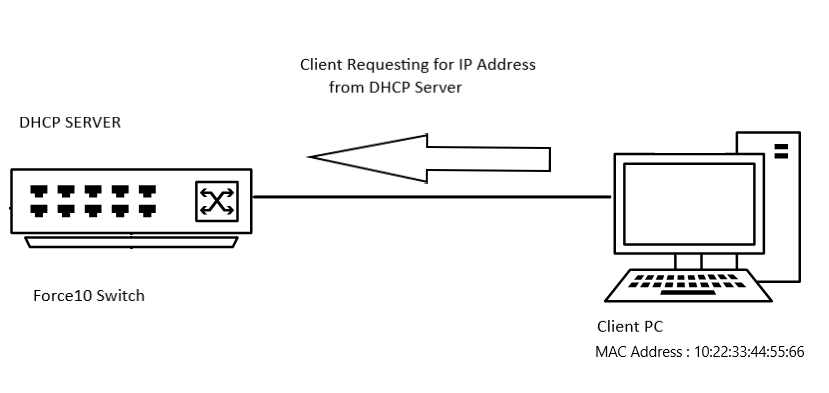
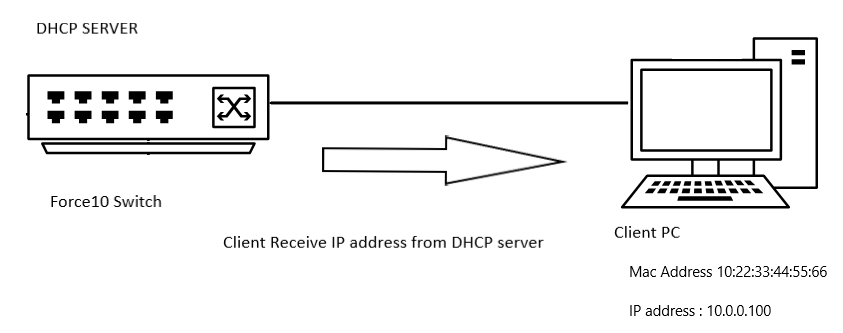
샘플 구성
DELL# configure
DELL(conf)# ip dhcp server
DELL(config-dhcp)# pool DYNAMICPOOL
DELL(config-dhcp-DYNAMICPOOL)# network 10.0.0.0/24
DELL(config-dhcp-DYNAMICPOOL)# default-router 10.0.0.1
DELL(config-dhcp-DYNAMICPOOL)# dns-server 8.8.8.8
DELL(config-dhcp-DYNAMICPOOL)# exit
DELL(config-dhcp)#

DELL(config-dhcp)# pool STATICPOOL
DELL(config-dhcp-STATICPOOL)# host-address 10.0.0.100
DELL(config-dhcp-STATICPOOL)# hardware-address 10:22:33:44:55:66
DELL(config-dhcp-DYNAMICPOOL)# exit
DELL(config-dhcp)#

DELL(config-dhcp)# no disable
확인
DHCP 구성
DHCP 서버 구성 및 풀 세부 정보를 확인하려면 다음 명령을 사용합니다.
DELL# show ip dhcp configuration pool
샘플 출력
DELL# show ip dhcp configuration  pool

Pool Name            : DYNAMICPOOL
Pool Type            : Dynamic
Domain Name          :
Lease Time           : 1Day 0Hrs 0Mins
DNS Servers          : 8.8.8.8
Default Routers      : 10.0.0.1
Network              : 10.0.0.0 255.255.255.0

Pool Name            : STATICPOOL
Pool Type            : Manual
Domain Name          :
Lease Time           : 1Day 0Hrs 0Mins
DNS Servers          :
Default Routers      :
Hardware Address     : 10:22:33:44:55:66
Hardware Address Type: Ethernet
Host                 : 10.0.0.100 0.0.0.0
제본
DHCP 서버에서 제공한 IP 주소를 확인하려면 다음 명령을 사용합니다.
DELL# show ip dhcp binding

Sample output
DELLEMC#show ip dhcp binding
 IP address      Hardware address   Lease expiration     Type
10.0.0.100      10:22:33:44:55:66    infinite             Manual
Total number of entries in the table: 1
염두에 두어야 할 부분
- 정적 풀이 작동하려면 해당 네트워크에 동적 풀 범위가 있어야 합니다
- 수동 바인딩은 단일 호스트 주소 풀로 간주할 수 있습니다. 수동 바인딩 수에는 제한이 없습니다.
- 수동 바인딩은 호스트당 하나만 구성할 수 있습니다.
- 서브넷 범위 내에서 유효한 호스트 IP를 호스트 IP로 사용하고 있는지 확인합니다.
Affected Products
OS9, PowerSwitch S3048-ON, PowerSwitch S4048-ON, PowerSwitch S4810P, PowerSwitch S4810-ON, PowerSwitch S4820T, PowerSwitch S5000, Dell Networking S3100 Series, PowerSwitch S4048T-ON, PowerSwitch S5048F-ONProducts
PowerSwitch S6000, PowerSwitch S6000 ON, PowerSwitch S6010-ON, PowerSwitch S6100-ON, PowerSwitch Z9100-ON, PowerSwitch Z9264F-ON, PowerSwitch Z9332F-ONArticle Properties
Article Number: 000312772
Article Type: How To
Last Modified: 25 Apr 2025
Version: 1
Find answers to your questions from other Dell users
Support Services
Check if your device is covered by Support Services.