Audio Settings not Available in Dell Display and Peripheral Manager 2.0 on Dell Monitors
Summary: This article provides information about Dell Display and Peripheral Manager (DDPM) 2.0 for Windows is not supporting audio settings for S series Monitors.
This article applies to
This article does not apply to
This article is not tied to any specific product.
Not all product versions are identified in this article.
Symptoms
Affected Products:
- Dell S2425H
- Dell S2425HS
- Dell S2725H
- Dell S2725HS
- Dell S2725DS
Cause
DDPM v2.0 does not have audio settings support for S series Monitors (S2425H, S2425HS, S2725H, S2725HS, S2725DS).
Resolution
The audio settings are no longer available in DDPM v2.0, and Dell Technologies recommends using the On-Screen Display (OSD) menu on the monitor to adjust the audio settings. Reference the monitors user guide for OSD settings.
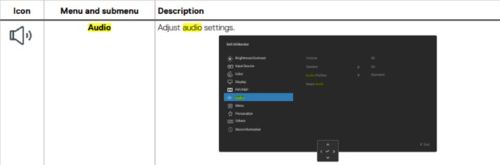
For detailed information about how to navigate the On-Screen Display (OSD) menu on the monitor, see the User’s Guide for your monitor.
See the Dell Knowledge Base article Manuals and Documentation for your Dell Product for information about how to obtain the User’s Guide for your monitor.
Affected Products
Dell Display and Peripheral Manager, Dell S2425H, Dell S2425HS, Dell S2725DS, Dell S2725H, Dell S2725HSArticle Properties
Article Number: 000247272
Article Type: Solution
Last Modified: 17 Sept 2025
Version: 4
Find answers to your questions from other Dell users
Support Services
Check if your device is covered by Support Services.