如何存取 Dell Data Security 伺服器管理主控台
Summary: 您可以依照下列指示來存取 Dell Data Security 或 Dell Data Protection 伺服器管理主控台。
This article applies to
This article does not apply to
This article is not tied to any specific product.
Not all product versions are identified in this article.
Symptoms
Dell Data Security (先前稱為 Dell Data Protection) 需要管理主控台來管理:
- 原則
- 報告
- 加密金鑰
受影響的產品:
- Dell Security Management Server
- Dell Data Protection | Enterprise Edition Server
- Dell Security Management Server Virtual
- Dell Data Protection | Virtual Edition
受影響的版本:
- v8.0 及更新版本
Cause
不適用
Resolution
按一下適當的產品版本,瞭解存取管理主控台的特定步驟。如需版本資訊,請參閱如何識別 Dell Data Security/Dell Data Protection 伺服器版本。
- 開啟網頁瀏覽器並前往 https://servername.company.com:8443/webui。

注意:
- FQDN (完整網域名稱) 範例會與環境中的伺服器不同。
- 連接埠 8443 可能與環境中的管理主控台連接埠不同。
- 登入管理主控台。
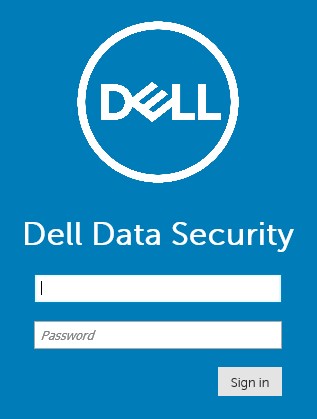
注意:
- 在版本 11.4 及更新版本中,如果已為使用者設定 Google Authenticator 或電子郵件 MFA (多重因素驗證),系統會提示使用者輸入 OTP (一次性密碼)。
- 如需更多有關設定 MFA 的資訊,請參閱如何在 Dell Security Management Server 管理主控台中管理多重因素驗證。
- 在 Windows 檔案總管中,前往:
- Dell 資料保護 |Enterprise Edition 伺服器:
C:\Program Files\Dell\Enterprise Edition - 端點:
C:\Program Files\Dell\Virtual Edition
- Dell 資料保護 |Enterprise Edition 伺服器:
注意:
- 端點存取需要從 Dell Data Protection | Virtual Edition 媒體安裝管理主控台 (先前稱為遠端管理主控台)。
- 如需安裝步驟,請參閱如何安裝 Dell Data Protection 遠端管理主控台。
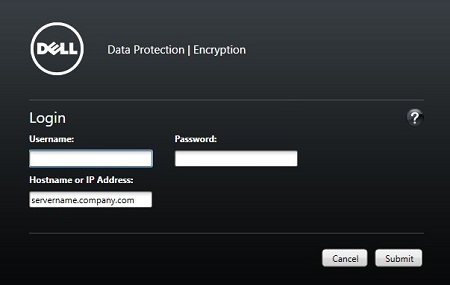
- 連按兩下
Credant.Console。

- 提交登入資料,以登入管理主控台。
如要聯絡支援部門,請參閱 Dell Data Security 國際支援電話號碼。
請前往 TechDirect,以線上產生技術支援要求。
如需更多深入見解與資源,請加入 Dell 安全性社群論壇。
Additional Information
Videos
Affected Products
Dell EncryptionArticle Properties
Article Number: 000126852
Article Type: Solution
Last Modified: 16 Nov 2023
Version: 15
Find answers to your questions from other Dell users
Support Services
Check if your device is covered by Support Services.