Support for Integrated Dell Remote Access Controller 7 (iDRAC7)
Summary: The Integrated Dell Remote Access Controller 7 (iDRAC7) provides comprehensive, embedded management across the PowerEdge family of servers, automation that lets your organization grow, and security that ensures peace of mind. From the variety of tools and technologies in the OpenManage portfolio, you can build a management solution that matches your needs, and by leveraging iDRAC, ensures optimal server management. ...
This article applies to
This article does not apply to
This article is not tied to any specific product.
Not all product versions are identified in this article.
Symptoms

Support for the Integrated Dell Remote Access Controller 7
- Agent-free local and remote embedded server management
- Automate with RESTFul API with Redfish support
- Deploy, update, monitor, and maintain your server
The iDRAC provides comprehensive, embedded management across the PowerEdge family of servers, automation that lets your organization grow, and security that ensures peace of mind. From the variety of tools and technologies in the OpenManage portfolio, you can build a management solution that matches your needs, and by leveraging iDRAC, ensures optimal server management.
iDRAC7 has reached both the End of Sale as of February 2017 and End of Software Maintenance as of February 2020. The last release of iDRAC7 firmware is version 2.65.65.65. Learn more >

Benefits of iDRAC7
Increased Availability: Early notification of potential or actual failures that help prevent a server failure or reduce recovery time after failure.
Improved Productivity and Lower Total Cost of Ownership: Extending the reach of administrators to larger numbers of distant servers can make IT staff more productive while driving down operational costs such as travel.
Secure Environment: By providing secure access to remote servers, administrators can perform critical management functions while maintaining server and network security.
Enhanced Embedded Management through Lifecycle Controller: Lifecycle Controller provides deployment and simplified serviceability through Lifecycle Controller GUI for local deployment and Remote Services (WS-Management) interfaces for remote deployment integrated with Dell OpenManage Essentials and partner consoles.
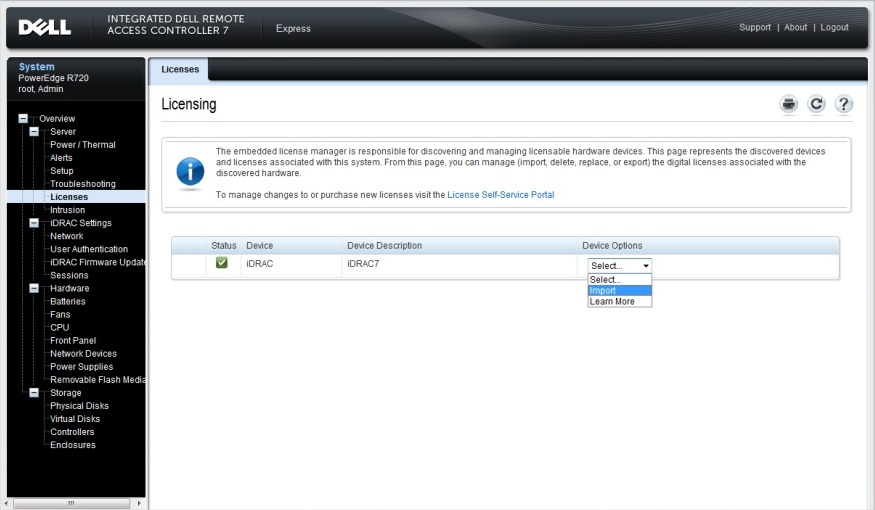
Licensing for iDRAC7
iDRAC7 features are available based on the type of the license, for complete listing of licensed features, expand the following feature list:
iDRAC7 Licensed Features
| Feature | iDRAC7 Basic | iDRAC7 Express | iDRAC7 Express for Blades | iDRAC7 Enterprise |
|---|---|---|---|---|
| Interfaces / Standards | ||||
| IPMI 2.0 | Yes | Yes | Yes | Yes |
| DCMI 1.5 | No | No | No | No |
| Web-based GUI | No | Yes | Yes | Yes |
| RACADM command line (local/remote) | No | Yes | Yes | Yes |
| Redfish | Yes | Yes | Yes | Yes |
| SMASH-CLP (SSH-only) | No | Yes | Yes | Yes |
| Telnet | No | Yes | Yes | Yes |
| SSH | No | Yes | Yes | Yes |
| WSMAN | Yes | Yes | Yes | Yes |
| Network Time Protocol | No | Yes | Yes | Yes |
| Connectivity | ||||
| Shared NIC (LOM) | Yes | Yes | N/A | Yes |
| Dedicated NIC1 | No | No | Yes | Yes |
| VLAN tagging | Yes | Yes | Yes | Yes |
| IPv4 | Yes | Yes | Yes | Yes |
| IPv6 | No | Yes | Yes | Yes |
| DHCP | No | No | No | No |
| Dynamic DNS | No | Yes | Yes | Yes |
| OS pass-through | No | No | No | No |
| Front panel USB | No | No | No | No |
| Security | ||||
| Role-based authority | Yes | Yes | Yes | Yes |
| Local users | Yes | Yes | Yes | Yes |
| SSL encryption | Yes | Yes | Yes | Yes |
| IP blocking | No | No | No | No |
| Directory services (AD, LDAP) | No | No | No | Yes |
| Two-factor authentication (smart card) | No | No | No | Yes |
| Single sign-On (kerberos) | No | No | No | Yes |
| PK authentication (for SSH) | No | No | No | No |
| Remote Presence | ||||
| Power control | Yes4 | Yes | Yes | Yes |
| Boot control | No | No | No | No |
| Serial-over-LAN | Yes | Yes | Yes | Yes |
| Virtual Media | No | No | Yes | Yes |
| Virtual Folders | No | No | No | Yes |
| Remote File Share | No | No | No | Yes |
| Virtual Console | No | No | Single user | Yes |
| VNC connection to OS | No | No | No | Yes |
| Quality/bandwidth control | No | No | No | No |
| Virtual Console collaboration (up to six simultaneous users) | No | No | No | No |
| Virtual Console chat | No | No | No | Yes |
| Virtual Flash partitions | No | No | No | Yes |
|
Power and Thermal |
||||
| Automatic power on after loss | No | No | No | No |
| Real-time power meter | Yes | Yes | Yes | Yes |
| Power thresholds and alerts (includes headroom) | No | No | No | No |
| Real-time power graphing | No | Yes | Yes | Yes |
| Historical power counters | Yes | Yes | Yes | Yes |
| Power capping | No | No | No | Yes |
| Power Center integration | No | No | No | No |
| Temperature monitoring | No | No | No | No |
| Temperature graphing | No | No | No | No |
|
Health Monitoring |
||||
| Full agent-free monitoring | No | No | No | No |
| Predictive failure monitoring | No | No | No | No |
| SNMPv1, v2, and v3 (traps and gets) | No | Yes | Yes | Yes |
| Email Alerting | No | Yes | Yes | Yes |
| Configurable thresholds | No | No | No | No |
| Fan monitoring | Yes | Yes | Yes | Yes |
| Power Supply monitoring | No | Yes | Yes | Yes |
| Memory monitoring | No | No | No | No |
| CPU monitoring | No | No | No | No |
| RAID monitoring | No | No | No | No |
| NIC monitoring | No | No | No | No |
| HD monitoring (enclosure) | No | No | No | No |
| Out of Band Performance Monitoring | No | No | No | No |
|
Update |
||||
| Remote agent-free update | Yes3 | Yes | Yes | Yes |
| Embedded update tools | No | No | No | No |
| Sync with repository (scheduled updates) | No | No | No | Yes |
| Auto-update | No | No | No | No |
|
Deployment and Configuration |
||||
| Embedded OS deployment tools | No | No | No | No |
| Embedded configuration tools (iDRAC Settings Utility) | No | No | No | No |
| Embedded configuration wizards (Lifecycle Controller wizards) | No | No | No | No |
| Auto-Discovery | No | Yes | Yes | Yes |
| Remote OS deployment | No | No | No | No |
| Embedded driver pack | No | No | No | No |
| Full configuration inventory | No | No | No | No |
| Inventory export | No | No | No | No |
| Remote configuration | No | Yes | Yes | Yes |
| Zero-touch configuration | No | No | No | No |
| System Retire/Repurpose | No | No | No | No |
| Diagnostics, Service, and Logging | ||||
| Embedded diagnostic tools | Yes | Yes | Yes | Yes |
| Part Replacement | No | Yes | Yes | Yes |
| Server Configuration Backup | No | No | No | Yes |
| Server Configuration Restore | No | No | No | Yes |
| Easy Restore (system configuration) | No | No | No | No |
| Health LED / LCD | No | No | No | No |
| iDRAC Service Module (iSM) | No | Yes | Yes | Yes |
| SupportAssist Collection (embedded) | No | Yes | Yes | Yes |
| Crash screen capture5 | No | Yes | Yes | Yes |
| Crash video capture5 | No | No | No | Yes |
| Boot capture | No | No | No | Yes |
| Manual reset for iDRAC | No | No | No | No |
| Virtual NMI | No | No | No | No |
| OS watchdog | No | No | No | No |
| Embedded Health Report | No | No | No | No |
| System Event Log | No | Yes | Yes | Yes |
| Lifecycle Log | No | No | No | No |
| Work notes | No | No | No | No |
| Remote Syslog | No | No | No | Yes |
| License management | No | No | No | No |
[2] 500 series and lower rack and tower servers require a hardware card to enable this feature; this hardware is offered at additional cost.
[3] Remote agent-free update feature is available only using IPMI.
[4] Available only using IPMI.
[5] Requires OMSA agent on target server.
| iDRAC Licenses / Server Model | 200-500 Series Rack / Tower / Modular | 600+ Rack / Tower / Modular |
|---|---|---|
| Basic: Basic instrumentation with iDRAC web GUI, this is the default license included with 200-500 series rack and tower servers. | Standard | n/a |
| Express: All the features of Basic and expanded remote management and server lifecycle features, this is the default license included with 600+ series rack, tower, and modular servers. | Upgrade | Standard |
| Enterprise: All the features of Express and additional remote presence features with advanced, Enterprise-class, management capabilities. | Upgrade | Upgrade |
An iDRAC license is a perpetual license that is valid for the life of a server, and can be bound to the Service Tag of only one server at a time. Upgraded iDRAC license can be included at time of server purchase or purchased separately and downloaded from Dell Digital Locker.
Trial License:
- A 30-day evaluation Enterprise trial license is available to fully test and experience all the features to help with purchasing decision. Learn More and download >
Upgrade License:
- To upgrade an iDRAC license, please contact your local Dell EMC sales representative.
Downloading an upgraded or replacing a lost license:
- The iDRAC license can be downloaded from Dell Digital Locker. License keys will be stored online and can be downloaded if needed. If an existing license key in not available in the Dell Digital Locker or there is an issue with a license key, please contact Dell EMC Technical Support or Customer Care.
Managing iDRAC Licenses
iDRAC licenses can be managed on either an individual server basis or through the Dell EMC License Manager which is a one-to-many license and deployment tool.-
Individual serverUtilize iDRAC to manage the license for an individual server. iDRAC web interface, License tab can be utilized to import, export licenses or RACADM CLI License command can be utilized to manage licenses as described in the RACADM CLI Guide.
-
Group of serversDell EMC License Manager is a one-to-many license deployment and reporting tool for OpenManage Enterprise Advanced, iDRAC, and CMC licenses. By using License Manager, you can download, bind, deploy, inventory and back up OpenManage Enterprise Advanced Licenses as well as iDRAC, CMC, and storage sled license. This tool can also inventory licensable systems to report the licensing status and features of the currently enabled management controller.
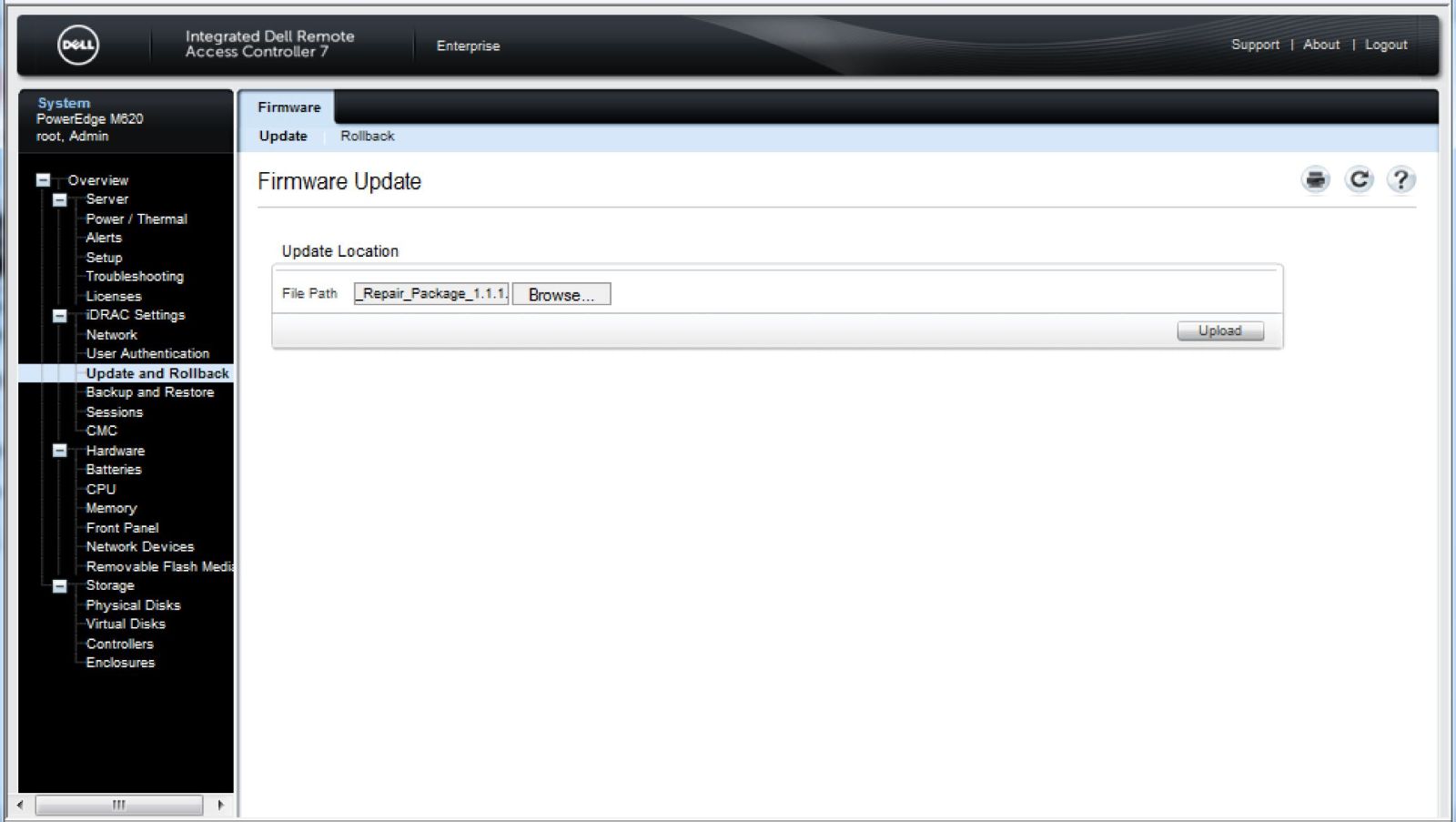
Update to latest iDRAC7 Firmware
iDRAC7 has reached both the End of Sale as of February 2017 and End of Software Maintenance as of February 2020. The last release of iDRAC7 firmware is version 2.65.65.65.
Dell EMC recommends keeping your system up to date with the latest iDRAC7 firmware available. This ensures the best performance as well as the latest security updates and bug fixes. iDRAC updates do not require a reboot of the host, allowing for in place updates. The iDRAC7 firmware version for a server model may vary from other server models with iDRAC7. To download the latest iDRAC7 firmware for your system:
- Navigate to Dell.com/support and select the server model or enter the service tag.
- Select Drivers & Downloads tab
- Select Category iDRAC with Lifecycle Controller
- Optionally, select the Operating system for your system
- Download the latest version provide for iDRAC with Lifecycle Controller firmware
Resources for iDRAC7
Community
Engage in the Systems Management community to find:
- Boards to post questions and answers
- Blogs to read and comment on articles
- Idea exchanges to improve products and vote for ideas that other community members have posted
- And more...
Documentation
Select your iDRAC7 firmware version, then the Documentation tab for the version specific documentation.
White Papers and Server Configuration Profiles (SCP) Files
- OpenManage Systems Management with iDRAC, iSM, & OMSA: selecting the right components for specific server management requirements
- Overview of Dell Systems Management using IPMI
- PowerEdge Software Licensing
- Understanding Physical Computer System View Profile Implementation
- iDRAC7 with Lifecycle Controller - Feature Guide
- Lifecycle Controller Workflow Optimization
- New Feature Overview: December 2013 Releases of iDRAC7 and Lifecycle Controller 2
- New Features and Usability Enhancements to RACADM Commands in iDRAC7
- Dell Network Adapters with iDRAC
- IPv6 Best Practices using iDRAC
- Managing IO Identity and Server State Information
- Optimizing I/O Identity and Applying Persistence Policy on Network and Fibre Channel Adapters
- Retrieving Server OS Networking Information through iDRAC
- Understanding PreBoot Networking on Dell PowerEdge Servers
- Auto Dedicated NIC Feature in iDRAC7
- Configuring BIOS and NIC Using RACADM through Dell iDRAC
- Converged Network Adapters with NIC, iSCSI, and FCoE Support
- OS to BMC Pass-through operation
- FCoE Boot Configuration Setup on Intel Card
- FCoE boot using Broadcom card
- iDRAC7 Network and Virtual Media Performance
- iDRAC7 Networking and Improved Remote Access Performance
- Network IO Identity
- Reinitiate Auto-Discovery
- Remote NIC Configuration Management
- Server Configuration Profiles: Reference Guide
- Lifecycle Controller 2 Web Services Interface Guide (WS-Man Scripting Guide) for Windows
- Lifecycle Controller 2 Web Services Interface Guide (WS-Man Scripting Guide) for Linux
- RESTful Server Configuration with iDRAC REST API
- Dell PowerEdge Redfish API Overview
- AutoConfig - Enabling rapid configuration of Dell servers using DHCP
- Creating Applications using the WSMAN API
- Methods to Save and Restore PowerEdge Server Configuration Settings and Firmware Images
- Using Filter Dialects with the WSMAN API
- Automatic Backup Server Profile
- Creating and Managing Server Configuration Profiles
- Hardware Inventory Viewing Script
- How to Build Inventory Reports
- iDRAC Cloning
- Import and Export Server Profiles
- Programmatic Scripting with WSMAN
- Scripting WSMAN to Deploy OS Drivers
- Scripting WSMAN to Deploy OS using Remote ISO Image to Stage and Boot
- Scripting WSMAN to Deploy OS using vFlash to Stage and Boot to ISO
- Server Cloning with Server Configuration Profiles
- Server Configuration Profile - XML File Structure
- Understanding the iDRAC Power State Management in Base Server Profile
- Understanding the iDRAC Power State Management Profile
- Using Microsoft Windows PowerShell CIM Cmdlets with Dell iDRAC
- Operating System Deployment in PowerEdge Servers
- Streamlined OS deployment using bootable USB devices and Lifecycle Controller
- Operating Systems Deployment using iSCSI or FCOE LUN
- Unattended Installation of Red Hat Enterprise Linux 7 Operating System on Dell PowerEdge Servers Using iDRAC With Lifecycle Controller
- Unattended Installation of Windows 2012 (12G and 13G)
- Automatic Updates in Dell PowerEdge 12G servers
- Lifecycle Controller Platform Update in Dell PowerEdge 12th Generation Servers
- Lifecycle Controller with Dell Repository Manager
- PowerEdge Updates with Repository Manager Best Practices Guide
- Recommended methods of Updating Firmware on Dell Servers
- Recommended Workflow for Performing Firmware Updates on PowerEdge Servers
- Remote Firmware Update
- Updating Firmware on PowerEdge Servers Using the iDRAC7 Web Interface
- Using Dell Repository Manager to create a Bootable ISO and perform updates
- Dell’s vFlash SD Flash Media Card – Better Endurance and Performance via Over-Provisioning
- Understanding Real Time Storage Configuration for PERC9
- Managing Web Server Certificates on iDRAC
- Express Flash NVMe PCIe SSD Devie Monitoring, Inventory, and Configuration
- vFlash Overview
- vFlash Partition Management
- Dell EMC Response to CVEs 2018-1207, 2018-1211, and 1000116 [updated June]
- Dell update regarding CVE-2016-2183 - Birthday attacks on 64-bit block ciphers (aka Sweet32 attack))
- Dell iDRAC Best Practices regarding Transport Layer Security (TLS) Protocols
- Dell response to 2016 Leap Second Issue
- Dell's response to CVE-2016-5685
- Dell Response to CVE-2016-2108 (OpenSSL)
- Dell OpenManage Response to CVE-2015-7547, glibc overflow
- Dell OpenManage Response to CVE-2016-0800, CVE-2016-0703 and CVE-2016-0704
- Dell iDRAC Response to recent CVE notices
- Security with iDRAC8 (and 7)
- Managing Web Server Certificates on iDRAC
- New Security Features in Integrated Dell Remote Access Controller 7
- Integrate iDRAC8 with Active Directory
- Look up Events and Error Messages codes
- Web Services Eventing Support for Hardware Inventory and Monitoring
- Using VNC with iDRAC
- Enhanced Out of Band Performance Monitoring
- FAQ: iDRAC Quick Sync & OpenManage Mobile - October 2014
- Agent-free Inventory and Monitoring for Storage and Network Devices
- Discovering Features in the iDRAC Remote Services API
- OMSA / OMSS to iDRAC SNMP-Gets Migration Guide
- Using OpenManage Essentials to configure iDRAC7 Action Alerts
- Using the iDRAC7 Video Capture Feature
- Web Service Eventing for iDRAC7 1.30.30 or later versions
In-Band iDRAC SNMP Alerts by using iDRAC Service Module
January 2017
14 page white paper
This White Paper provides information about the usage, configuration and troubleshooting of In-Band iDRAC SNMP Alerts in iDRAC Service Module v2.3 or later.
Read the white paper

iDRAC Service Module - iDRAC Access via Host Operating System
January 2017
17 page white paper
This White Paper provides information about the usage and troubleshooting of iDRAC Access via Host Operating System feature in iDRAC Service Module v2.3 or later.
Read the white paper

iDRAC CPU Hard Reset using iDRAC Service Module (minimum version 2.3.0)
July 2016
8 page white paper
This White Paper provides information about the usage and troubleshooting of iDRAC CPU Hard Reset feature in iDRAC Service Module v2.3 or later.
Read the white paper

In-Band iDRAC SNMP Alerts by using iDRAC Service Module
July 2016
13 page white paper
This White Paper provides information about the usage and troubleshooting of InBand iDRAC SNMP Alerts in iDRAC Service Module v2.3 or later.
Read the white paper

iDRAC Service Module - iDRAC Access via Host Operating System
July 2016
18 page white paper
This White Paper provides information about the usage and troubleshooting of iDRAC Access via the Host Operating System feature in iDRAC Service Module v2.3 or later.
Read the white paper

iDRAC Service Module 2.1 or later on Ubuntu & Debian Linux Operating Systems
September 2015
19 page white paper
This White Paper provides information about the usage and troubleshooting of iDRAC Service Module v2.1 or later on Ubuntu and Debian Linux Operating systems.
Read the white paper

iDRAC Service Module - Windows Management Instrumentation
April 2015
17 page white paper
This White paper is about using iDRAC Service Module to monitor the various hardware profiles through the Windows Management Instrumentation (WMI) client interfaces such as Windows PowerShell, Windows Management Instrumentation Command-line, Windows Remote Management client (WINRM), WBEMTEST.
Read the white paper

Videos
iDRAC7 Lifecycle Controller videos playlist
iDRAC7 with Lifecycle Controller playlist of videos
Connect to iDRAC7 and Change default password
Be sure to change the default password on your equipment to something secure. How to connect to iDRAC7 and change the password either at the first run prompt, from the web UI or from the command line.
April 2020Cause
Not required
Resolution
Dell Technologies 2021
Affected Products
iDRAC7, iDRAC7 with Lifecycle Controller Version 2.43.43.43, iDRAC7 with Lifecycle Controller Version 2.21.21.21, iDRAC7 with Lifecycle Controller Version 2.30.30.30, iDRAC7 with Lifecycle Controller Version 2.41.40.40
, iDRAC7/8 with Lifecycle Controller Version 2.50.50.50, iDRAC7/8 with Lifecycle Controller Version 2.60.60.60, iDRAC7/8 with Lifecycle Controller Version 2.62.60.60, iDRAC7/8 with Lifecycle Controller version 2.65.65.65, iDRAC7 with Lifecycle Controller Version 2.10.10.10, iDRAC7 with Lifecycle Controller Version 2.20.20.20, iDRAC7 Version 1.10.10, iDRAC7 Version 1.20.20, iDRAC7 Version 1.30.30, iDRAC7 Version 1.35.35, iDRAC7 Version 1.50.50, iDRAC7 Version 1.51.51, iDRAC7 Version 1.56.55, iDRAC7 Version 1.57.57, PowerEdge M420, PowerEdge M520, PowerEdge M520 (for PE VRTX), PowerEdge M620, PowerEdge M620 (for PE VRTX), PowerEdge M820, PowerEdge M820 (for PE VRTX), PowerEdge R220, PowerEdge R320, PowerEdge R420, PowerEdge R420XR, PowerEdge R520, PowerEdge R620, PowerEdge R720, PowerEdge R720XD, PowerEdge R820, PowerEdge R920, PowerEdge T320, PowerEdge T420, PowerEdge T620
...
Article Properties
Article Number: 000175831
Article Type: Solution
Last Modified: 18 Jun 2025
Version: 19
Find answers to your questions from other Dell users
Support Services
Check if your device is covered by Support Services.