PowerEdge: PXE boot failure when an Unavailable Boot Entry is present
Summary: PowerEdge 14G, 15G, 16G, and 17G servers skip Preboot eXecution Environment (PXE) boot when an "Unavailable" entry is last in the boot order.
This article applies to
This article does not apply to
This article is not tied to any specific product.
Not all product versions are identified in this article.
Symptoms
Systems exhibit the following behavior:
- PowerEdge 14G, 15G, 16G, and 17G servers fail to boot from PXE devices.
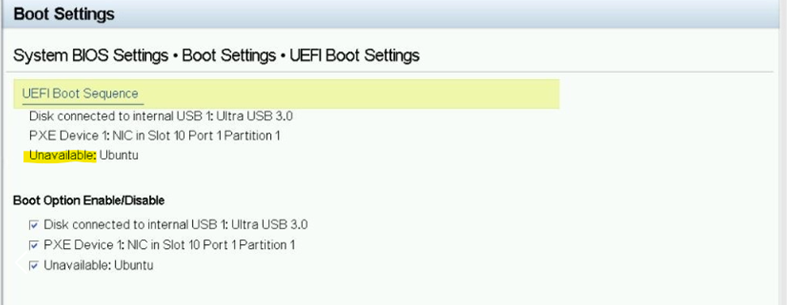
- The failure occurs when an
Unavailableboot entry is present as the last item in the boot sequence. - The system skips the PXE device and boots from the first available boot device.
Example as below:
Cause
When there is an Unavailable device, the system BIOS skips the PXE boot device and boots with the first boot device.
Resolution
The next BIOS release includes the fix.
Here is the BIOS release schedule:
| 14G | June 2026 |
| 15G | March 2026 |
| 16G | March 2026 |
| 17G | March 2026 |
Short‑Term Workaround: Remove the Unavailable Boot Options.
- Reboot the server and press F2 (or F11) during POST to open the Boot Manager.
- Navigate to One‑Shot UEFI Boot Menu.
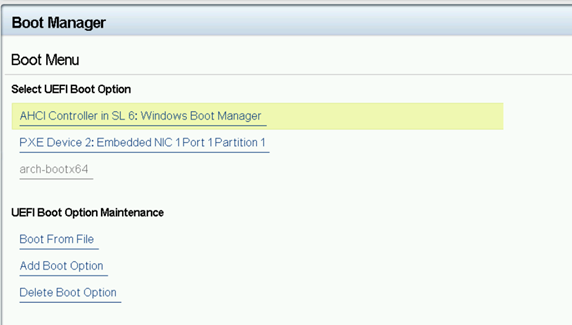
- Select Delete Boot Option.
- Highlight each entry labeled
Unavailable. Choose Commit Change and Exit to delete it.
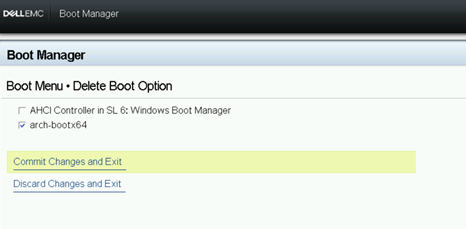
- Return to the boot order screen and place the PXE device in the wanted position.
After the BIOS update is applied, the short‑term workaround is no longer required.
Affected Products
Rack Servers, Tower ServersArticle Properties
Article Number: 000396285
Article Type: Solution
Last Modified: 24 May 2026
Version: 3
Find answers to your questions from other Dell users
Support Services
Check if your device is covered by Support Services.