Windows Server: DFS - DFSR의 일관되지 않은 구성이 감지됨

Summary: 이 문서에서는 지정된 복제 그룹에서 DFS 진단 보고서를 실행할 때 이벤트 ID 6004와 함께 오류가 발생하는 문제를 자세히 설명합니다.

This article applies to This article does not apply to This article is not tied to any specific product. Not all product versions are identified in this article.

Symptoms

지정된 복제 그룹에서 DFS 진단 보고서를 실행할 때 다음과 같은 이벤트 ID 6004와 함께 오류가 발생합니다.

The DFS Replication service detected a conflict between two or more nTDSConnection objects while polling Active Directory Domain Services for configuration information.
The conflict detected on <connection object distinguished name> was resolved by using <connection object distinguished name>"


Cause

조정해야 하는 충돌하는 연결 개체가 있습니다.


Resolution

단계:

  1. 이벤트의 조언에 따라 첫 번째 복제 연결 또는 이후 연결에서 확인된 연결을 삭제합니다.

  2. Server Manager에서 Tools 를 클릭하고 ADSI Edit를 선택합니다.

  3. 열리면 ADSI Edit를 마우스 오른쪽 버튼으로 클릭하고 Connect To를 선택합니다.

  4. 그러면 다음 화면이 나타납니다. Configuration Naming Context를 선택하고 OK를 클릭합니다.
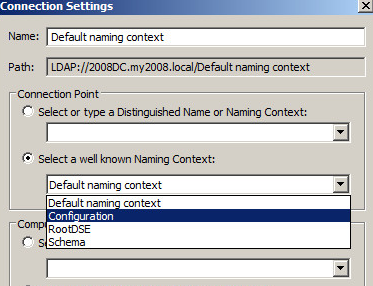
    연결 설정

  5. 이제 충돌이 감지된 이벤트에 나열된 연결 개체를 삭제하고 " 후 개체를 남겨 두십시오.was resolved by using" 혼자서, 그것은 좋은 또는 작동하는 연결이기 때문에. 연결 개체의 예는 다음과 같습니다.

    "CN=b707b5f7-3c2c-491e-b7ee-537963299830,CN=NTDS Settings,CN=CustomerDC,
    CN=Servers,CN=Site1,CN=Sites,CN=Configuration,DC=domain,DC=com"

    예를 사용하여 ADSI Edit에서 Sites-Site1- Servers- CustomerDC-NTDS 다음에 대한 설정 및 연결 개체 CN=b707b5f7-3c2c-491e-b7ee-537963299830 오른쪽 창에 있습니다. 화면은 다음과 유사합니다.
    연결 개체 예

  6. 이 경우 연결 개체가 여러 개 있어야 합니다. 이것이 문제의 원인입니다.
    오른쪽 창에 여러 개체가 표시되지 않는 경우 중지하고 다른 근본 원인을 고려합니다.

  7. 연결 개체가 여러 개 있다고 가정하고 예제를 사용하여 개체를 마우스 오른쪽 단추로 클릭합니다. CN=b707b5f7-3c2c-491e-b7ee-537963299830 을 클릭하고 삭제를 선택합니다. 이렇게 하면 양호하거나 유효한 연결 개체가 그대로 유지됩니다.

  8. " 다음에 언급된 추가 연결 개체에 대해 이 프로세스를 반복합니다.The conflict detected on.." 이벤트에서 그러나 이전에 언급했듯이 "was resolved by using…."
    연결 상태.


Additional Information

Affected Products

Microsoft Windows Server 2016, Microsoft Windows Server 2019, Microsoft Windows Server 2022

Products

PowerEdge M640, PowerEdge M640 (for PE VRTX), PowerEdge MX740C, PowerEdge MX750c, PowerEdge MX760c, PowerEdge MX840C, PowerEdge R240, PowerEdge R250, PowerEdge R260, PowerEdge R340, PowerEdge R350, PowerEdge R360, PowerEdge R440, PowerEdge R450 , PowerEdge R540, PowerEdge R550, PowerEdge R640, PowerEdge R6415, PowerEdge R650, PowerEdge R650xs, PowerEdge R6515, PowerEdge R6525, PowerEdge R660, PowerEdge R660xs, PowerEdge R6615, PowerEdge R6625, PowerEdge R740, PowerEdge R740XD, PowerEdge R740XD2, PowerEdge R7415, PowerEdge R7425, PowerEdge R750, PowerEdge R750XA, PowerEdge R750xs, PowerEdge R7515, PowerEdge R7525, PowerEdge R760, PowerEdge R760XA, PowerEdge R760xd2, PowerEdge R760xs, PowerEdge R7615, PowerEdge R7625, PowerEdge R840, PowerEdge R860, PowerEdge R940, PowerEdge R940xa, PowerEdge R960, PowerEdge T140, PowerEdge T150, PowerEdge T160, PowerEdge T340, PowerEdge T350, PowerEdge T360, PowerEdge T440, PowerEdge T550, PowerEdge T560, PowerEdge T640 ...
Article Properties
Article Number: 000137298
Article Type: Solution
Last Modified: 05 Sept 2025
Version:  9
Find answers to your questions from other Dell users
Support Services
Check if your device is covered by Support Services.