Windows Server: DFS - DFSR inconsistent configuration detected
Summary: This article details an issue where you get an error when running a DFS Diagnostic report on a given replication group, there is an error, with accompanying Event ID 6004.
Symptoms
When running a DFS Diagnostic report on a given replication group, there is an error, with accompanying Event ID 6004, stating:
The DFS Replication service detected a conflict between two or more nTDSConnection objects while polling Active Directory Domain Services for configuration information.
The conflict detected on <connection object distinguished name> was resolved by using <connection object distinguished name>"
Cause
There are conflicting connection objects which must be reconciled.
Resolution
Steps:
-
Follow the advice of the event and delete the first replication connection, or connections that were resolved by the latter connection.
-
From Server Manager click Tools and choose ADSI Edit.
-
When it opens, right-click ADSI Edit, choose Connect To.
-
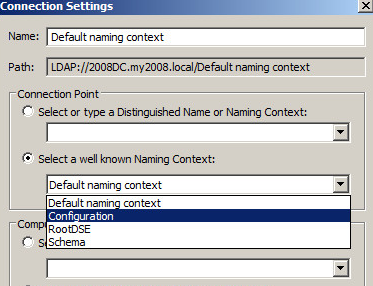
This brings up the following screen. Choose the Configuration Naming Context and click OK.
-
Now delete the connection objects listed in the event where the conflict was detected while making sure to leave the object after "
was resolved by using" alone, as it is the good or working connection. An example of a connection object would be:"CN=b707b5f7-3c2c-491e-b7ee-537963299830,CN=NTDS Settings,CN=CustomerDC, CN=Servers,CN=Site1,CN=Sites,CN=Configuration,DC=domain,DC=com"
Using the example, in ADSI Edit, browse to
Sites-Site1- Servers- CustomerDC-NTDSSettings and the connection object forCN=b707b5f7-3c2c-491e-b7ee-537963299830would be over in the right pane. The screen would look similar to this: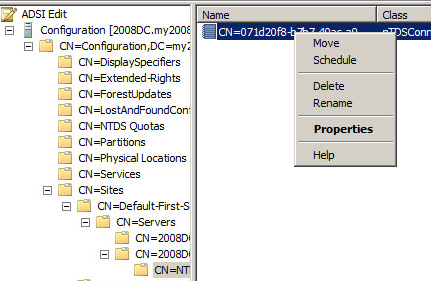
-
In this case, there should be multiple connection objects. That is what is causing the issue.
If there are not multiple objects in the right pane, stop and consider an alternative root cause. -
Assuming there are multiple connection objects, using the example we would right-click the object for
CN=b707b5f7-3c2c-491e-b7ee-537963299830and choose delete. This would leave the good or valid connection object in place. -
Repeat the process for any additional connection objects mentioned after "
The conflict detected on.." in the event but as previously stated, leave the "was resolved by using…."
Connection in place.