Windows Server:DFS - 检测到 DFSR 不一致的配置
Summary: 本文详细介绍在给定复制组上运行 DFS 诊断报告时出现错误并伴随事件 ID 6004 的问题。
This article applies to
This article does not apply to
This article is not tied to any specific product.
Not all product versions are identified in this article.
Symptoms
在给定复制组上运行 DFS 诊断报告时,出现错误,并伴随事件 ID 6004,指出:
The DFS Replication service detected a conflict between two or more nTDSConnection objects while polling Active Directory Domain Services for configuration information.
The conflict detected on <connection object distinguished name> was resolved by using <connection object distinguished name>"
Cause
存在必须协调的冲突连接对象。
Resolution
步骤:
-
遵循事件的建议并删除第一个复制连接或后一个连接解析的连接。
-
在“服务器管理器”中,单击“工具 ”,然后选择 “ADSI 编辑”。
-
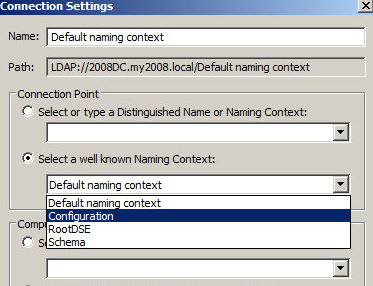
当它打开时,右键单击 ADSI 编辑,选择 连接到。
-
这将显示以下屏幕。选择Configuration Naming Context,然后单击OK。
-
现在,删除检测到冲突的事件中列出的连接对象,同时确保在”
was resolved by using“单独,因为它是良好或有效的连接。连接对象的一个示例是:"CN=b707b5f7-3c2c-491e-b7ee-537963299830,CN=NTDS Settings,CN=CustomerDC, CN=Servers,CN=Site1,CN=Sites,CN=Configuration,DC=domain,DC=com"
使用示例,在 ADSI Edit 中浏览到
Sites-Site1- Servers- CustomerDC-NTDS的设置和连接对象CN=b707b5f7-3c2c-491e-b7ee-537963299830将在右窗格中结束。屏幕类似于以下内容: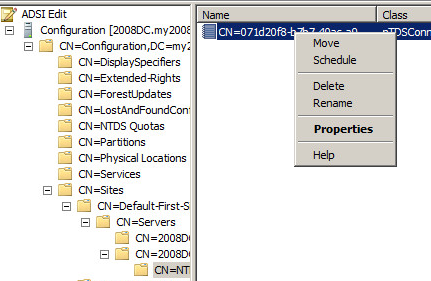
-
在这种情况下,应该有多个连接对象。这就是导致问题的原因。
如果右窗格中没有多个对象,请停止并考虑其他根本原因。 -
假设有多个连接对象,在示例中,我们将右键单击该对象
CN=b707b5f7-3c2c-491e-b7ee-537963299830,然后选择 Delete (删除)。这将使良好或有效的连接对象保留在原位。 -
对”
The conflict detected on..“,但如前所述,保留”was resolved by using….“
连接到位。
Additional Information

Affected Products
Microsoft Windows Server 2016, Microsoft Windows Server 2019, Microsoft Windows Server 2022Products
PowerEdge M640, PowerEdge M640 (for PE VRTX), PowerEdge MX740C, PowerEdge MX750c, PowerEdge MX760c, PowerEdge MX840C, PowerEdge R240, PowerEdge R250, PowerEdge R260, PowerEdge R340, PowerEdge R350, PowerEdge R360, PowerEdge R440, PowerEdge R450
, PowerEdge R540, PowerEdge R550, PowerEdge R640, PowerEdge R6415, PowerEdge R650, PowerEdge R650xs, PowerEdge R6515, PowerEdge R6525, PowerEdge R660, PowerEdge R660xs, PowerEdge R6615, PowerEdge R6625, PowerEdge R740, PowerEdge R740XD, PowerEdge R740XD2, PowerEdge R7415, PowerEdge R7425, PowerEdge R750, PowerEdge R750XA, PowerEdge R750xs, PowerEdge R7515, PowerEdge R7525, PowerEdge R760, PowerEdge R760XA, PowerEdge R760xd2, PowerEdge R760xs, PowerEdge R7615, PowerEdge R7625, PowerEdge R840, PowerEdge R860, PowerEdge R940, PowerEdge R940xa, PowerEdge R960, PowerEdge T140, PowerEdge T150, PowerEdge T160, PowerEdge T340, PowerEdge T350, PowerEdge T360, PowerEdge T440, PowerEdge T550, PowerEdge T560, PowerEdge T640
...
Article Properties
Article Number: 000137298
Article Type: Solution
Last Modified: 05 Sept 2025
Version: 9
Find answers to your questions from other Dell users
Support Services
Check if your device is covered by Support Services.