PowerProtect Health Check Score impacted by DNS resolution
Summary: The PowerProtect Data Manager appliance was deployed with the initial environment details. The Health Check shows a component failure indicating there was a Domain name Server (DNS) configuration issue. There was a typo and the Default network settings may not be updated. ...
Symptoms
The Default Network settings page shows:
The DNS Servers below cannot resolve the domain name of the virtual machine to the specific IP address.
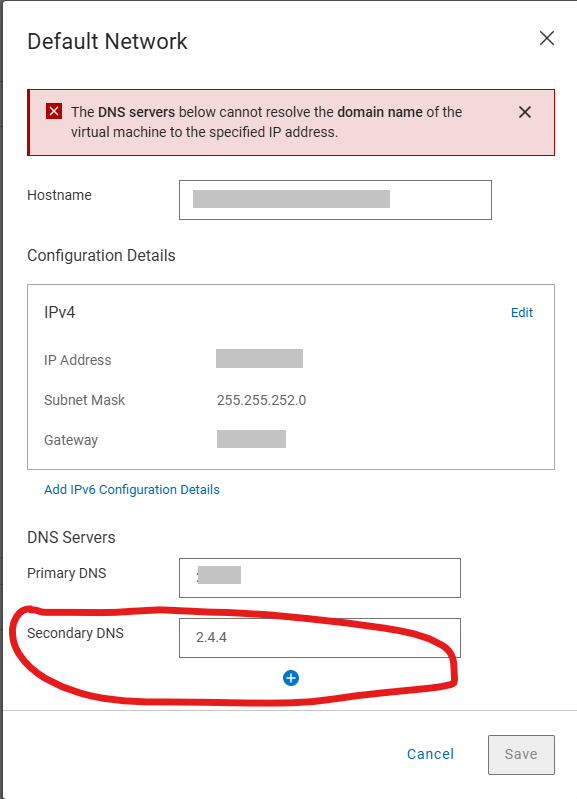
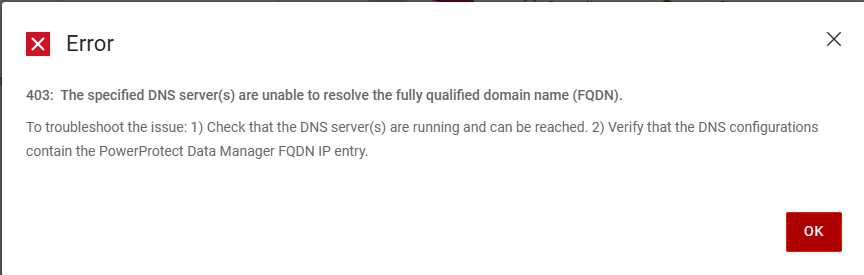
The following error is generated when attempting to save the correct DNS Server details in the Default Network settings page
Error
403: The specific DNS server(s) are unable to resolve the fully qualified domain name (FQDN).
To troubleshoot the issue: 1)Check that the DNS server(s) are running and can be reached. 2) Verify that the DNS configurations contain the PowerProtect Data manager FQDN IP entry.
The /var/log/brs/sysmgr/sysmgr-health-check.log shows:
YYYY-MM-DD HH:MM:SS INFO [] [Health-Check] [][][][TRACE_ID:bbd731535f2a4450][] [c.e.b.s.s.h.CDRSHealthCheck.check(72)] -  Start CDRS health check
YYYY-MM-DD HH:MM:SS INFO [] [Health-Check] [][][][TRACE_ID:bbd731535f2a4450][] [c.e.b.s.s.h.CDRSHealthCheck.check(77)] -  CDRA is not enabled, will not perform CDRS health check.
YYYY-MM-DD HH:MM:SS INFO [] [Health-Check] [][][][TRACE_ID:bbd731535f2a4450][] [c.e.b.s.s.h.CDRSHealthCheck.check(97)] -  End CDRS health check
YYYY-MM-DD HH:MM:SS INFO [] [Health-Check] [][][][TRACE_ID:bbd731535f2a4450][] [c.e.b.s.s.h.DiskHealthCheck.check(61)] -  Start disk health check
YYYY-MM-DD HH:MM:SS INFO [] [Health-Check] [][][][TRACE_ID:bbd731535f2a4450][] [c.e.b.s.s.h.ESSettingsHealthCheck.check(40)] -  Start ES settings health check.
YYYY-MM-DD HH:MM:SS INFO [] [Health-Check] [][][][TRACE_ID:bbd731535f2a4450][] [c.e.b.s.s.h.DumpHealthCheck.check(45)] -  Start dump health check
YYYY-MM-DD HH:MM:SS INFO [] [Health-Check] [][][][TRACE_ID:bbd731535f2a4450][] [c.e.b.s.s.h.MemoryHealthCheck.check(73)] -  Start memory health check
YYYY-MM-DD HH:MM:SS INFO [] [Health-Check] [][][][TRACE_ID:bbd731535f2a4450][] [c.e.b.s.s.h.ESSettingsHealthCheck.check(42)] -  ES settings health check finished.
YYYY-MM-DD HH:MM:SS INFO [] [Health-Check] [][][][TRACE_ID:bbd731535f2a4450][] [c.e.b.s.s.h.OsAccountHealthCheck.check(70)] -  Start Os account health check
YYYY-MM-DD HH:MM:SS INFO [] [Health-Check] [][][][TRACE_ID:bbd731535f2a4450][] [c.e.b.s.s.h.NTPHealthCheck.check(62)] -  Start NTP Servers health check.
YYYY-MM-DD HH:MM:SS INFO [] [Health-Check] [][][][TRACE_ID:bbd731535f2a4450][] [c.e.b.s.s.h.ReportingHealthCheck.check(67)] -  Start Reporting health check
YYYY-MM-DD HH:MM:SS INFO [] [Health-Check] [][][][TRACE_ID:bbd731535f2a4450][] [c.e.b.s.s.h.DNSHealthCheck.check(57)] -  Start DNS Servers health check.
YYYY-MM-DD HH:MM:SS INFO [] [Health-Check] [][][][TRACE_ID:bbd731535f2a4450][] [c.e.b.s.s.h.SearchClusterHealthCheck.check(69)] -  Start Search Cluster health check
YYYY-MM-DD HH:MM:SS INFO [] [Health-Check] [][][][TRACE_ID:bbd731535f2a4450][] [c.d.p.c.c.h.e.s.i.ESCatalogHealthCheck.check(51)] -  Start ES Catalog cluster health check.
YYYY-MM-DD HH:MM:SS INFO [] [Health-Check] [][][][TRACE_ID:bbd731535f2a4450][] [c.d.p.c.c.h.e.d.ESHealthCheckDao.checkESShardsHealth(43)] -  es connection port is 14300
YYYY-MM-DD HH:MM:SS INFO [] [Health-Check] [][][][TRACE_ID:bbd731535f2a4450][] [c.d.p.c.c.h.e.s.i.ESCatalogInspector.inspect(54)] -  The cluster status is green
YYYY-MM-DD HH:MM:SS INFO [] [Health-Check] [][][][TRACE_ID:bbd731535f2a4450][] [c.d.p.c.c.h.e.s.i.ESCatalogHealthCheck.check(53)] -  ES Catalog cluster health check finished.
YYYY-MM-DD HH:MM:SS INFO [] [Health-Check] [][][][TRACE_ID:bbd731535f2a4450][] [c.e.b.s.s.h.DumpHealthCheck.check(59)] -  End dump health check
YYYY-MM-DD HH:MM:SS INFO [] [Health-Check] [][][][TRACE_ID:bbd731535f2a4450][] [c.e.b.s.s.h.ReportingHealthCheck.check(90)] -  End Reporting health check
YYYY-MM-DD HH:MM:SS INFO [] [Health-Check] [][][][TRACE_ID:bbd731535f2a4450][] [c.e.b.s.s.h.SearchClusterHealthCheck.check(97)] -  End Search Cluster health check
YYYY-MM-DD HH:MM:SS INFO [] [Health-Check] [][][][TRACE_ID:bbd731535f2a4450][] [c.e.b.s.s.h.OsAccountHealthCheck.check(89)] -  End Os account health check
YYYY-MM-DD HH:MM:SS INFO [] [Health-Check] [][][][TRACE_ID:bbd731535f2a4450][] [c.e.b.s.s.h.MemoryHealthCheck.check(112)] -  End memory health check
YYYY-MM-DD HH:MM:SS INFO [] [Health-Check] [][][][TRACE_ID:bbd731535f2a4450][] [c.e.b.s.s.h.DNSHealthCheck.check(81)] -  Cannot resolve the host my-ppdm.my-domain.com with dns server XXX.XXX.XXX.XXX.
YYYY-MM-DD HH:MM:SS INFO [] [Health-Check] [][][][TRACE_ID:bbd731535f2a4450][] [c.e.b.s.s.h.DNSHealthCheck.check(81)] -  Cannot resolve the host my-ppdm.my-domain.com with dns server XXX.XXX.XXX.
YYYY-MM-DD HH:MM:SS INFO [] [Health-Check] [][][][TRACE_ID:bbd731535f2a4450][] [c.e.b.s.s.h.DNSHealthCheck.check(84)] -  End DNS Servers health check.
YYYY-MM-DD HH:MM:SS INFO [] [Health-Check] [][][][TRACE_ID:bbd731535f2a4450][] [c.e.b.s.s.h.DiskHealthCheck.check(82)] -  End disk health check
YYYY-MM-DD HH:MM:SS INFO [] [Health-Check] [][][][TRACE_ID:bbd731535f2a4450][] [c.e.b.s.s.h.NTPHealthCheck.isNTPServersValid(93)] -  Specified ntp server is valid my-timeserver.my-domain.com
YYYY-MM-DD HH:MM:SS INFO [] [Health-Check] [][][][TRACE_ID:bbd731535f2a4450][] [c.e.b.s.s.h.NTPHealthCheck.check(75)] -  End NTP Servers health check.
YYYY-MM-DD HH:MM:SS INFO [] [Health-Check-Request] [][][][TRACE_ID:bbd731535f2a4450][] [c.d.p.c.c.h.s.i.HealthAlertService.handleResult(52)] -  health check total 11, success 10, failed 1
YYYY-MM-DD HH:MM:SS INFO [] [Health-Check-Request] [][][][TRACE_ID:bbd731535f2a4450][] [c.d.p.c.c.h.s.i.HealthAlertService.onEvent(38)] -  On event SYS0075 None of the specified DNS servers are accessible. []
YYYY-MM-DD HH:MM:SS INFO [] [Health-Check-Request] [][][][TRACE_ID:bbd731535f2a4450][] [c.d.p.c.c.h.s.i.HealthCheckPersistenceSubscriber.onComplete(66)] -  health check entity 02538bab-2ff8-4ee4-bc57-0a40c1061ca1 is completed and persisted
Cause
There was a typo and the Default network settings during the initial deployment. The post configuration for the Default Network has validation for the DNS server entries, but the initial deployment does not do a validation. The validation is failing on the typo and not allowing the settings to be changed.
Resolution
The DNS Servers may be updated using the PowerProtect /usr/local/brs/puppet/manifests/extdata/common.json configuration file. Ensure that there are no backups or restore jobs running in the environment as it requires a PowerProtect Appliance reboot to apply the changes.
- Validate there are no active backups or restore sessions.
- Open an SSH session to PowerProtect Data Manager and authenticate with the admin account.
- Confirm the current settings of the
common.jsonconfiguration file:cat /usr/local/brs/puppet/manifests/extdata/common.json - Open the
common.jsonconfiguration file and edit thednsServersvalues:vi /usr/local/brs/puppet/manifests/extdata/common.json

- Confirm the current settings of the
common.jsonconfiguration file:cat /usr/local/brs/puppet/manifests/extdata/common.json - Restart the PowerProtect Appliance:
sudo reboot - Allow the PowerProtect Appliance to fully initialize
- Confirm that the Default network settings were properly updated.