NetWorker: AD and LDAP Integration and Configuration (Troubleshooting Guide)
Summary: This KB can be used to help troubleshoot NetWorker authentication issues for external authority users; Microsoft Active Directory (AD), or Linux Lightweight Directory Access Protocol (LDAP). ...
This article applies to
This article does not apply to
This article is not tied to any specific product.
Not all product versions are identified in this article.
Instructions
Configuration
The following articles can help with configuring AD or LDAP with NetWorker.
NetWorker Web User Interface (NWUI): How to Configure AD/LDAP: NetWorker: How to Configure AD or LDAP from the NetWorker Web User Interface
How To Configure AD/LDAP: NetWorker: How To Set up AD/LDAP Authentication
How To Configure Secure AD/LDAP (LDAPS): NetWorker: How To configure LDAPS Authentication
Information to Make Note of:
- Detailed problem description
- Error message or screenshot showing the error message
- Make note of the AUTHC server used by the NetWorker Management Console (NMC).
- On the NMC server, check the following file:
-
-
- Linux:
/opt/lgtonmc/etc/gstd.conf - Windows (default):
C:\Program Files\EMC NetWorker\Management\etc\gstd.conf - For more information, see: NetWorker: How To Identify Which Server is the Authentication Server Used By NMC and NWUI
- Linux:
-
-
- Confirm the
authsvc_hostnameis the correct AUTHC server hostname.
- Confirm the
NOTE: By default the NetWorker server is an AUTHC server. In a single server (NetWorker server and NMC all managed through one host) this is the case. In larger environments where multiple NetWorker servers are managed through a single NMC, only one server is the AUTHC server used to process login requests.
- Environment details:
- Full NetWorker server version, including build number of each NetWorker host (if different):
- NetWorker server.
- AUTHC server (see above step 2).
- NetWorker Management Console (NMC) server.
- Operating system version of each NetWorker host (if different):
- NetWorker server.
- AUTHC server (see above step 2).
- NetWorker Management Console (NMC) server.
- Directory service in use: Active Directory or LDAP server?
- Is LDAPS (AD or LDAP over SSL) in use?
- Obtain the attributes and object class from the Active Directory or LDAP server.
- Distinguished Name (DN) of the bind account
- User and group search path (DN)
- User id attribute
- User object class
- Group name attribute
- Group object class
- Group member attribute
Information Collection
- If an issue is occurring during an initial configuration or update, confirm which of the following methods is being used and collect output:
- Script: There is a template script that is provided in both the Linux and Windows NetWorker server. The
authc-create-ad-config*script is used when the authenticating server is Active Directory;authc-create-ldap-config*is for the LDAP server.- Linux:
/opt/nsr/authc-server/scripts/(authc-create-ad-config.sh.templateandauthc-create-ldap-config.sh.template) - Windows:
C:\Program Files\EMC NetWorker\nsr\authc-server\scripts\(authc-create-ad-config.batandauthc-create-ldap-config.bat)
- Linux:
- NMC or NWUI: Collect a screenshot of the configuration parameters set in the external authority wizard in the NMC. Ensure to expand "Show advanced options." Collect a screenshot of the error message observed.
- If AD/LDAP configuration succeeded but issue is occurring during login, run the following on the NetWorker server:
authc_config -u Administrator -e find-all-configs
authc_config -u Administrator -e find-config -D config-id=config-id_from_above_command
NOTE: When running the above commands, you are prompted to enter the NetWorker Administrator account password (hidden). You can specify "
-p password" when running the command, but it may fail on some operating systems when using a plain text password with -p.
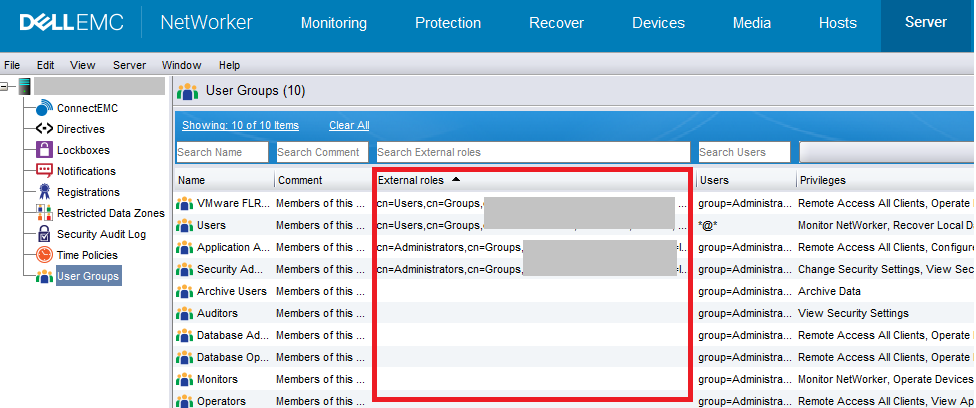
- What AD/LDAP group or user DNs are set in:
- NMC: NMC ->Setup -> Users and Roles -> NMC Roles:

- NetWorker Server: Server -> User Groups:
- Does NetWorker query the AD/LDAP groups and users correctly:
authc_mgmt -u Administrator -e query-ldap-users -D query-tenant=tenant_name -D query-domain=domain_name
authc_mgmt -u Administrator -e query-ldap-groups -D query-tenant=tenant_name -D query-domain=domain_name
authc_mgmt -u Administrator -e query-ldap-groups-for-user -D query-tenant=tenant_name -D query-domain=domain_name -D user-name=external_username
NOTE: When running the above commands, you are prompted to enter the NetWorker Administrator account password (hidden). You can specify "
-p password" when running the command, but it may fail on some operating systems when using a plain text password with -p. For the query-tenant value, unless you configured a tenant, the value is default.
- Are you able to authenticate AD/LDAP users outside of the NMC? On the NetWorker server run:
nsrlogin -t tenant_name -d domain_name -u external_username
If successful, run:
nsrlogout
NOTE: Unless you configured a tenant, the value is default. The domain name value is the domain value set in the AUTHC configuration script or NMC external authority. If the
nsrlogin succeeds then the NetWorker server is authenticating correctly; If NMC logins fail, then the issue is most likely permissions related.
Extra Resources
- NetWorker Security Configuration Guide: https://www.dell.com/support/product-details/product/networker/docs (Must be signed into support site for link to work).
- NetWorker: AD or LDAP External Authentication Integration - Troubleshooting issues with login or missing information
- Active Directory has a tool that is called ADSI Edit
where the DN, attributes, and object classes can be queried, as well as
dsgetanddsqueryutilities. - On an LDAP server, use the ldapsearch
- Microsoft
Get-ADPrincipalGroupMembership
Additional Information
authc_configoptions:
usage: authc_config
 -d <logindomain>               The domain name to use when connecting to
                                service.
 -D,--define <property=value>   Set value for given configuration property.
                                (e.g. -D config-domain=foo or --define
                                config-domain=foo)
                                Available property names:
                                tenant-id, tenant-name, tenant-alias,
                                tenant-details, config-id, config-tenant-id,
                                config-name, config-domain,
                                config-server-address, config-user-dn,
                                config-user-dn-password, config-user-group-attr,
                                config-user-id-attr, config-user-object-class,
                                config-user-search-filter,
                                config-user-search-path,
                                config-group-member-attr,
                                config-group-name-attr,
                                config-group-object-class,
                                config-group-search-filter,
                                config-group-search-path, config-object-class,
                                config-active-directory, config-search-subtree,
                                permission-id, permission-name,
                                permission-group-dn,
                                permission-group-dn-pattern, option-id,
                                option-name, option-value
 -e <operation>                 Specify an operation to execute.
                                Available operations:
                                find-all-tenants, find-tenant, add-tenant,
                                update-tenant, remove-tenant, find-all-configs,
                                find-config, add-config, update-config,
                                remove-config, find-all-permissions,
                                find-permission, add-permission,
                                update-permission, remove-permission,
                                find-all-options, find-option, add-option,
                                update-option, remove-option,
                                query-api-versions, query-cert-pem,
                                query-cert-pemtext, query-server-info
 -H,--help                      Print help information
 -p <loginpassword>             The password to use when connecting to service.
 -t <logintenant>               The tenant name to use when connecting to
                                service.
 -u <loginuser>                 The user name to use when connecting to service.
authc_mgmtoptions:
usage: authc_mgmt
 -d <logindomain>               The domain name to use when connecting to
                                service.
 -D,--define <property=value>   Set value for given management property.
                                (e.g. -D user-name=foo or --define
                                user-name=foo)
                                Available property names:
                                user-id, user-name, user-domain, user-password,
                                user-first-name, user-last-name, user-email,
                                user-details, user-enabled, user-groups (csv
                                format), group-id, group-name, group-details,
                                group-users (csv format), query-tenant,
                                query-domain, password-new-value,
                                user-options-id, user-options-user-id,
                                user-options-password-must-change,
                                user-options-password-never-expires
 -e <operation>                 Specify an operation to execute.
                                Available operations:
                                find-all-users, find-user, add-user,
                                update-user, remove-user, update-password,
                                find-all-user-options, find-user-options,
                                update-user-options, find-all-groups,
                                find-group, add-group, update-group,
                                remove-group, query-ldap-users,
                                query-ldap-groups, query-ldap-users-for-group,
                                query-ldap-groups-for-user
 -H,--help                      Print help information
 -p <loginpassword>             The password to use when connecting to service.
 -t <logintenant>               The tenant name to use when connecting to
                                service.
 -u <loginuser>                 The user name to use when connecting to service.
Affected Products
NetWorkerProducts
NetWorker, NetWorker Management ConsoleArticle Properties
Article Number: 000013620
Article Type: How To
Last Modified: 17 Feb 2026
Version: 7
Find answers to your questions from other Dell users
Support Services
Check if your device is covered by Support Services.