由于 QA 目录中的磁盘测试文件,Avamar 数据分区已满
Summary: 由于 QA 目录中的磁盘测试文件,Avamar 数据分区已满。
This article applies to
This article does not apply to
This article is not tied to any specific product.
Not all product versions are identified in this article.
Symptoms
Avamar 系统遇到操作系统文件系统容量问题。
典型症状包括: -
典型症状包括: -
- 垃圾数据收集或检查点失败, MSG_ERR_DISKFULL。
- HFScheck 失败并显示 ERROR: avmaint: hfscheck: server_exception(MSG_ERR_STRIPECREATE)。
- 由于容量已满,备份无法运行或将运行并失败。
- 备份失败, MSG_ERR_STRIPECREATE 或报告目标服务器已满。
- /data01/cur/gsan.log 或 err.log包含创建tripetask::allocstripe 没有足够的空间。
- Avamar Server 访问状态为 admin 模式。
Cause
Avamar 数据分区包含包含 dt 的 QA 目录。X 文件。这些是较早运行的磁盘吞吐量性能测试脚本中的文件。 这些文件可能存在于所有节点上。
例子;
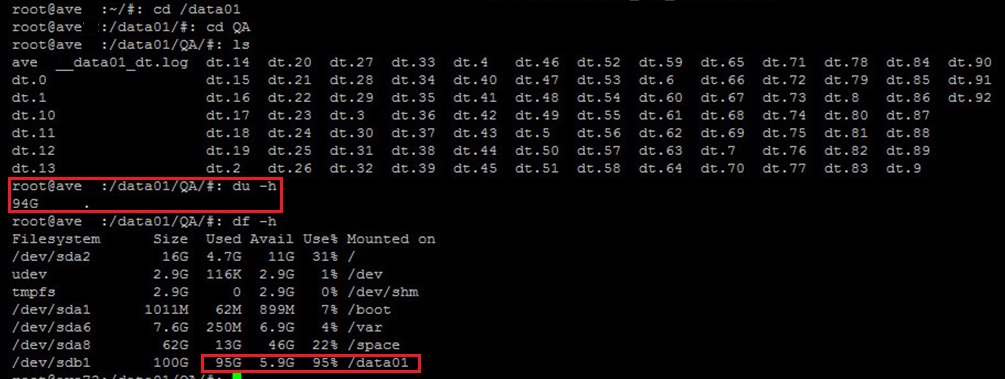
例子;
admin@storagenode1:/data04/QA/>: du -cksh *
8.0K    storagenode1__data04_dt.log
1.1G    dt.0
1.1G    dt.1
1.1G    dt.10
1.1G    dt.11
1.1G    dt.12
1.1G    dt.13
1.1G    dt.14
1.1G    dt.15
1.1G    dt.16
1.1G    dt.17
1.1G    dt.18
1.1G    dt.19
1.1G    dt.2
1.1G    dt.3
1.1G    dt.4
1.1G    dt.5
1.1G    dt.6
1.1G    dt.7
1.1G    dt.8
1.1G    dt.9
21G     total
Resolution
删除剩余的 QA 测试目录。
- 以管理员用户身份登录。
- 加载 SSH 密钥。
- 运行以下命令。
mapall --parallel --bg --user=root --noerror --all+ '/usr/local/avamar/bin/dtsh --cleanup'
Additional Information
dt 命令将数据写入节点上的硬盘驱动器,以用于基准测试性能。
命令通常用于新 Avamar 系统的磁盘性能测试。对于底层磁盘存储性能可能为可变的 Avamar Virtual Edition 而言,它非常有用。
当 dtsh 脚本启动 dt 程序以测试磁盘吞吐量时。
dt 程序在每个数据分区下创建一个名为 QA 的工作目录。名为 dt.1、dt.2 等的文件在 QA 目录中创建。
命令通常用于新 Avamar 系统的磁盘性能测试。对于底层磁盘存储性能可能为可变的 Avamar Virtual Edition 而言,它非常有用。
当 dtsh 脚本启动 dt 程序以测试磁盘吞吐量时。
dt 程序在每个数据分区下创建一个名为 QA 的工作目录。名为 dt.1、dt.2 等的文件在 QA 目录中创建。
Affected Products
AvamarProducts
Avamar, Avamar Data Store, Avamar ServerArticle Properties
Article Number: 000041013
Article Type: Solution
Last Modified: 25 May 2025
Version: 10
Find answers to your questions from other Dell users
Support Services
Check if your device is covered by Support Services.