PowerStore: Management Network Reconfiguration does not validate NTP server provided as FQDN when changing IP protocol version
Resumen: Management network IP protocol version change from IPv4 to IPv6 or from IPv6 to IPv4 using Management Network Reconfiguration (MNR) does not validate NTP server provided as Fully Qualified Domain Name. ...
Este artículo se aplica a
Este artículo no se aplica a
Este artículo no está vinculado a ningún producto específico.
No se identifican todas las versiones del producto en este artículo.
Síntomas
The Management Network Reconfiguration IP protocol version change (IPv4 > IPv6 or IPv6 > IPv4) operation does not accept NTP server value configured as FQDN with the following error message:
"The following NTP server addresses are invalid: 'NTP_SERVER_FQDN' (0xE0E400701002)"
"The following NTP server addresses are invalid: 'NTP_SERVER_FQDN' (0xE0E400701002)"
Causa
PowerStore supports changing management network IP protocol version from IPv4 to IPv6 and IPv6 to IPv4. This requires the change of configured environment services (NTP, DNS) to match the updated network.
Management Network Reconfiguration (MNR) wizard asks for new PowerStore addresses and for new addresses of network service. Multiple addresses can be provided for DNS and NTP for redundancy purposes.
If a user provides at least one FQDN for the NTP server, wizard does not validate the NTP server and gives an error of invalid NTP server:
"The following NTP server addresses are invalid: 'NTP_SERVER_FQDN' (0xE0E400701002)"
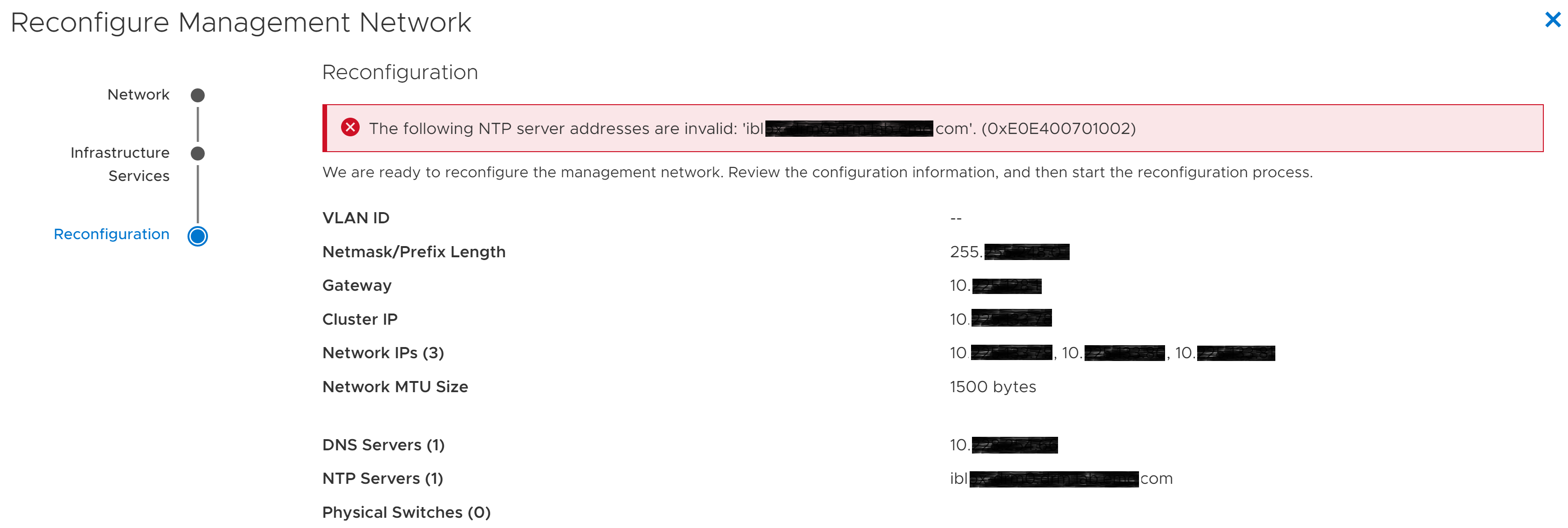
Figure 1: Management Network Reconfiguration wizard-Invalid NTP error
MNR wizard stops, newly provided settings are not applied, and management network is not reconfigured. The system is available with the old network settings.
Management Network Reconfiguration (MNR) wizard asks for new PowerStore addresses and for new addresses of network service. Multiple addresses can be provided for DNS and NTP for redundancy purposes.
If a user provides at least one FQDN for the NTP server, wizard does not validate the NTP server and gives an error of invalid NTP server:
"The following NTP server addresses are invalid: 'NTP_SERVER_FQDN' (0xE0E400701002)"
Figure 1: Management Network Reconfiguration wizard-Invalid NTP error
MNR wizard stops, newly provided settings are not applied, and management network is not reconfigured. The system is available with the old network settings.
Resolución
NTP server must be configured by specifying its IP address instead of a Fully Qualified Domain Name (FQDN).

Figure 2: NTP configured as FQDN

Figure 3: NTP configured with IP address
NTP validation should succeed now, and management network reconfiguration should finish. The system should be accessible at newly provided addresses.
* If Reconfigure Management Network wizard was closed, start it again and provide NTP server IP addresses (not FQDN) at Infrastructure Services step.
- If Reconfigure Management Network wizard is not closed (*), click Back button until the Infrastructure Services step.
Figure 2: NTP configured as FQDN
- Replace any provided NTP server FQDN values with corresponding IP addresses.
Figure 3: NTP configured with IP address
- Click Next and go through further steps until the end.
NTP validation should succeed now, and management network reconfiguration should finish. The system should be accessible at newly provided addresses.
* If Reconfigure Management Network wizard was closed, start it again and provide NTP server IP addresses (not FQDN) at Infrastructure Services step.
Productos afectados
PowerStorePropiedades del artículo
Número del artículo: 000201823
Tipo de artículo: Solution
Última modificación: 13 jun 2025
Versión: 4
Encuentre respuestas a sus preguntas de otros usuarios de Dell
Servicios de soporte
Compruebe si el dispositivo está cubierto por los servicios de soporte.