CloudLink: CloudLink 노드가 비상 모드로 중단됨
Resumen: CloudLink 노드가 비상 모드로 중단되었습니다.
Este artículo se aplica a
Este artículo no se aplica a
Este artículo no está vinculado a ningún producto específico.
No se identifican todas las versiones del producto en este artículo.
Síntomas
CloudLink 노드를 부팅한 후 다음과 같은 메시지가 표시됩니다.
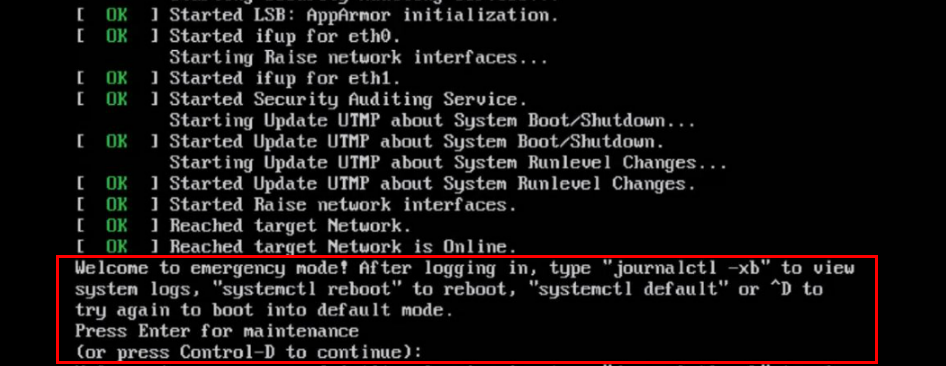
Welcome to emergency mode! After logging in, type "journalctl -xb" to view
system logs, "systemctl reboot" to reboot, "systemctl default" or ^D to
try again to boot into default mode.
Press Enter for maintenance
(or press Control-D to continue):
Causa
이 문제는 복구해야 하는 파일 시스템 문제로 인해 발생합니다.
Resolución
노드에서 파일 시스템 문제를 해결하려면 다음을 수행합니다.
루트 파일 시스템이 깨끗한 경우 위의 동일한 절차를 사용하여 다른 파일 시스템에서 fsck를 실행할 수 있습니다.
journalctl -xb 명령을 실행합니다. 이러한 로그는 복구가 필요한 손상된 파일 시스템이 있는지 여부를 나타낼 수 있습니다.
lsblk 및 blkid 명령을 사용하여 uuid를 해당 파일 시스템과 연결하는 데 도움이 될 수 있습니다.
다음은 journalctl -xb:
/dev/sda6에서 볼 수 있는 오류의 몇 가지 예입니다. 손상된 분리된 연결 목록의 일부인 Inode가 발견되었습니다.
/dev/sda6: 예기치 않은 불일치: 수동으로 fsck를 실행합니다.
/dev/disk/by-uuid/fd782a8-a70d-045513691c7e에서 파일 시스템 검사를 시작하지 못했습니다. fsck를 사용하여 파일 시스템을 복구할 수 없거나 긴급 모드에서 자주 중단되는 Cloudlink 노드가 하나 있는 경우 해당 손상된 Cloudlink 노드를 클러스터에서 제거해야 합니다.
그런 다음 OVA에서 새 Cloudlink 노드를 구축하고 기존 클러스터에 연결합니다.
파일 시스템을 복구할 수 있는 경우 Cloudlink UI에서 클러스터의 상태를 확인해야 합니다.
이 작업은 시스템 > 클러스터에서 수행되며 수신 및 발신 동기화 상태가 정상인지 확인합니다.
- 계속하려면 Control-D를 누르지만 비상 모드로 유지됩니다.
- 유지 보수를 위해 ENTER 키를 누릅니다.
- 루트(/) 파일 시스템에서 파일 시스템 검사를 실행합니다.
root@cloudlink:~# lsblk
- 발견된 오류를 해결하려면 y 를 누릅니다.
- 노드를 재부팅합니다.
루트 파일 시스템이 깨끗한 경우 위의 동일한 절차를 사용하여 다른 파일 시스템에서 fsck를 실행할 수 있습니다.
journalctl -xb 명령을 실행합니다. 이러한 로그는 복구가 필요한 손상된 파일 시스템이 있는지 여부를 나타낼 수 있습니다.
lsblk 및 blkid 명령을 사용하여 uuid를 해당 파일 시스템과 연결하는 데 도움이 될 수 있습니다.
다음은 journalctl -xb:
/dev/sda6에서 볼 수 있는 오류의 몇 가지 예입니다. 손상된 분리된 연결 목록의 일부인 Inode가 발견되었습니다.
/dev/sda6: 예기치 않은 불일치: 수동으로 fsck를 실행합니다.
/dev/disk/by-uuid/fd782a8-a70d-045513691c7e에서 파일 시스템 검사를 시작하지 못했습니다. fsck를 사용하여 파일 시스템을 복구할 수 없거나 긴급 모드에서 자주 중단되는 Cloudlink 노드가 하나 있는 경우 해당 손상된 Cloudlink 노드를 클러스터에서 제거해야 합니다.
그런 다음 OVA에서 새 Cloudlink 노드를 구축하고 기존 클러스터에 연결합니다.
파일 시스템을 복구할 수 있는 경우 Cloudlink UI에서 클러스터의 상태를 확인해야 합니다.
이 작업은 시스템 > 클러스터에서 수행되며 수신 및 발신 동기화 상태가 정상인지 확인합니다.
Productos afectados
CloudLinkProductos
CloudLink SecureVMPropiedades del artículo
Número del artículo: 000197726
Tipo de artículo: Solution
Última modificación: 13 may 2026
Versión: 6
Encuentre respuestas a sus preguntas de otros usuarios de Dell
Servicios de soporte
Compruebe si el dispositivo está cubierto por los servicios de soporte.