Data protection Search - OpenLDAP Configuration does not work with Redhat Identity Management
Resumen: DPSearch OpenLDAP Configuration with Redhat Identity Management does not work with the default configuration.
Este artículo se aplica a
Este artículo no se aplica a
Este artículo no está vinculado a ningún producto específico.
No se identifican todas las versiones del producto en este artículo.
Síntomas
DPSearch fails to connect to Redhat Identity Management using LDAP in DPSearch.
An LDAP connection is added, and the following error message is displayed:
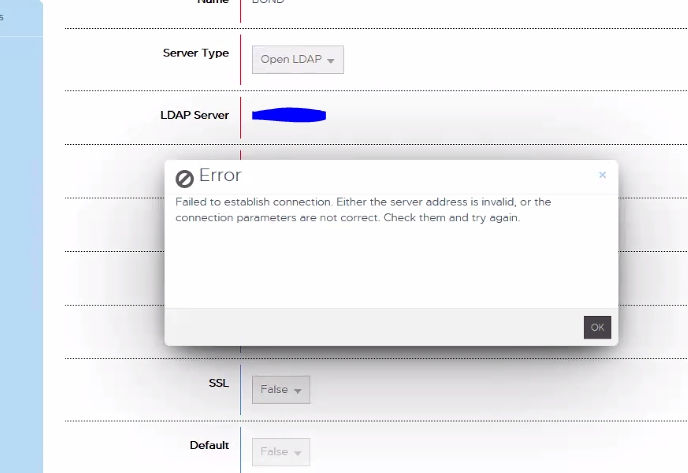
"Failed to establish connection. Either the server address is invalid, or the connection parameters are not correct. Check them and try again."
CIS.log reports the following:
P1C68|2023/01/06 15:35:31:419|DEBUG|cislockbox.rb(79)|Binding to ldap using: [Server=domain.com, Port:389, User=CN=user_1,OU=users,OU=accounts,DC=domain,DC=com, Pwd: ***************]
P1C68|2023/01/06 15:35:31:420|DEBUG|cisconfigldap.rb(128)|Binding to [domain.com:389 as CN=user_1,OU=users,OU=accounts,DC=domain,DC=com]
P1C68|2023/01/06 15:35:31:482|ERROR|ldap_internal.rb(248)|ldap bind_as CN=user_1,OU=users,OU=accounts,DC=domain,DC=com entries: false, result: #<OpenStruct extended_response=nil, code=0, error_message="", matched_dn="", message="Success">
P1C68|2023/01/06 15:35:31:483|INFO|ldap_internal.rb(253)|ldap bind_as CN=user_1,OU=users,OU=accounts,DC=domain,DC=com entry: , result: #<OpenStruct extended_response=nil, code=0, error_message="", matched_dn="", message="Success">
P1C68|2023/01/06 15:35:31:483|ERROR|ldap_provider.rb(164)|ldap validate_user, bind_as user CN=user_1,OU=users,OU=accounts,DC=domain,DC=com failed on LDAP Host domain.com with #<OpenStruct extended_response=nil, code=0, error_message="", matched_dn="", message="Success">
P1C68|2023/01/06 15:35:31:483|ERROR|ldap_provider.rb(182)|ldap validate_user failed, entry or id is null, user: CN=user_1,OU=users,OU=accounts,DC=domain,DC=com, entry: null, result: #<OpenStruct extended_response=nil, code=0, error_message="", matched_dn="", message="Success">
P1C68|2023/01/06 15:35:31:484|ERROR|cislockbox.rb(99)|PUT /cis/lockbox/ldap/_test : LDAP binding failed. ldap validate_user failed, entry or id is null, user: CN=user_1,OU=users,OU=accounts,DC=domain,DC=com, entry: null, result: #<OpenStruct extended_response=nil, code=0, error_message="", matched_dn="", message="Success">
Causa
Redhat Identity Management does not use the same LDAP object class fields as standard OpenLDAP, for which Search is configured.
Resolución
The LDAP filter configuration must be changed in order for RedHat Identity Management LDAP to work with DPSearch,
Resolve the issue with the following steps.
Different filter configurations may be needed, depending on the implementation.
Remove the OPENLDAP section filter from organizationalRole in /usr/local/search/cis/Common/ldap/ldap.conf.
FROM
"objectclass" : { "users" : ["inetOrgPerson", "person", "organizationalRole"],
TO
"objectclass" : { "users" : ["inetOrgPerson", "person"]
Followed by a Restart of the search-cis-core service:
service search-cis-core restart
After this is completed, RedHat Identity Management LDAP can be added.
Users should authenticate successfully.
Resolve the issue with the following steps.
Different filter configurations may be needed, depending on the implementation.
Remove the OPENLDAP section filter from organizationalRole in /usr/local/search/cis/Common/ldap/ldap.conf.
FROM
"objectclass" : { "users" : ["inetOrgPerson", "person", "organizationalRole"],
TO
"objectclass" : { "users" : ["inetOrgPerson", "person"]
Followed by a Restart of the search-cis-core service:
service search-cis-core restart
After this is completed, RedHat Identity Management LDAP can be added.
Users should authenticate successfully.
Productos afectados
Data Protection SearchPropiedades del artículo
Número del artículo: 000208643
Tipo de artículo: Solution
Última modificación: 23 may 2023
Versión: 2
Encuentre respuestas a sus preguntas de otros usuarios de Dell
Servicios de soporte
Compruebe si el dispositivo está cubierto por los servicios de soporte.