데이터 보호 검색 - OpenLDAP 구성이 Redhat IDENTITY Management에서 작동하지 않음
Resumen: DPSearch OpenLDAP Configuration with Redhat Identity Management는 기본 구성에서 작동하지 않습니다.
Este artículo se aplica a
Este artículo no se aplica a
Este artículo no está vinculado a ningún producto específico.
No se identifican todas las versiones del producto en este artículo.
Síntomas
DPSearch가 DPSearch에서 LDAP를 사용하여 Redhat Identity Management에 연결하지 못합니다.
LDAP 연결이 추가되고 다음과 같은 오류 메시지가 표시됩니다.
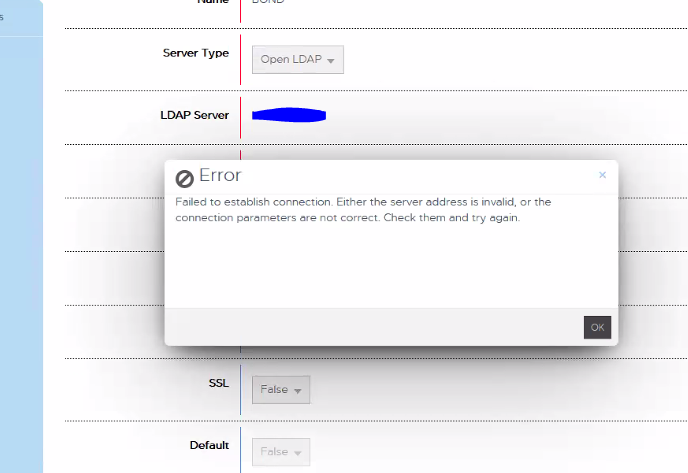
"연결 설정에 실패했습니다. 서버 주소가 잘못되었거나 연결 매개변수가 올바르지 않습니다. 확인 후 다시 시도하십시오."
CIS.log 는 다음을 보고합니다.
P1C68|2023/01/06 15:35:31:419|DEBUG|cislockbox.rb(79)|Binding to ldap using: [Server=domain.com, Port:389, User=CN=user_1,OU=users,OU=accounts,DC=domain,DC=com, Pwd: ***************]
P1C68|2023/01/06 15:35:31:420|DEBUG|cisconfigldap.rb(128)|Binding to [domain.com:389 as CN=user_1,OU=users,OU=accounts,DC=domain,DC=com]
P1C68|2023/01/06 15:35:31:482|ERROR|ldap_internal.rb(248)|ldap bind_as CN=user_1,OU=users,OU=accounts,DC=domain,DC=com entries: false, result: #
P1C68|2023/01/06 15:35:31:483|INFO|ldap_internal.rb(253)|ldap bind_as CN=user_1,OU=users,OU=accounts,DC=domain,DC=com entry: , result: #
P1C68|2023/01/06 15:35:31:483|ERROR|ldap_provider.rb(164)|ldap validate_user, bind_as user CN=user_1,OU=users,OU=accounts,DC=domain,DC=com failed on LDAP Host domain.com with #
P1C68|2023/01/06 15:35:31:483|ERROR|ldap_provider.rb(182)|ldap validate_user failed, entry or id is null, user: CN=user_1,OU=users,OU=accounts,DC=domain,DC=com, entry: null, result: #
P1C68|2023/01/06 15:35:31:484|ERROR|cislockbox.rb(99)|PUT /cis/lockbox/ldap/_test : LDAP binding failed. ldap validate_user failed, entry or id is null, user: CN=user_1,OU=users,OU=accounts,DC=domain,DC=com, entry: null, result: #
Causa
Redhat Identity Management는 검색이 구성된 표준 OpenLDAP와 동일한 LDAP 오브젝트 클래스 필드를 사용하지 않습니다.
Resolución
RedHat Identity Management LDAP가 DPSearch
와 함께 작동하려면 LDAP 필터 구성을 변경해야 합니다. 다음 단계를 통해 문제를 해결하십시오.
구축에 따라 다른 필터 구성이 필요할 수 있습니다.
/usr/local/search/cis/Common/ldap/ldap.conf의 organizationalRole에서 OPENLDAP 섹션 필터를 제거합니다.
"objectclass"에서
다음을 수행합니다. { "사용자": ["inetOrgPerson", "person", "organizationalRole"]
TO
"objectclass" : { "사용자": ["inetOrgPerson", "person"]
검색-cis-core 서비스의
재시작: 서비스 검색-cis-core 재시작
이 완료된 후 RedHat Identity Management LDAP를 추가할 수 있습니다.
사용자는 성공적으로 인증해야 합니다.
와 함께 작동하려면 LDAP 필터 구성을 변경해야 합니다. 다음 단계를 통해 문제를 해결하십시오.
구축에 따라 다른 필터 구성이 필요할 수 있습니다.
/usr/local/search/cis/Common/ldap/ldap.conf의 organizationalRole에서 OPENLDAP 섹션 필터를 제거합니다.
"objectclass"에서
다음을 수행합니다. { "사용자": ["inetOrgPerson", "person", "organizationalRole"]
TO
"objectclass" : { "사용자": ["inetOrgPerson", "person"]
검색-cis-core 서비스의
재시작: 서비스 검색-cis-core 재시작
이 완료된 후 RedHat Identity Management LDAP를 추가할 수 있습니다.
사용자는 성공적으로 인증해야 합니다.
Productos afectados
Data Protection SearchPropiedades del artículo
Número del artículo: 000208643
Tipo de artículo: Solution
Última modificación: 23 may 2023
Versión: 2
Encuentre respuestas a sus preguntas de otros usuarios de Dell
Servicios de soporte
Compruebe si el dispositivo está cubierto por los servicios de soporte.