Intune kan inte distribuera Dell Optimizer version 4.2.2 när den laddas ner från Microsoft Store
Resumen: Information om att Intune inte distribuerar Dell Optimizer version 4.2.2 om det laddas ner från Microsoft Store.
Este artículo se aplica a
Este artículo no se aplica a
Este artículo no está vinculado a ningún producto específico.
No se identifican todas las versiones del producto en este artículo.
Síntomas
Appen har inget giltigt senaste paketversionsfel
Intune visar ett felmeddelande, "Den valda appen har inte en giltig senaste paketversion" (bild 1).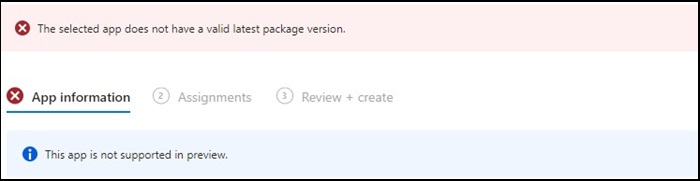
Figur 1
Obs! Endast tillgängligt på utvalda Dell Latitude-, Precision-, OptiPlex- och Rugged-datorer.
Causa
Dell Optimizer klarade inte Intune-verifieringen som kräver att appar installeras på all maskinvara (Dell och icke-Dell).
Resolución
Manuell distribution av Dell Optimizer
Som en tillfällig lösning kan IT-administratören prova följande för att manuellt distribuera Dell Optimizer via Intune.
- Hämta installationsprogrammet för Dell Optimizer på Dell.com
- Följ instruktionerna nedan:
- Installera programvaran med det här kommandot:
Install command: Dell-Optimizer-Application_xxxxx_WIN_x.x.x.x_A00.EXE /passthrough /silent /InstallDotNet=true /FACTORY=TRUE

Obs! Om du vill avinstallera använder du följande kommando:
Uninstall command: Dell-Optimizer-Application_xxxxx_WIN_x.x.x.x_A00.EXE /passthrough /silent /remove
Productos afectados
Alienware, Inspiron, OptiPlex, Vostro, XPS, G Series, G Series, Alienware, Inspiron, Latitude, Vostro, XPS, Fixed Workstations, Mobile WorkstationsPropiedades del artículo
Número del artículo: 000224821
Tipo de artículo: Solution
Última modificación: 17 jul 2025
Versión: 7
Encuentre respuestas a sus preguntas de otros usuarios de Dell
Servicios de soporte
Compruebe si el dispositivo está cubierto por los servicios de soporte.