NetWorker Family: DD Boost device is Marked as suspect
Resumen: DD Boost device is Marked as suspect, which result in backups not progressing. And Mounting and Unmounting operation for the device fails.
Este artículo se aplica a
Este artículo no se aplica a
Este artículo no está vinculado a ningún producto específico.
No se identifican todas las versiones del producto en este artículo.
Síntomas
- NetWorker DD Boost devices are marked as Suspect impacting data protection operations
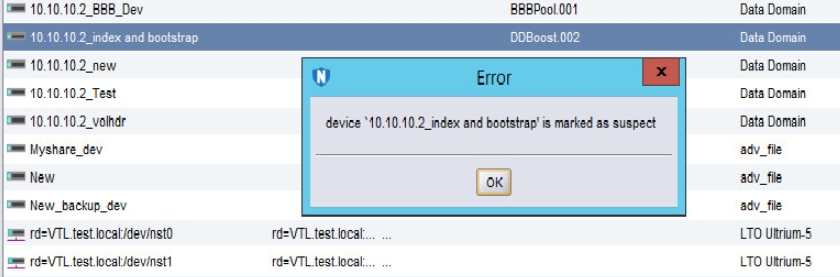
- Any activity on the device such as a "Mount and Unmount" operation fails, stating the following error:
"Device name is Marked as Suspect."
Causa
There are multiple causes for the device to be marked as suspect. The Most likely reasons are as follows:
- The NetWorker Server/Storage node losses connection to the DD and conversely.
- The Username/password has changed and the same is not being updated in the "Device Properties."
- The Password for the user has expired.
- The account for the User has been locked from the DD end.
Resolución
1. Has the ddboost user password been changed recently?
a. If the ddboost user password was changed recently, open the Device properties in NetWorker.
b. Go to the Configuration tab and update the ddboost user password:
b. Go to the Configuration tab and update the ddboost user password:
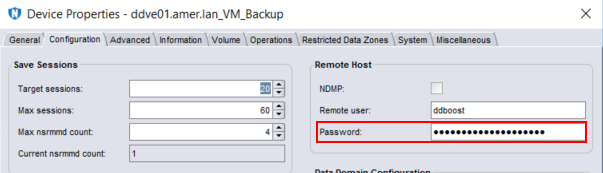
c. Once the password has been updated, click Ok.
NOTE: This process must be repeated for any ddboost device configured using the same ddboost user account.
d. Right-click the device and select disable.
e. Right-click the device and select enable.
f. Mount the device.
2. If the ddboost user password was not changed, ensure that it is not expired or locked.
a. Data Domain: DD Boost user shows locked status.
b. Disable and enable the device from NetWorker.
c. Perform a Mount operation.
b. Disable and enable the device from NetWorker.
c. Perform a Mount operation.
3. Check communication between the NetWorker Server or Storage node:
Productos afectados
NetWorkerProductos
NetWorker Family, Data DomainPropiedades del artículo
Número del artículo: 000050014
Tipo de artículo: Solution
Última modificación: 17 abr. 2026
Versión: 6
Encuentre respuestas a sus preguntas de otros usuarios de Dell
Servicios de soporte
Compruebe si el dispositivo está cubierto por los servicios de soporte.