Internal or datetime varchar conversion error on non-EN SQL instances
Resumen: When Dell Security Management Server (formerly Dell Data Protection | Enterprise Edition) is installed on a non-English server operating system (French for instance), you may encounter an "internal error" or a "Data access error" in the WebUi console. ...
Este artículo se aplica a
Este artículo no se aplica a
Este artículo no está vinculado a ningún producto específico.
No se identifican todas las versiones del producto en este artículo.
Síntomas
Affected Products:
- Dell Data Protection | Enterprise Edition
Affected Versions:
- v9.7 and Earlier
Affected Platforms:
- Windows Server
Compatibility logs report an error similar to: The conversion of a varchar datatype to datetime datatype created a value out of range.
Causa
Not Applicable
Resolución
In this case:
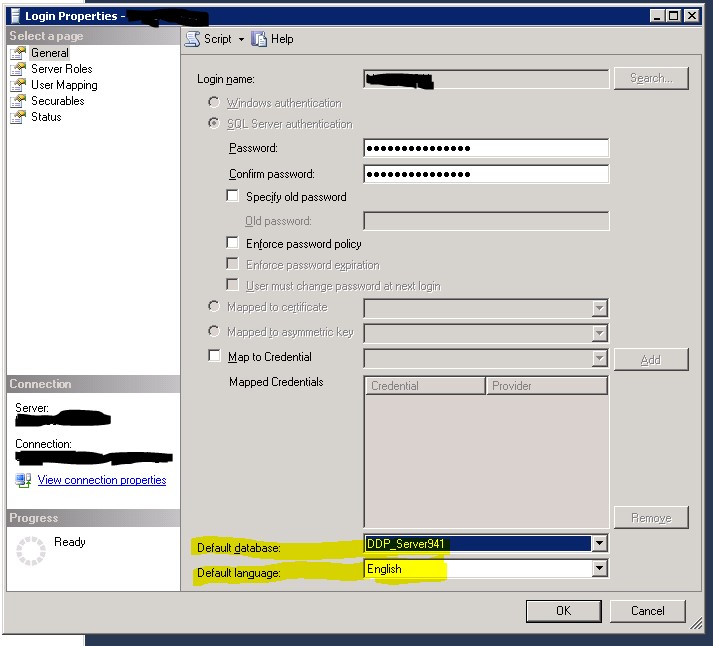
- Open SQL Server Management Studio
- Go to the Properties of the Login.
Note: The Login under instance\Security not the User under database\Security, used by the Dell Data Protection services to connect to the Dell Data Protection database
- Ensure that the Default database is set to the Dell Data Protection database.
- The default language is set to English.
- Then restart the Security and Compatibility Server services.
Productos afectados
Dell EncryptionPropiedades del artículo
Número del artículo: 000126660
Tipo de artículo: Solution
Última modificación: 18 sept. 2026
Versión: 9
Encuentre respuestas a sus preguntas de otros usuarios de Dell
Servicios de soporte
Compruebe si el dispositivo está cubierto por los servicios de soporte.