How to Install Dell BIOS Using the 64-Bit BIOS Installation Utility
Résumé: Upgrade your Dell BIOS with the Dell 64-Bit BIOS Flash Utility (Flash64W.exe). Follow our guide for installation using Flash64W to ensure your computers optimal performance.
Cet article concerne
Cet article ne concerne pas
Cet article n’est associé à aucun produit spécifique.
Toutes les versions du produit ne sont pas identifiées dans cet article.
Instructions
Affected Products
- 64-Bit BIOS Utility
Dell now has a utility to allow for BIOS upgrades in a native 64-bit environment (WinPE).
Begin by downloading the Dell BIOS Flash Utility 64 Bit, by going to the computers product page and clicking Drivers & Downloads.
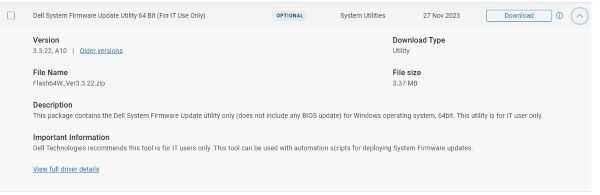
Note: The version number may differ from that in the screenshot above.
Install Instructions
- Download the BIOS executable for the specific computer that you are going to update and place it in a directory of your choice.
- Download Flash64W.exe and place it in the same directory as the BIOS executable.
- Open a Windows command prompt (The Command Prompt: What It Is and How to Use It on a Dell System) and go to the directory that you placed the BIOS and the Flash64W.exe file.
- Type:
Run Flash64W.exe /b=BIOSExecutableName.exe
Example: Flash64W.exe /b=XPS_9350_112.exe
Note: This is for Client computers only and does not work on Enterprise servers.
Propriétés de l’article
Numéro d’article: 000147030
Type d’article: How To
Dernière modification: 02 mai 2026
Version: 12
Trouvez des réponses à vos questions auprès d’autres utilisateurs Dell
Services de support
Vérifiez si votre appareil est couvert par les services de support.