Indlæsning af standard i BIOS ændrer ikke tilstanden sikker opstart fra overvågningstilstand til implementeret tilstand
Résumé: Få mere at vide om, hvorfor tilstanden Sikker opstart ikke skifter fra overvågningstilstand til implementeret tilstand efter indlæsning af standardtilstanden i BIOS.
Cet article concerne
Cet article ne concerne pas
Cet article n’est associé à aucun produit spécifique.
Toutes les versions du produit ne sont pas identifiées dans cet article.
Symptômes
Secure Boot-tilstand ændres muligvis ikke fra overvågningstilstand til implementeret tilstand efter indlæsning af standard i BIOS.
Berørte platforme:
- Alienware m16 R1 AMD
- Alienware m18 R1 AMD
- Inspiron 14 5425
- Inspiron 14 5435
- Inspiron 14 7425 2-i-1
- Inspiron 14 7435 2-i-1
- Inspiron 16 5625
- Inspiron 16 5635
- Inspiron 16 7635 2-i-1
- Inspiron 7415 2-i-1
- Vostro 16 5635
- Vostro 5625
Cause
Denne indstilling er ikke defineret i standardindstillingen for belastning i det oprindelige design.
Résolution
Følg trinene for manuelt at ændre sikker starttilstand fra overvågningstilstand til implementeret tilstand.
- Tryk gentagne gange på F2-tasten, efter at du har tændt computeren for at starte til BIOS-opsætningsmenuen.
- Vælg Sikkerhed.
- Vælg Sikker start.
- Vælg Udrullet tilstand.
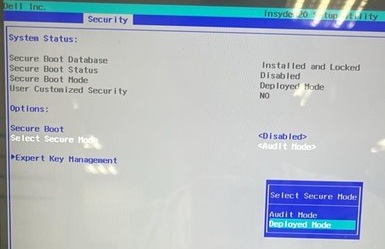
- Bekræft meddelelsen, og vælg Ja.

- Se om det er ændret til Implementeringstilstand.
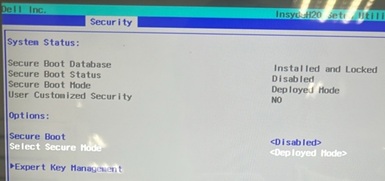
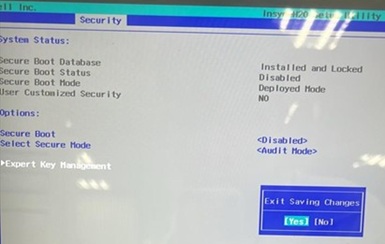
- Tryk på F10. Vælg Ja , når Afslut lagring af ændringer vises.
Produits concernés
Alienware m16 R1 AMD, Alienware m18 R1 AMD, Inspiron 14 5425, Inspiron 14 5435, Inspiron 7415 2-in-1, Inspiron 14 7425 2-in-1, Inspiron 14 7435 2-in-1, Inspiron 16 5625, Inspiron 16 5635, Inspiron 16 7635 2-in-1, Vostro 5625, Vostro 16 5635Propriétés de l’article
Numéro d’article: 000388366
Type d’article: Solution
Dernière modification: 24 mai 2026
Version: 2
Trouvez des réponses à vos questions auprès d’autres utilisateurs Dell
Services de support
Vérifiez si votre appareil est couvert par les services de support.