Dell Encryption Enterprise 또는 Dell Encryption Personal 버전 식별 방법
Résumé: 다음 지침에 따라 Dell Encryption Enterprise 또는 Dell Encryption Personal의 버전을 식별하는 방법을 알아보십시오.
Cet article concerne
Cet article ne concerne pas
Cet article n’est associé à aucun produit spécifique.
Toutes les versions du produit ne sont pas identifiées dans cet article.
Instructions
Dell Encryption Enterprise(이전 Dell Data Protection Enterprise Edition) 또는 Dell Encryption Personal(이전 Dell Data Protection Personal Edition)의 버전을 알면 다음을 수행할 수 있습니다.
- 알려진 문제 식별
- UI 차이점 확인
- 워크플로 변경 이해
- 시스템 요구 사항 확인
영향을 받는 제품:
- Dell Encryption Enterprise
- Dell Encryption Personal
- Dell Data Protection Enterprise Edition
- Dell Data Protection Personal Edition
영향을 받는 운영 체제:
- Windows
버전 관리는 제품 UI(User Interface) 또는 제품 설치 프로그램을 통해 확인할 수 있습니다. 자세한 내용을 확인하려면 해당 탭을 클릭하십시오.
UI
참고: UI를 통해 버전을 확인하기 전에 Dell Encryption Enterprise 또는 Dell Encryption Personal을 설치해야 합니다.
- Windows 컴퓨터에 로그인합니다.
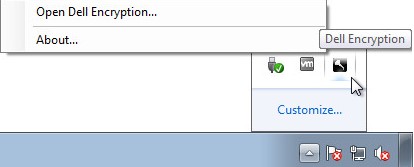
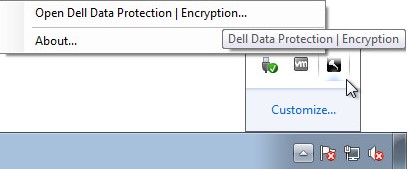
- Windows 시스템 트레이에서 Dell Encryption (이전 Dell Data Protection | 암호화) 아이콘을 클릭한 다음 Dell Encryption 열기 또는 Dell Data Protection | 암호화.
- 다음 이미지는 Dell Encryption 옵션을 보여줍니다.
- 다음 이미지는 Dell Data Protection Encryption 옵션을 보여줍니다.
- 다음 이미지는 Dell Encryption 옵션을 보여줍니다.
- 제품 UI에서 물음표 아이콘을 클릭한 다음 About Version 뒤에 표시된 버전 번호를 기록합니다. 처음 세 개의 숫자를 기록하는 것이 가장 중요합니다. 이 예에서는 8.15.0이 처음 세 번호입니다.
 참고: 클라이언트 버전은 위의 스크린샷과 다를 수 있습니다.
설치 관리자
참고: 설치 프로그램 다운로드에 대한 자세한 내용은 Dell Encryption Enterprise 또는 Dell Encryption Personal 다운로드 방법을 참조하십시오.
- 설치 관리자를> 마우스 오른쪽 버튼으로 <클릭한 다음 속성을 선택합니다.
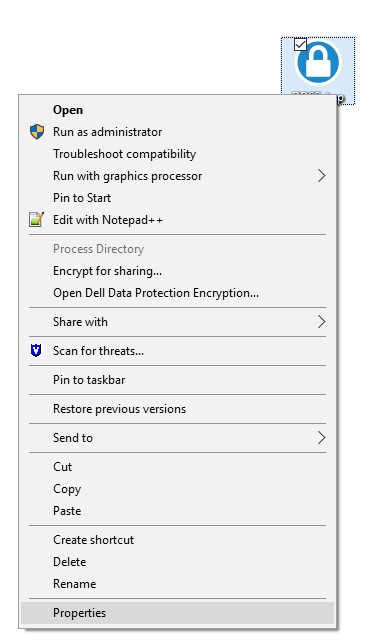 참고: <설치 관리자> =
- Dell Encryption Enterprise =
DDSSetup.exe - Dell Encryption Personal =
DDSSetup.exe - Dell Data Protection Enterprise Edition =
DDPSetup.exe - Dell Data Protection Personal Edition =
DDPSetup.exe
- Dell Encryption Enterprise =
- 세부 정보 탭을 클릭합니다.

- Product version을 기록합니다. 처음 세 개의 숫자를 기록하는 것이 가장 중요합니다. 예제 이미지에서 8.15.0은 처음 세 개의 숫자입니다.
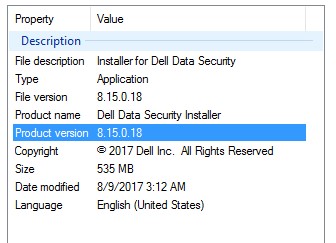 참고: 클라이언트 버전은 위의 스크린샷과 다를 수 있습니다.
Informations supplémentaires
Vidéos
Produits concernés
Dell EncryptionPropriétés de l’article
Numéro d’article: 000124591
Type d’article: How To
Dernière modification: 15 juil. 2026
Version: 13
Trouvez des réponses à vos questions auprès d’autres utilisateurs Dell
Services de support
Vérifiez si votre appareil est couvert par les services de support.