Precision 7540:電腦視覺指南
Résumé: 本文為 Dell Precision 7540 行動工作站外部埠和功能的視覺化指南。
Cet article concerne
Cet article ne concerne pas
Cet article n’est associé à aucun produit spécifique.
Toutes les versions du produit ne sont pas identifiées dans cet article.
Symptômes
注意:如需每個位置的詳細說明,請前往系統手冊,網址為 www.dell.com/support
目錄:
前視圖

(圖 1 前視圖)
| 1 | 麥克風 (選配) | 2 | 攝影機含快門 (選配) |
| 3 | 攝影機狀態 LED (選配) | 4 | 麥克風 (選配) |
| 5 | 電池狀態 LED | 6 | 喇叭 |
上視圖

(圖 2 上視圖)
| 1 | 電源按鈕 | 2 | 鍵盤 |
| 3 | 指紋辨識器 (選用) | 4 | 感應式讀卡機 (選配) |
| 5 | 觸控板 |
後視圖

(圖.3 後視圖)
| 1 | 乙太網路 (網路介面卡) 連接器 | 2 | Mini DisplayPort 連接器 |
| 3 | HDMI 連接器 | 4 | 電源連接器 |
下視圖

(圖.4 底視圖)
| 1 | 產品服務編號 |
左側視圖

(圖.5 左側視圖)
| 1 | Thunderbolt 3 Type-C 連接器 | 2 | SD 卡讀卡機 |
| 3 | 智慧卡讀卡機 |
右側視圖
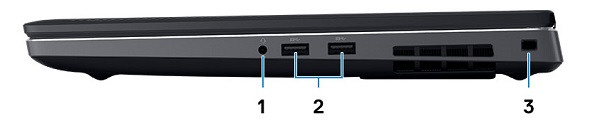
(圖.6 右側視圖)
| 1 | 耳麥連接器 | 2 | USB 3.1 Gen 1 連接器 x2 (具備 PowerShare 功能) |
| 3 | 安全纜線插槽 |
AC 變壓器檢視

(圖.7 180 W 變壓器)
| 類型 180 W 系列 | 說明 |
| 輸入電壓 | 100 VAC 至 240 VAC |
| 輸出電流 | 9.23 A (連續) |
| 輸出功率 | 180 W |
| 輸出電壓 | 19.5 VDC |
其他資訊:
Cause
不適用。
Résolution
不適用。
Produits concernés
Precision 7540Propriétés de l’article
Numéro d’article: 000136652
Type d’article: Solution
Dernière modification: 29 sept. 2023
Version: 6
Trouvez des réponses à vos questions auprès d’autres utilisateurs Dell
Services de support
Vérifiez si votre appareil est couvert par les services de support.