ECS: NFS-etä-I/O-virheet; FS-yhteensopivan säilön omistajan vaihtaminen voi johtaa siihen, että sovellukset ja/tai käyttäjät eivät voi käyttää NFS-tiedostoja
Résumé: Edellinen säilön omistaja ei ole sallittu tai rajoitettu ObjectControllerException: Method-päivitysObjectInternal ei sallittu säilön edelliselle omistajalle
Cet article concerne
Cet article ne concerne pas
Cet article n’est associé à aucun produit spécifique.
Toutes les versions du produit ne sont pas identifiées dans cet article.
Symptômes
Käyttäjän tekemä muutos säilön omistajasivulle käyttöliittymässä:
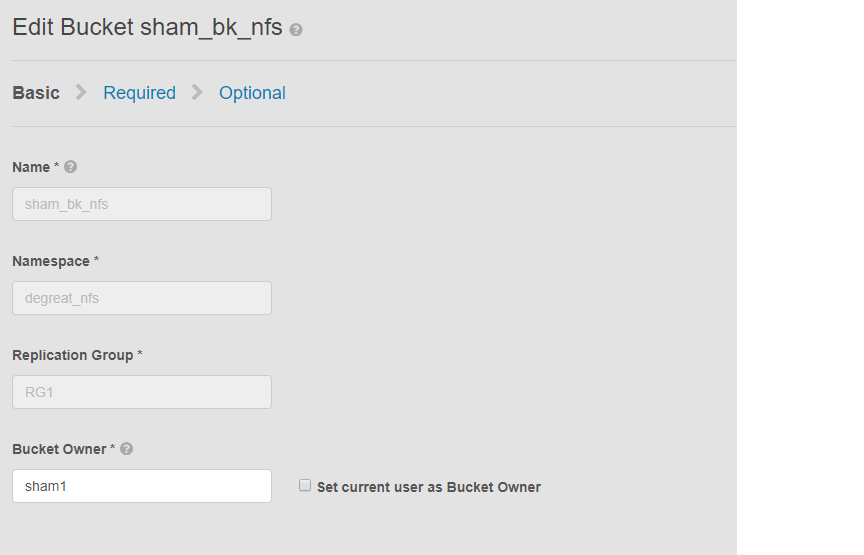
Tämä ongelma koskee säilöjä, joissa NFS on käytössä, ja säilön omistajan muutosta käyttöliittymässä. Tämä saattaa aiheuttaa sen, että sovellukset tai liitetyt käyttäjät menettävät pääsyn ryhmään Linux-tiedostojärjestelmässä. Vaikka palauttaisimme muutoksen takaisin alkuperäiselle omistajalle, käyttö ei ole mahdollista, mikä johtaa tietojen hallintaan.
Tässä esimerkissä:
Säilön omistajaksi on vaihdettu sham2 käyttöliittymässä. ECS:n rajoituksen vuoksi, vaikka säilön omistajan nimeksi olisi vaihdettu sham1. ECS ei muuta säilön omistajaa takaisin sham1-omistajaksi käyttöliittymässä. Tämä voidaan tehdä toistaiseksi vain komentoriviliittymässä käyttämällä ohjelmointirajapintaa, jossa on hyötykuorma palautuksen omistajan lipun arvoon tosi.
Tapoja tunnistaa ongelma pyytämällä Linux-koneessa käyttäjää koskettamaan tiedostoa, esimerkiksi:
Tämä ongelma koskee säilöjä, joissa NFS on käytössä, ja säilön omistajan muutosta käyttöliittymässä. Tämä saattaa aiheuttaa sen, että sovellukset tai liitetyt käyttäjät menettävät pääsyn ryhmään Linux-tiedostojärjestelmässä. Vaikka palauttaisimme muutoksen takaisin alkuperäiselle omistajalle, käyttö ei ole mahdollista, mikä johtaa tietojen hallintaan.
Tässä esimerkissä:
Säilön omistajaksi on vaihdettu sham2 käyttöliittymässä. ECS:n rajoituksen vuoksi, vaikka säilön omistajan nimeksi olisi vaihdettu sham1. ECS ei muuta säilön omistajaa takaisin sham1-omistajaksi käyttöliittymässä. Tämä voidaan tehdä toistaiseksi vain komentoriviliittymässä käyttämällä ohjelmointirajapintaa, jossa on hyötykuorma palautuksen omistajan lipun arvoon tosi.
Tapoja tunnistaa ongelma pyytämällä Linux-koneessa käyttäjää koskettamaan tiedostoa, esimerkiksi:
admin@node1~>touch file
touch: setting times of `file': Remote I/O error

se svc_log with the string  "method updateObjectInternal "

Command:
# svc_log -a -sr dataheadsvc | grep "method updateObjectInternal"
Example:
admin@node1~>svc_log -a -sr dataheadsvc | grep "method updateObjectInternal"
svc_log v1.0.22 (svc_tools v1.5.3)                 Started 2019-06-06 10:45:04

Running on nodes:              <All nodes>
Time range:                    2019-06-05 10:45:04 - 2019-06-06 10:45:04
Filter string(s):              <All messages>
Show nodename(s):              True
Search reclaim logs (if any):  False

com.emc.storageos.data.object.exception.ObjectControllerException: method updateObjectInternal not allowed for previous bucket owner sham1
Caused by: com.emc.storageos.data.object.exception.ObjectControllerException: method updateObjectInternal not allowed for previous bucket owner sham1
Cause
Säilön luominen, jonka omistajana on tietty käyttäjä, minkä jälkeen säilön omistaja vaihtuu. Lopuksi täyden hallinnan antaminen alkuperäiselle omistajalle ACLs-sivulla epäonnistuu ECS-lokipoikkeuksen myötä:
ObjectControllerException: method updateObjectInternal not allowed for previous bucket owner <ownerid>
This is a known issue currently being evaluated by Dell EMC at this time.
Résolution
Ongelman voi kiertää vaihtamalla säilön omistajan arvoksi tosi käyttämällä ohjelmointirajapintaa komentoriviliittymän kautta tietosisällön palautusomistajamerkinnän avulla.
1. Määritä säilön nykyinen omistaja.
2 Luo yksinkertainen xml-tiedosto vi-editorilla. Alla olevassa esimerkissä sen nimi on /tmp/bucket-owner.xml. Tämä on kaksivaiheinen prosessi. Meidän on asetettava se uudelle omistajalle väliaikaisesti sham2: lle. Kuten tässä alla olevassa esimerkissä, vahvista tulos ennen kuin palautat alkuperäisen omistajan huijaus1:een:
. 7 Kun kokoonpanomuutos on tehty, meidän ei pitäisi enää nähdä samaa virhettä
1. Määritä säilön nykyinen omistaja.
Vaadi käyttöliittymän root-salasana tunnuksen luomiseen. Esimerkki:
admin@ecsnode1:~> tok=$(curl -iks https://XX.XX.XX.XX:4443/login -u 'root:ChangeMe' | grep X-SDS-AUTH-TOKEN)
Vahvista säilön nykyinen omistaja (korvaa säilö ja nimitila tilanteessasi):
admin@node1:~> curl -s -k -X GET -H "$tok" https://XX.XX.XX.XX:4443/object/bucket/sham_bk_nfs/info?namespace=degreat_nfs | xmllint --format - | grep '<owner>'
  <owner>sham2</owner>
Tämä vahvistaa, että parametrin reset_previous_owners arvo on määritettävä true. Säilön omistaja on käyttöliittymässä, mutta ohjelmointirajapinta vahvistaa komentoriviliittymän kautta, että ECS näkee säilön omistajan edelleen nimellä sham2.
2 Luo yksinkertainen xml-tiedosto vi-editorilla. Alla olevassa esimerkissä sen nimi on /tmp/bucket-owner.xml. Tämä on kaksivaiheinen prosessi. Meidän on asetettava se uudelle omistajalle väliaikaisesti sham2: lle. Kuten tässä alla olevassa esimerkissä, vahvista tulos ennen kuin palautat alkuperäisen omistajan huijaus1:een:
admin@node1:~ # vi /tmp/bucket-owner.xml

admin@ecsnode1:~ # cat /tmp/bucket-owner.xml
<object_bucket_update_owner>
   <namespace>degreat_nfs</namespace>
   <new_owner>sham2</new_owner>
   <reset_previous_owners>true</reset_previous_owners>
</object_bucket_update_owner>

3. Change the bucket owner to the temporary owner.
API-syntaksi, joka tarvitaan säilön omistajan muuttamiseen "sham2":ksi xml-tiedoston kautta, on seuraava:
admin@ecsnode1:~> curl -v -k -X "POST" "https://xx.xx.xx.xx:4443/object/bucket/sham_bk_nfs/owner" -H "$tok" -H "Content-Type: application/xml" -H "ACCEPT:application/xml" -d @/tmp/bucket-owner.xml -v
* Hostname was NOT found in DNS cache
*   Trying xx.xx.xx.xx...
* Connected to xx.xx.xx.xx (xx.xx.xx.xx) port 4443 (#0)
* successfully set certificate verify locations:
*   CAfile: none
  CApath: /etc/ssl/certs/
* SSLv3, TLS unknown, Certificate Status (22):
* SSLv3, TLS handshake, Client hello (1):
* SSLv3, TLS handshake, Server hello (2):
* SSLv3, TLS handshake, Certificate (11):
* SSLv3, TLS handshake, Server key exchange (12):
* SSLv3, TLS handshake, Server finished (14):
* SSLv3, TLS handshake, Client key exchange (16):
* SSLv3, TLS change cipher, Client hello (1):
* SSLv3, TLS handshake, Finished (20):
* SSLv3, TLS change cipher, Client hello (1):
* SSLv3, TLS handshake, Finished (20):
* SSL connection using TLSv1.2 / ECDHE-RSA-AES256-GCM-SHA384
* Server certificate:
*        subject: CN=localhost
*        start date: 2019-03-25 09:53:41 GMT
*        expire date: 2029-03-22 09:53:41 GMT
*        issuer: CN=localhost
*        SSL certificate verify result: self signed certificate (18), continuing anyway.
> POST /object/bucket/sham_bk_nfs/owner HTTP/1.1
> User-Agent: curl/7.37.0
> Host: xx.xx.xx.xx:4443
> X-SDS-AUTH-TOKEN: BAAcUy9KYlhxTlVYb2M0bnF3bTNscEsvSEdDeWhJPQMAjAQASHVybjpzdG9yYWdlb3M6VmlydHVhbERhdGFDZW50ZXJEYXRhOmJhOGQ3ZTkzLTMyMGYtNDNmNy05Y2FkLWM4YWQzMWFiMzY1MAIADTE1NTk3Mzk3OTA2MDgDAC51cm46VG9rZW46YjQ4NGNiZjEtNTkwNy00YWI3LTgzYTctM2Y3OGRhM2RiY2NiAgAC0A8=
> Content-Type: application/xml
> ACCEPT:application/xml
> Content-Length: 179
>
* upload completely sent off: 179 out of 179 bytes
< HTTP/1.1 200 OK
< Date: Thu, 06 Jun 2019 10:56:08 GMT
< Content-Length: 0
< Connection: keep-alive
<
* Connection #0 to host xx.xx.xx.xx left intact
4. Edit the simple.xml file previously created in step 2 and this time insert original owner of sham1
admin@node1:~ # vi /tmp/bucket-owner.xml

admin@ecsnode1:~ # cat /tmp/bucket-owner.xml
<object_bucket_update_owner>
   <namespace>degreat_nfs</namespace>
   <new_owner>sham1</new_owner>
   <reset_previous_owners>true</reset_previous_owners>
</object_bucket_update_owner>

5. Change the bucket owner back to the original owner
The API syntax required to change the bucket owner back to "sham1" through the xml file is as follows:
admin@ecsnode1:~> curl -v -k -X "POST" "https://xx.xx.xx.xx:4443/object/bucket/sham_bk_nfs/owner" -H "$tok" -H "Content-Type: application/xml" -H "ACCEPT:application/xml" -d @/tmp/bucket-owner.xml -v
* Hostname was NOT found in DNS cache
*   Trying xx.xx.xx.xx...
* Connected to xx.xx.xx.xx (xx.xx.xx.xx) port 4443 (#0)
* successfully set certificate verify locations:
*   CAfile: none
  CApath: /etc/ssl/certs/
* SSLv3, TLS unknown, Certificate Status (22):
* SSLv3, TLS handshake, Client hello (1):
* SSLv3, TLS handshake, Server hello (2):
* SSLv3, TLS handshake, Certificate (11):
* SSLv3, TLS handshake, Server key exchange (12):
* SSLv3, TLS handshake, Server finished (14):
* SSLv3, TLS handshake, Client key exchange (16):
* SSLv3, TLS change cipher, Client hello (1):
* SSLv3, TLS handshake, Finished (20):
* SSLv3, TLS change cipher, Client hello (1):
* SSLv3, TLS handshake, Finished (20):
* SSL connection using TLSv1.2 / ECDHE-RSA-AES256-GCM-SHA384
* Server certificate:
*        subject: CN=localhost
*        start date: 2019-03-25 09:53:41 GMT
*        expire date: 2029-03-22 09:53:41 GMT
*        issuer: CN=localhost
*        SSL certificate verify result: self signed certificate (18), continuing anyway.
> POST /object/bucket/sham_bk_nfs/owner HTTP/1.1
> User-Agent: curl/7.37.0
> Host: xx.xx.xx.xx:4443
> X-SDS-AUTH-TOKEN: BAAcUy9KYlhxTlVYb2M0bnF3bTNscEsvSEdDeWhJPQMAjAQASHVybjpzdG9yYWdlb3M6VmlydHVhbERhdGFDZW50ZXJEYXRhOmJhOGQ3ZTkzLTMyMGYtNDNmNy05Y2FkLWM4YWQzMWFiMzY1MAIADTE1NTk3Mzk3OTA2MDgDAC51cm46VG9rZW46YjQ4NGNiZjEtNTkwNy00YWI3LTgzYTctM2Y3OGRhM2RiY2NiAgAC0A8=
> Content-Type: application/xml
> ACCEPT:application/xml
> Content-Length: 179
>
* upload completely sent off: 179 out of 179 bytes
< HTTP/1.1 200 OK
< Date: Thu, 06 Jun 2019 10:56:08 GMT
< Content-Length: 0
< Connection: keep-alive
<
* Connection #0 to host xx.xx.xx.xx left intact


6.  Confirm the bucket owner change is reflected.
Varmista, että säilön omistajan muutos on nyt sham1.
admin@ecsnode1:~> curl -s -k -X GET -H "$tok" https://XX.XX.XX.XX:4443/object/bucket/sham_bk_nfs/info?namespace=degreat_nfs | xmllint --format - | grep '<owner>'
<owner>sham1</owner>
Kun säilön omistaja on palautettu APIssa, varmista, että isäntä voi nyt käyttää säilöä Linux-tiedostojärjestelmässä.
. 7 Kun kokoonpanomuutos on tehty, meidän ei pitäisi enää nähdä samaa virhettä
svc_log -f "method updateObjectInternal not allowed" -start "20 hour ago" -sr all -sh -st hour
svc_log v1.0.22 (svc_tools v1.6.8)                 Started 2020-01-23 09:28:17

Running on nodes:              <All nodes>
Time range:                    2020-01-22 13:28:17 - 2020-01-23 09:28:17
Filter string(s):              'method updateObjectInternal not allowed'
Show nodename(s):              True
Search reclaim logs (if any):  False

Count of message occurrences per hour:

2020-01-22 13:xx - 5066
2020-01-22 14:xx - 9580
2020-01-22 15:xx - 9574
2020-01-22 16:xx - 9580
2020-01-22 17:xx - 9570
2020-01-22 18:xx - 9576
2020-01-22 19:xx - 9564
2020-01-22 20:xx - 9576
2020-01-22 21:xx - 9576
2020-01-22 22:xx - 9572
2020-01-22 23:xx - 9564
2020-01-23 00:xx - 9586
2020-01-23 01:xx - 9574
2020-01-23 02:xx - 9572
2020-01-23 03:xx - 4564
2020-01-23 04:xx - 0
2020-01-23 05:xx - 0
2020-01-23 06:xx - 0
2020-01-23 07:xx - 0
2020-01-23 08:xx - 0
2020-01-23 09:xx - 0


Dell EMC is aware of this issue and are working on a fix in a future release.
Informations supplémentaires
Aiheeseen liittyvä NFS KB:
- ECS: NFS-perusviennin luominen ja asentaminen työasemaan
- ECS: dataheadsvc-lokin suoratoistovirhe: NFSv3-menettely Pyyntö ReadLinkRequest ei tue LINK-linkkiä
- ECS: NFS-asennus epäonnistuu, ei tällaista tiedostoa, hakemistoa tai ERROR_OBJECT_NOT_FOUND
- ECS: NFS-etä-I/O-virheet; FS-yhteensopivan säilön omistajan vaihtaminen voi johtaa siihen, että sovellukset/käyttäjät eivät voi käyttää NFS-tiedostoja
- ECS: NFS-kirjoitus heittää I/O-virheen tietyn tietomäärän jälkeen.
- ECS: ECS:n NFS-tiedostonjaon käyttäminen VMware NFS -tietosäilön kanssa
- ECS: Parhaat käytännöt ECS NFS -viennin lisäämiseen
- ECS: NFS-jaon ottaminen käyttöön Windows-asiakasohjelmassa
- ECS: NFS:n käyttöönotto epäonnistuu, kun tiedostojen vientiasetuksia on muutettu käyttöliittymässä
- ECS: Onko Oracle WebCenter Content (WCC) yhteensopiva ECS:n kanssa?
Tilaa tuotepäivitykset.
Voit tilata päivitykset noudattamalla alla olevan tietämyskannan artikkelin ohjeita:
DELL EMC: Tuotesivujen tilaaminen – Dellin tuki?
Produits concernés
Elastic Cloud StorageProduits
ECS Appliance, ECS Appliance Software with Encryption, ECS Appliance Software without Encryption, Elastic Cloud StoragePropriétés de l’article
Numéro d’article: 000055535
Type d’article: Solution
Dernière modification: 29 juil. 2026
Version: 5
Trouvez des réponses à vos questions auprès d’autres utilisateurs Dell
Services de support
Vérifiez si votre appareil est couvert par les services de support.