如何啟動 Microsoft Copilot in Windows
Résumé: 這是使用 Windows 和 Microsoft Edge 中的鍵盤、快速鍵或按鈕啟動 Microsoft Copilot in Windows 的方式。
Cet article concerne
Cet article ne concerne pas
Cet article n’est associé à aucun produit spécifique.
Toutes les versions du produit ne sont pas identifiées dans cet article.
Instructions
受影響的作業系統:
- Windows 11
- Windows 10
- Microsoft Copilot in Windows 未在中華人民共和國 (PRC) 提供使用
- Recall 是一項 NPU 驅動的功能,僅適用於 Microsoft Copilot+ PC
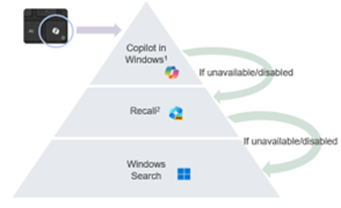
- 在適用情況下,使用者也可停用 Microsoft Copilot in Windows 和 Recall,這會導致 Microsoft Copilot 鍵出現不同行為
- 該階層適用於所有搭載 Windows 11 的電腦
- 使用 Windows Update 在搭載 Windows 10 的非 Copilot+ PC 上啟用 Microsoft Copilot 鍵 - 即將公佈 (TBA)
Microsoft Copilot in Windows 可透過多種方式啟動。
| 若要啟動 Microsoft Copilot | 鍵盤快速鍵、圖示或按鍵 |
|---|---|
| Windows 鍵 + C |  |
| Windows 工作列 |  |
| Microsoft Edge |  |
| Microsoft Copilot 鍵 |  |
注意:從 2024 年春季開始,全新 Windows 11 裝置隨附全新鍵盤配置和專屬鍵,可在 Windows 中啟動 Microsoft Copilot。此鍵會取代右側 Alt 鍵旁的功能表鍵。在部分地區配置上,按鍵位置可能會有所不同。
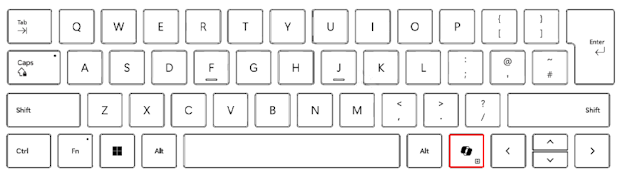
已知行為
在 Microsoft Copilot+ PC 上,按下 Microsoft Copilot 鍵將:
- 啟動 Microsoft Copilot in Windows。
- 如果 Microsoft Copilot 無法使用或停用,按鍵會啟動「Recall」。
- 如果無法使用或停用「Recall」,則按鍵會啟動 Windows 搜尋
按住 Microsoft Copilot 鍵可啟動語音聽寫:
這可讓使用者在 Microsoft Copilot in Windows 中提出問題或反覆使用語音命令。此功能將在未來的某個時間點啟用。
Informations supplémentaires

Propriétés de l’article
Numéro d’article: 000221081
Type d’article: How To
Dernière modification: 19 mai 2026
Version: 9
Trouvez des réponses à vos questions auprès d’autres utilisateurs Dell
Services de support
Vérifiez si votre appareil est couvert par les services de support.