Microsoft Edge Runtime Error when Opening SupportAssist
Résumé: Microsoft Edge WebView2 runtime error is displayed when opening SupportAssist for Home PCs v4.0 on computers that does not have the WebView2 runtime installed.
Cet article concerne
Cet article ne concerne pas
Cet article n’est associé à aucun produit spécifique.
Toutes les versions du produit ne sont pas identifiées dans cet article.
Symptômes
Affected Products:
- SupportAssist for Home PCs
Affected Versions:
- v4.0
When you open the SupportAssist for Home PCs v4.0 on computers that do not have the WebView2 runtime installed, Edge displays the following messages:
- A suitable version of Microsoft Edge Webview2 Runtime was not detected. Download and install WebView2 Runtime.
- Error occurred while initializing webview2: Object reference not set to an instance of an object.
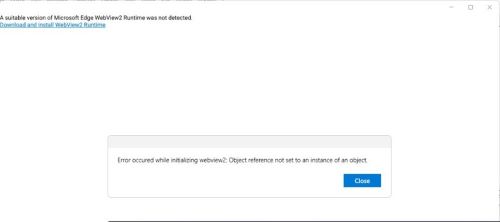
Figure 1: (English Only) Messages displayed when attempting to open SupportAssist without the WebView2 runtime installed
Cause
Microsoft Edge WebView2 runtime is not installed or corrupted.
Résolution
- Open the control panel and verify that the Microsoft edge webview2 runtime is installed.
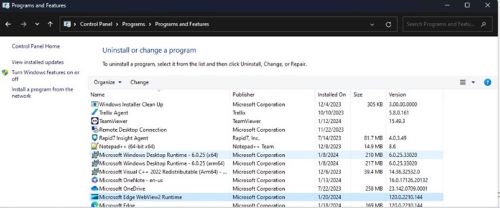
Figure 2: (English Only) Microsoft Edge WebView2 Runtime listed under Programs and Features
- If not installed, then go to step 5.
- If installed, double-click on Microsoft Edge Webview2 Runtime and select repair option and let it complete.
- Now Open SupportAssist UI from the Start menu, the UI should open fine, or else proceed with the next step.
- Download and install the latest version of Microsoft Edge Webview2 Runtime
.
- After you open the above URL, you will find multiple Builds or versions available.
- Sort the latest available version using Last Updated.

Figure 3: (English Only) Sort by Last Updated
- To identify your System Type, go to search bar and type System Information.
- Reference to System Type for the bit version and use appropriate build from the list.
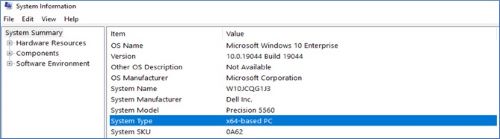
Figure 4: (English Only) Reference System Type for bit version
Produits concernés
SupportAssist for Home PCsPropriétés de l’article
Numéro d’article: 000221725
Type d’article: Solution
Dernière modification: 16 sept. 2025
Version: 3
Trouvez des réponses à vos questions auprès d’autres utilisateurs Dell
Services de support
Vérifiez si votre appareil est couvert par les services de support.