DPA: Error message 'Error 401: Unauthorized Action' appears in UI
Résumé: A 401 Unauthorized Action error appears in the Data Protection Advisor (DPA) UI after a user stays logged in for many hours; it is caused by the session being automatically closed due to inactivity. ...
Cet article concerne
Cet article ne concerne pas
Cet article n’est associé à aucun produit spécifique.
Toutes les versions du produit ne sont pas identifiées dans cet article.
Symptômes
User sees an error message on the DPA UI and has to log back in again:
Error 401: Unauthorized Action Cause
This error happens when a user is logged into the DPA UI for hours at a time and the open session is being closed due to inactivity or some other environment factor closes the session.
Résolution
The error can be ignored as it has no impact on DPA functionality.
User can log in to DPA again and continue as normal.
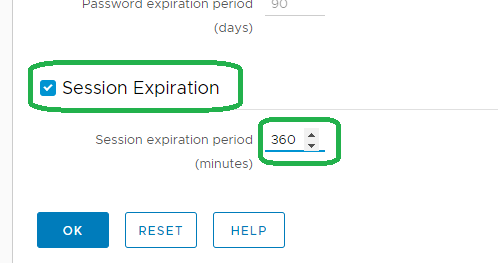
The following setting can be configured on the UI to force a clean logoff after a specific period:
Administration > User & Security > Security Settings
The Session Expiration parameter can be set to example for 6 hours (the default is off):
Note: The above feature was introduced on 18.2.
Contact support for more information.
Contact support for more information.
Produits concernés
Data Protection AdvisorProduits
Data Protection AdvisorPropriétés de l’article
Numéro d’article: 000173588
Type d’article: Solution
Dernière modification: 10 Jun 2026
Version: 5
Trouvez des réponses à vos questions auprès d’autres utilisateurs Dell
Services de support
Vérifiez si votre appareil est couvert par les services de support.