How to Install Dell Client Device Manager
Résumé: This article provides information about installing Dell Client Device Manager (DCDM).
Cet article concerne
Cet article ne concerne pas
Cet article n’est associé à aucun produit spécifique.
Toutes les versions du produit ne sont pas identifiées dans cet article.
Instructions
Affected Products:
- Dell Client Device Manager
- Download and extract:
- Reference, How to Download Dell Client Device Manager
- Reference, How to Extract Dell Client Device Manager.
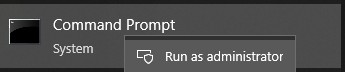
- Run the command prompt as administrator.
- Change the directory (cd) to the location where DCDM was extracted.

- Run the PowerShell script using the parameters or examples found below based on your needs
powershell.exe -executionpolicy Bypass -windowstyle hidden -noninteractive -nologo -file "dcdm_deployment.ps1" -action -modules

| Parameter | Description |
|---|---|
| -help | Optional Displays a description of parameters |
| -action | Mandatory Specifies the action to be performed (install or uninstall) |
| -modules | Optional Specifies the modules to be included.Default (DCDMCS,DCDMU,DCDMS) |
| -logpath | Optional The default is C:ProgramData\Dell\ClientDeviceManager. Specifies the path for log files |
| -verboselog | Optional Enables log display in the console (True or False) |
| -debuglevel | Optional Default is all. Specifies the level of debugging information |
| -telemetryconsent | Optional Default is true. Indicates telemetry consent |
| Module | Description | Module depends on |
|---|---|---|
| DCDMCS | Dell Client Device Manager Core Services (formerly known as Dell Core Service (DCS)) | N/A core component required |
| DCDMS | Dell Client Device Manager Security (formerly known as Dell Trusted Device (DTD)) | DCDMCS |
| DCDMU | Dell Client Device Manager Update (formerly known as Dell Command Update (DCU)) | DCDMCS, DCDMS |
Examples:
Install or update all modules and send telemetry for DCDMU
powershell.exe -executionpolicy Bypass -windowstyle hidden -noninteractive -nologo -file "dcdm_deployment.ps1" -action "install"
Install or update all modules without telemetry
powershell.exe -executionpolicy Bypass -windowstyle hidden -noninteractive -nologo -file "dcdm_deployment.ps1" -action "install" -telemetryconsent "false"
Install or update Dell Client Device Manager | Security (DCDMS)
powershell.exe -executionpolicy Bypass -windowstyle hidden -noninteractive -nologo -file "dcdm_deployment.ps1" -action "install" -modules "DCDMS"
Uninstall Dell Client Device Manager | Security (DCDMS)
powershell.exe -executionpolicy Bypass -windowstyle hidden -noninteractive -nologo -file "dcdm_deployment.ps1" -action "uninstall" -modules "DCDMS"
Uninstall all modules
powershell.exe -executionpolicy Bypass -windowstyle hidden -noninteractive -nologo -file "dcdm_deployment.ps1" -action "uninstall"
Produits concernés
Dell Client Device ManagerPropriétés de l’article
Numéro d’article: 000299185
Type d’article: How To
Dernière modification: 22 mai 2026
Version: 3
Trouvez des réponses à vos questions auprès d’autres utilisateurs Dell
Services de support
Vérifiez si votre appareil est couvert par les services de support.