Dell Unity: Unable to Back up vCenter Server Appliance to Unity NFS Shares Using VMware Appliance Management Interface After Upgrading Unity to 5.1
Résumé: vCenter Server Appliance (VCSA) backup using VMware Appliance Management Interface (VAMI) did not complete after upgrading Unity to 5.1. This is due to a code issue in Unity 5.1 and later which rejects the mount request from vCenter when a slash "/" is appended to the mount path. ...
Cet article concerne
Cet article ne concerne pas
Cet article n’est associé à aucun produit spécifique.
Toutes les versions du produit ne sont pas identifiées dans cet article.
Symptômes
User noticed that after upgrading Unity to 5.1, they were unable to perform vCenter Server Appliance (VCSA) backup to Unity NFS export using VMware Appliance Management Interface (VAMI). The same NFS backup path worked before the Unity code upgrade.
The issue only occurs under a certain scenario.
- NFS share is created on a subfolder of the file system.
- The NFS share name is the same as the file system name.
- Only NFSv3 is enabled on the NAS server.
Below is an example of the NFS export configuration that encounters the backup issue:
FS name: test
FS path: /test
NFS export local path: /test/subfolder
NFS export name: test
The backup location on VAMI is nfs://<nfs server ip address/fqdn>:/test.
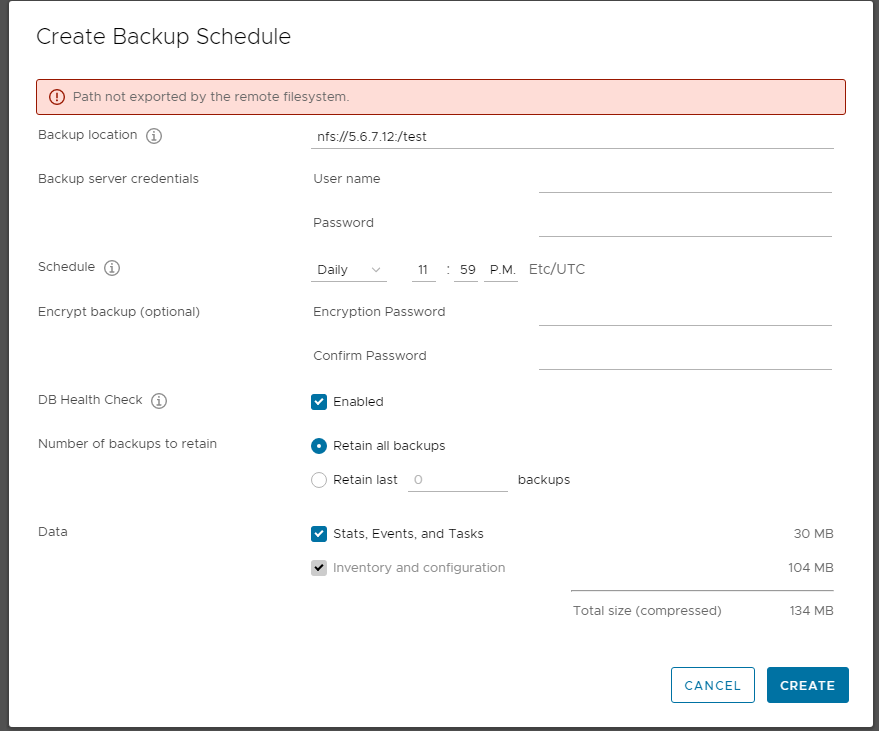
Figure 1: Example of the Create Backup Schedule Error Message
From the vCenter /var/log/vmware/applmgmt/applmgmt.log, mount request failed due to access denied.
2023-04-06T01:22:04 AM UTC [2182]ERROR:plugins.MountedFSStorageIOLib:Cmd ['/usr/bin/mount', '-t', 'nfs', '5.6.7.12:/test/', '/storage/remote/backup/nfs/5.6.7.12/BKCA6Hf0/lrcCF3e2', '-o', 'hard,intr'] failed. rc: 32, stdout: , stderr: mount.nfs: access denied by server while mounting 5.6.7.12:/test/

2023-04-06T01:22:04 AM UTC [2182]INFO:plugins.MountedFSStorageIOLib:Failed to mount the nfs share 5.6.7.12:/test/ at /storage/remote/backup/nfs/5.6.7.12/BKCA6Hf0/lrcCF3e2. Err- rc: 32, out=, err=mount.nfs: access denied by server while mounting 5.6.7.12:/test/

2023-04-06T01:22:04 AM UTC [2182]ERROR:plugins.MountedFSStorageIOLib:Didn't mount the remote filesystem root.
Cause
By default, when an NFS export is created on Unity, two paths are exported. The first path is the file system's local path, and the other path is the exported path which is the name of the share that the user specifies by during share creation.
For example, the user creates a file system "test_fs." It is mounted on "/test_fs" on the NAS server's root partition. If the user exports the root partition "/test_fs" of file system "test_fs" as the NFS share "test_export," the client sees two mount paths for this export as shown below:
A parameter named showExportLevel on the NAS server controls whether both paths are displayed or only one of the paths is displayed when the client is running showmount. If only one path is seen, it is possible a nondefault value of this parameter is configured.
The reason why a backup using VAMI fails is because VAMI appends a slash "/" to the backup path and due to a code issue on Unity, the path is treated as invalid by Unity, the mount request is denied.
For example, if a backup path is configured as "nfs://5.6.7.12:/test," the vCenter tries to mount the NFS export with the path "nfs://5.6.7.12:/test/" and Unity rejects the mount request.
The issue may also be encountered on a Linux client if a slash "/" is appended to the mount path.
For example, the user creates a file system "test_fs." It is mounted on "/test_fs" on the NAS server's root partition. If the user exports the root partition "/test_fs" of file system "test_fs" as the NFS share "test_export," the client sees two mount paths for this export as shown below:
[root@rhel8 ~]# showmount -e 5.6.7.12
Export list for 5.6.7.12:
/test/subfolder (everyone) >>>>  local path of the file system
/test           (everyone) >>>> exported path (Share name)
A parameter named showExportLevel on the NAS server controls whether both paths are displayed or only one of the paths is displayed when the client is running showmount. If only one path is seen, it is possible a nondefault value of this parameter is configured.
22:38:41 service@ABCDEFG spa:~/user# svc_nas Test_server -param -f nfs -i showExportLevel

Test_server :
name                    = showExportLevel
facility_name           = nfs
default_value           = 0
current_value           = 0
configured_value        = 0
param_type              = NAS server
user_action             = none
change_effective        = immediate
range                   = (0,2)
description             = An export is defined by both the exported path and the name of the export. By default the server reports both entries in the 'showmount -e' query. When set, this param will filter one or the other kind: Value=1 will report only the exported paths, Value=2 will report only the export names.
The reason why a backup using VAMI fails is because VAMI appends a slash "/" to the backup path and due to a code issue on Unity, the path is treated as invalid by Unity, the mount request is denied.
For example, if a backup path is configured as "nfs://5.6.7.12:/test," the vCenter tries to mount the NFS export with the path "nfs://5.6.7.12:/test/" and Unity rejects the mount request.
The issue may also be encountered on a Linux client if a slash "/" is appended to the mount path.
[root@rhel8 ~]# showmount -e 5.6.7.12
Export list for 5.6.7.12:
/test/subfolder (everyone)
/test           (everyone)

[root@rhel8 /]# mount 5.6.7.12:/test/ /mnt
mount.nfs: access denied by server while mounting 5.6.7.12:/test/

[root@rhel8 /]# mount 5.6.7.12:/test /mnt
[root@rhel8 /]#
Résolution
A permanent fix is planned to be available in the next Unity code release, but the date is tentative and subject to change.
There are two workarounds that can be used until the code release is available.
There are two workarounds that can be used until the code release is available.
- Use the NFS local path to perform the backup in VAMI.
- Enable NFSv4 on the NAS server.
Produits concernés
Dell EMC Unity, Dell Unity Operating Environment (OE)Propriétés de l’article
Numéro d’article: 000212114
Type d’article: Solution
Dernière modification: 26 Jun 2023
Version: 5
Trouvez des réponses à vos questions auprès d’autres utilisateurs Dell
Services de support
Vérifiez si votre appareil est couvert par les services de support.