Data Domain: DD3300 Supported connection types
Summary: The DD3300 platform has several external connections that are not necessary, and as such are not used or supported. This article describes the supported connection types and the preferred connection method. ...
Ez a cikk a következő(k)re vonatkozik:
Ez a cikk nem vonatkozik a következő(k)re:
Ez a cikk nem kapcsolódik egyetlen konkrét termékhez sem.
Ez a cikk nem azonosítja az összes termékverziót.
Instructions
The Data Domain DD3300 is built on a customized version of the Dell PowerEdge R740 server platform. The DD3300 platform has several external connections that are not necessary and so are not used or supported. Reference the included charts to determine which connection types are supported and the preferred connection method.
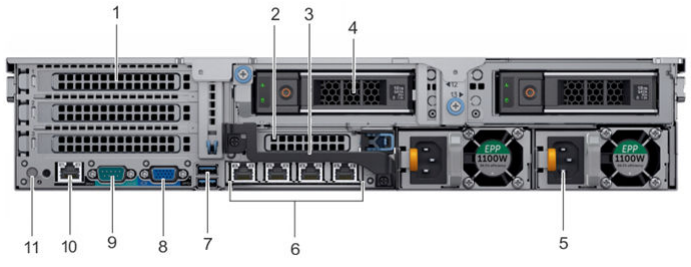
Supported connection types:
- 1: Optional dual-port 10G Ethernet PCI card
- 6: Quad-port 1Gig Ethernet daughter card
- 8: VGA port front and rear (DDOS 6.2.x and higher)
- 9: DB9 Male Serial port (SSH at115200 baud)
- 10: iDRAC9 dedicated management port (browser)
Unsupported connection types:
- 7: USB 3.0 ports
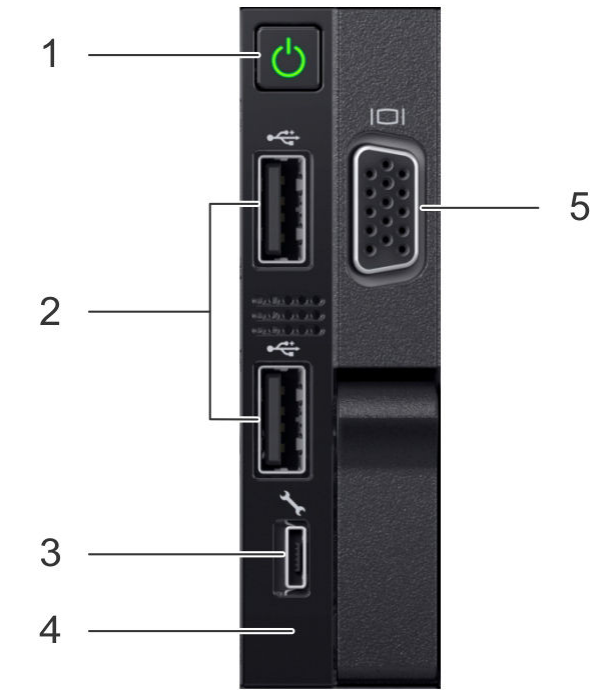
Supported connection types:
- 3: iDRAC Direct port (micro USB 2.0)
- 5: Front VGA (DDOS 6.2.x and higher)
Unsupported connection types:
- 2: Two USB 2.0 ports (can be manually enabled in the BIOS to facilitate USB reimaging)
- 4: Near Field Communication (NFC) with mobile app
Érintett termékek
Data Domain, DD3300 ApplianceTermékek
Data DomainTermék tulajdonságai
Article Number: 000009376
Article Type: How To
Utoljára módosítva: 17 márc. 2026
Version: 6
Választ kaphat kérdéseire más Dell-felhasználóktól
Támogatási szolgáltatások
Ellenőrizze, hogy a készüléke rendelkezik-e támogatási szolgáltatással.