Dell EMC Unity: Difference between LUN allocated space and total pool space used for a LUN (User Correctable)
Summary: Dell EMC Unity: Difference between LUN allocated space and total pool space used for a LUN (User Correctable)
Ez a cikk a következő(k)re vonatkozik:
Ez a cikk nem vonatkozik a következő(k)re:
Ez a cikk nem kapcsolódik egyetlen konkrét termékhez sem.
Ez a cikk nem azonosítja az összes termékverziót.
Instructions
-- The LUN space utilized as seen in the GUI under 'Block -> LUNs -> Allocated(%)' is the 'PrimaryDataConsumptionInBlocks' which is the amount of LUN space that has been consumed by host IO.
--The amount of space utilized by the LUN under LUN properties -> Total Pool Space Used is the cumulative value of the PrimaryDataConsumptionInBlocks + MetaDataConsumption + Uncommitted Consumption
MetaDataConsumption is the amount of space consumed by metadata for the LUN.
It should be noted that the Uncommitted Consumption is additional space that is pre-allocated. Space additional to the used space is allocated to the thin LUN in order to prevent frequent auto-extension requests to be sent as writes come in to the LUN.
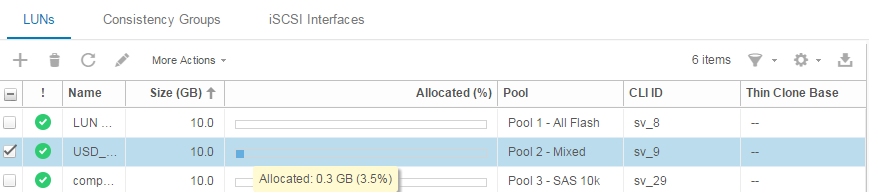
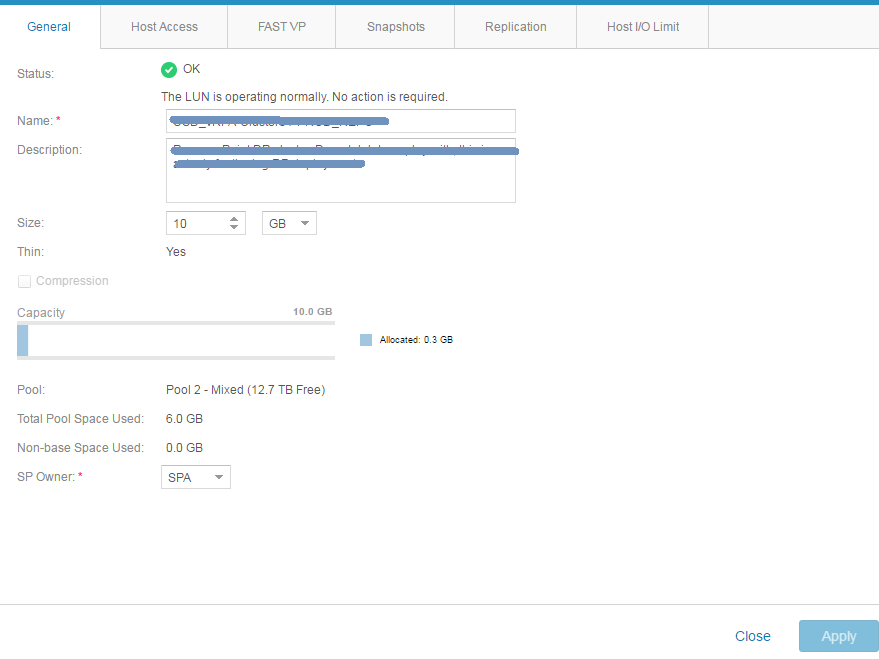
According to the above example:
The LUN total pool space viewed from LUN properties does not imply how much user space used on the LUN, It is actually stating the LUN is consuming 6GB from the Pool and that some of that is the overhead for the thin LUN and some is the unused capacity in the LUN. But it does not indicate how much actual free user space is available.
Érintett termékek
Dell EMC Unity FamilyTermékek
Dell Unity 300, Dell EMC Unity 300F, Dell EMC Unity 400, Dell EMC Unity 400F, Dell EMC Unity 500, Dell EMC Unity 500F, Dell EMC Unity 600, Dell EMC Unity 600F, Dell EMC Unity Family |Dell EMC Unity All Flash, Dell EMC Unity FamilyTermék tulajdonságai
Article Number: 000019209
Article Type: How To
Utoljára módosítva: 22 okt. 2025
Version: 4
Választ kaphat kérdéseire más Dell-felhasználóktól
Támogatási szolgáltatások
Ellenőrizze, hogy a készüléke rendelkezik-e támogatási szolgáltatással.