VNXe: How to find the Serial Number on the VNXe array
Summary: How to find Serial Number on VNXe array (User correctable)
Ez a cikk a következő(k)re vonatkozik:
Ez a cikk nem vonatkozik a következő(k)re:
Ez a cikk nem kapcsolódik egyetlen konkrét termékhez sem.
Ez a cikk nem azonosítja az összes termékverziót.
Instructions
There are three options to find the Serial Number on a VNXe array.
Option 1: EMC Unisphere
- Log in to EMC Unisphere UI.
- Go to Dashboard tab.
- The Serial Number can be found under "System Information" next to Product ID/SN:
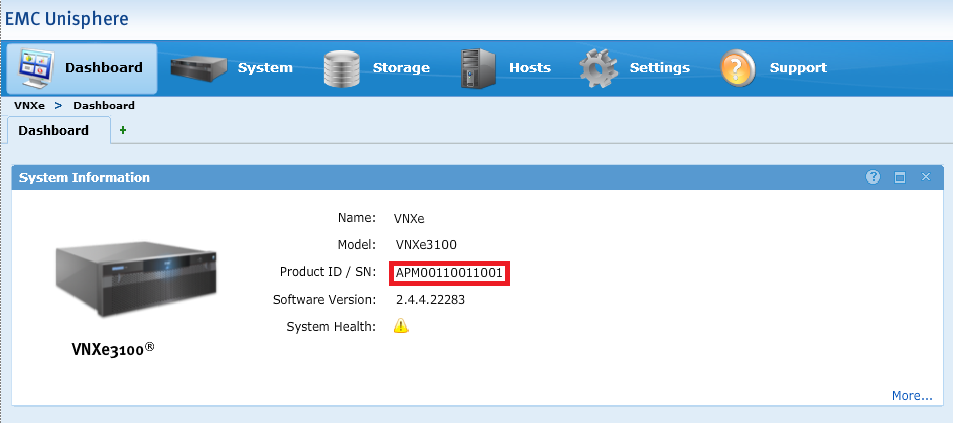
Option 2: EMC Unisphere
- Log in to EMC Unisphere UI.
- Go to the System tab and select System Health.
- The Serial Number can be found under "System Info" next to Product ID/SN:
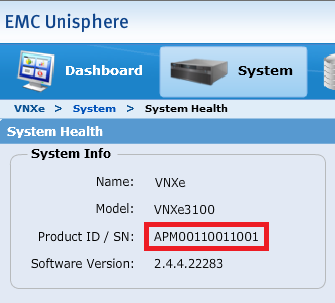
Option 3: Command Line
- Open an SSH session to VNXe.
- Log in using the service account credential.
- Run the following command:
svc_diag
Example:service@(VNXe) spb:~> svc_diag ======== Now executing basic state ======== * System Friendly Host Name is: (VNXe) * System Serial Number is: APM00110011001 * Current Software version: NeoMain-2.4.4.22283-MAGNUM-RETAIL
Érintett termékek
VNX/VNXeTermékek
VNXe1 Series, VNXe2 Series, VNX/VNXeTermék tulajdonságai
Article Number: 000019667
Article Type: How To
Utoljára módosítva: 09 okt. 2025
Version: 5
Választ kaphat kérdéseire más Dell-felhasználóktól
Támogatási szolgáltatások
Ellenőrizze, hogy a készüléke rendelkezik-e támogatási szolgáltatással.